Freelance client problems log: what you tried and what worked
A freelance client problems log is a running record of every client issue you hit, what you tried, and whether it worked. This guide shows you how to keep one: what you tried, what happened, and which fixes you should turn into rules. Without a log, you solve the same late invoice in March that you already solved last October. With a log, you open it, see what worked last time, and skip the guesswork.
Why freelancers need a client problems log
As a freelancer, you are the sales team, the project manager, the accountant and the person who does the work. Client problems land on you with no colleague to ask. So you fix them in the moment and move on.
The fix can fade from memory. The next time a client stretches the scope or goes quiet before a deadline, you start from zero. You might even try the same approach that failed before, because you forgot it failed.
A log keeps that history for you. It also changes how you see your business. One late payment feels like bad luck. Five late payments from clients who all skipped a deposit is a pattern you can act on.
If you already keep a budget problems log for your personal money, this is the same habit pointed at your client work.
The client problems that keep coming back: scope creep, late payments, vague briefs, and ghosting
This guide sorts freelance trouble into four groups. Name them in your log so you can see which group costs you the most.
- Scope creep. "Can you also do the landing page?" arrives after you quoted for a logo. Small extras add up to unpaid days.
- Late payments. The invoice is due in 14 days. Day 30 passes. You send a polite nudge, then a less polite one.
- Vague briefs. The client says "make it pop" or "you know what we want." You deliver, they reject it, and the real brief shows up in round three.
- Ghosting. The client stops replying in the middle of a project. Your calendar is blocked and your invoice is stuck.
What to record in your freelance client problems log: what you tried and the result
Each entry needs four things. Keep each one short.
- Client. Who it was, or a label if you would rather not write names. "Agency client, design retainer" works fine.
- Trigger. What started it. "Signed without a deposit." "Brief was a single email." "Contact person changed mid-project."
- What you tried. Each attempt as its own line. Do not merge them. "Sent reminder on day 15" and "Called the finance contact" are two different attempts.
- The result. Did it work, partly work, or fail? Be honest. A failed attempt is the most useful thing in the log, because it tells you what not to repeat.
The trigger is easy to skip, and it matters most. "Late payment" tells you what happened. "Late payment after starting work with no deposit" tells you how to stop it.
A simple freelance client problems log template you can copy
You can keep this in a notebook or a notes app. Here is the shape of one entry, written out as a list:
- Problem (one line): Client paid invoice 26 days late.
- Client: Small marketing agency, second project together.
- Trigger: No deposit. Invoice went to my contact, not their finance team.
- Tried: Friendly reminder email on day 3 past due. Result: failed.
- Tried: Asked for the finance contact and resent the invoice there. Result: worked. Paid four days later.
- Tried: Mentioned the late fee from my terms. Result: partly. They paid, but the tone of the project cooled.
- Linked to: "Started work before deposit" and "Invoice sent to the wrong person."
Notice that each attempt has its own result. That is the core of the template. A list of fixes with no outcomes is just a list of ideas.
Keeping the same template in Problem Graph
Problem Graph fits this shape. You write the problem in one line and put it in a lane. Problem Graph has four lanes: personal, work, expert and scientific. Client problems belong in work. The problem lands on the graph the moment you press Enter.
Then you attach solutions. You can add them as ideas, mark the ones you are trying, and record the outcome as worked, partly or failed. So for the late invoice above, you would add three solutions: the reminder email marked failed, the finance contact marked worked, the late fee marked partly.
Your problems are private by default. Only you see them, and they follow you to any phone or computer you log in on. That matters when your log names real clients.
Spotting patterns across clients before they cost you money
A log pays off once it has ten or twenty entries. Read back through it and look for three things.
- Repeated triggers. If "no deposit" shows up next to three late payments and one ghosting, that is not three separate problems. It is one gap in how you start projects.
- Repeated failures. If the friendly reminder email failed four times, stop sending it as your first step. Lead with whatever worked instead.
- Repeated clients. One client might account for most of your entries. That is useful to know before you agree to the next project with them.
This is where linking helps. In Problem Graph, you link problems that belong together, even across lanes. Link "Client paid 26 days late" to "Started work before deposit." Link "Ghosted after first draft" to the same deposit problem. The deposit problem now sits in the middle with several lines running into it. As the home page puts it, patterns show up on the map that never show up in a list.
You can also link across lanes when a client problem spills into your life, such as a ghosting client and a side project that stalled while you waited.
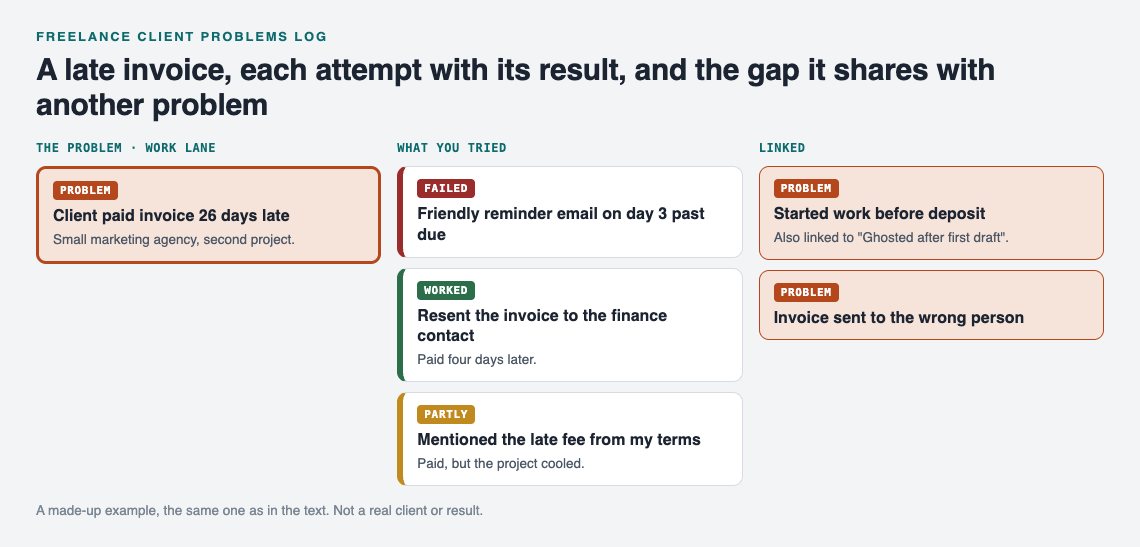
The worked example on the graph. A made-up client, not a real business or result.
If you prefer reading to looking at a map, the app has a List view beside the map. You can filter by lane, so you see only your Work problems when you review.
Turning what you tried into contract clauses, onboarding steps, and boundaries
The point of the log is not to collect bad memories. It is to change how you work. Each fix that worked more than once is a candidate for a permanent rule.
Contract clauses
Look at the fixes that worked for late payments and scope creep. They can become clauses. "Invoices go to the finance contact named here." "Work starts after a deposit." "Extra pages are quoted separately before work begins." Write the clause in plain words, have a lawyer or your local small business advice service check the wording, then check your log in a few months to see if that problem dropped off.
Onboarding steps
A vague brief can trace back to a thin start. If "asked five set questions on a kickoff call" worked better than "accepted the brief by email," that becomes a step you do with every new client. Same with "agreed on one person who gives final feedback."
Boundaries
Some fixes are about you, not the contract. "Stopped replying to messages after 7pm" might be marked partly: some clients adjusted, one did not. Keep it on the log anyway. A partial result tells you the rule needs a better way to explain it upfront.
Ask for more ideas when you are stuck
When every fix you tried for a problem has failed, Problem Graph can help you widen the list. The AI proposes new solutions grounded in what worked for others on problems like yours. Treat these as proposals to test, not answers. Add the one you want to try, then record what happened like any other solution.
Problem Graph also shows similar problems other people have shared, in any lane, and which of their solutions worked. You can borrow one into your own graph with one tap, and it keeps a link back to where it came from.
Sharing with people you trust
Maybe you work alongside a few other freelancers, or you run a small studio. You can mark one problem as a main node and share it into a private network. You create the network and give the invite code to the people you choose. Only main nodes can be shared, and when you share one, its solutions, outcomes and requirements go with it. Problems you only linked to it stay private. Keep in mind that anyone with the invite code can join, so give it out with care.
Frequently asked questions
What should a freelance client problems log include?
Each entry should include the client, the trigger, each thing you tried as its own line, and the result of each attempt. Mark results as worked, partly or failed so you can tell your reliable fixes from the ones to drop.
How often should I update my client problems log?
Add the problem when it happens, while the trigger is fresh. Add each result as soon as you know it, then read back through the whole log once a month to look for repeats.
Should I share the log with my clients?
Usually no. The log is for your own decisions, and it may name clients and money. In Problem Graph, problems are private by default, and you choose if a main node goes into a private network or out to everyone.
Get started
Think of the client problem that bothered you most this month. Write it as one line. Add the trigger in your own words. Then add the first thing you will try, and come back to mark the result.
If you want to see how a graph looks before you add your own, open the app and use the Load example set button on the empty graph.
Try Problem Graph: it is free, and you can look around the public network without an account. Write one problem down in a line and attach the first thing you will try.
Comments
No comments yet.
Sign in or make an account to comment.