Home maintenance log: track repairs and what worked
A home maintenance log is a simple idea: track repairs and what worked. Every time something in your house breaks, you write down what broke, why, what you did, what it cost, and whether the fix held. It sounds like paperwork. In practice it is the thing that stops you from paying for the same repair twice, or from trying the same failed fix for the third winter in a row.
Why a home maintenance log saves you money and repeat repairs
Many house problems are not new problems. The bathroom fan that rattles, the gutter that overflows above the back door, the drain that slows down every few months. They come back. When they do, you rely on memory, and details are easy to lose.
You remember that you "fixed the drain last spring." You do not remember whether it was a plunger, a chemical cleaner, or a plumber who said the real issue was the vent pipe. So you start from zero. You buy the same product. You call someone new who charges for the same diagnosis.
A log changes that. When the drain slows again, you open the log and see: chemical cleaner, partly worked, back in six weeks. Plumber snaked it, worked, said to watch for tree roots. Now you know what to try first and what to skip.
The log also catches the slow problems. One damp patch on a ceiling is a stain. Three entries about the same corner over two years is a roof or flashing problem you should look at properly.
What to record for every repair: problem, cause, fix, cost, and result
Keep each entry short. Five things are enough:
- Problem. One line, written so you would recognize it later. "Kitchen sink drains slowly" beats "plumbing issue."
- Cause. What you or the repair person think caused it. If you are not sure, write "unknown" or your best guess. A guess is still useful later.
- Fix. What was done, by whom, and with what part or product. Write the model number of a filter or the brand of sealant if you can.
- Cost. Parts plus labor. Include your own time if it was a full Saturday.
- Result. Did it work? This is the easiest field to skip, and the one that matters most.
Add the date to every entry. Dates turn a list of repairs into a timeline, and timelines show you how often things really fail.
How to track what worked (and what failed) so you never guess twice
The result field needs more than "done." A repair being finished is not the same as a repair working. Use three plain outcomes:
- Worked. The problem has not come back after a fair amount of time.
- Partly. It improved, or it held for a while and then returned.
- Failed. Nothing changed, or it got worse.
Then go back and update the outcome. Mark a fix "worked" too early and you will trust it when you should not. A good habit is to check a repair again after one full season. If you want a sharper way to decide when a fix has truly held, read how to know when a solution has really worked.
Keep the failures. It is tempting to delete the entry for the sealant that peeled off in a month. Do not. That failed attempt is exactly what you need to see next time, so you do not buy it again. The same thinking sits behind a mistake log: the errors are the useful part.
When you pick one fix over another, say a full window replacement instead of resealing, write one line about why. Six years later you will want to know. A decision log explains this habit in more depth.
A simple home maintenance log template you can copy
Copy this into a notebook, a notes app, or a document. One block per repair:
- Date: 2026-03-14
- Area: Upstairs bathroom
- Problem: Shower drain slow, standing water after 5 minutes
- Likely cause: Hair buildup in trap
- Fix tried: Plastic drain snake, pulled out a clump
- Who: Me
- Cost: Snake from hardware store, 20 minutes
- Result: Worked (checked again 2026-06-14, still clear)
- Next time: Snake first, skip the chemical cleaner
The "next time" line is the one you will thank yourself for. It turns the entry into instructions.
Keep a separate short section for each major system: roof, plumbing, heating and cooling, electrical, appliances. Note install dates and model numbers there so you have them when a part fails.
Seasonal maintenance checklist to log alongside repairs
Repairs are reactive. Maintenance is what you do so the repair list stays short. Log both in the same place so you can see the link between them. A basic seasonal list:
Spring
- Check the roof and gutters after winter
- Test outdoor faucets for leaks
- Service the cooling system before you need it
Summer
- Look for gaps around windows and doors
- Clean dryer vent ducting
- Check the outside of the house for peeling paint or wood rot
Fall
- Clear gutters after leaves drop
- Service the heating system
- Shut off and drain outdoor water lines if you get frost
Winter
- Test smoke and carbon monoxide alarms
- Watch for ice dams and drafts
- Check under sinks for slow leaks
When you do a task, write the date and anything you noticed. "Gutters cleared, small sag near downspout" is a note that could save you a soaked basement next year.
Turning recurring house problems into patterns you can actually solve
A list of entries tells you what happened. It does not easily show you that three of them are the same problem. That is where drawing the log as a map helps.
Problem Graph is a problem and solution journal drawn as a graph. Here is how a house log looks in it.
You type one line, for example "Basement smells damp after heavy rain," put it in the personal lane, and press Enter. It appears on the map right away. Then you attach the things you try as solutions: "Run dehumidifier," "Extend downspout 2 meters," "Regrade soil by back wall." Each one starts as an idea. You mark the one you are trying, and later you record the outcome as worked, partly, or failed.
Now add a second problem from a different month: "Paint bubbling on lower basement wall." And a third: "Gutter overflows over back door." Link them. On a list these look like three separate chores. On the map they sit next to each other, and you can see they all point at water reaching the back wall. The dehumidifier marked "partly" and the downspout extension marked "worked" tell you where to spend money next.
The failed solutions stay on the map too. If you tried a waterproof paint and it peeled, it stays there as a failed solution, so the next time someone suggests it you already have your answer.
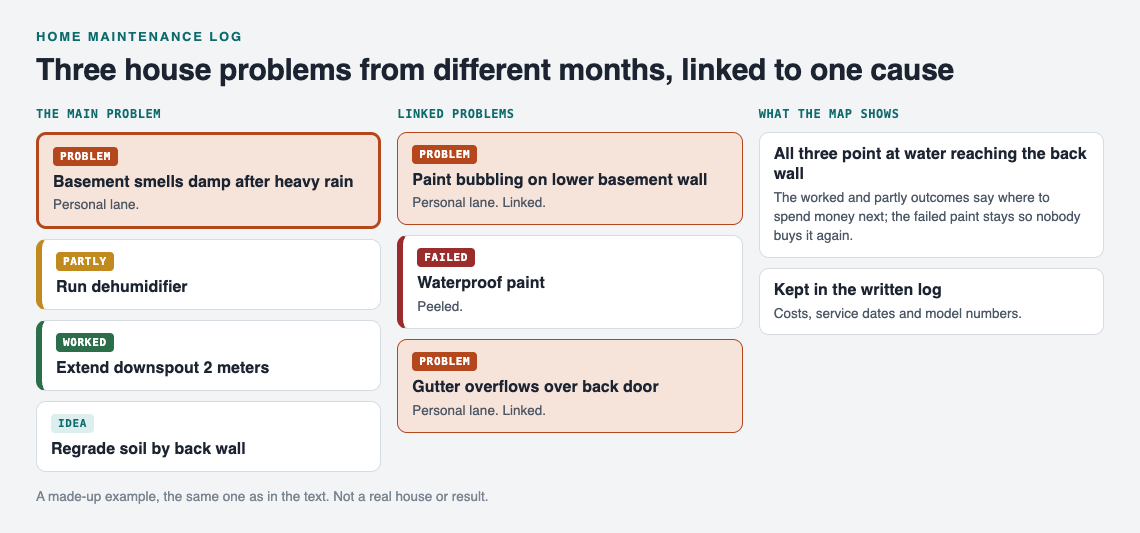
The made-up house log from this post, drawn as a map.
Your graph is private by default. Only you see it, and it follows you to any phone or computer you log in on. If you share a house, you can create a private network, give the invite code to the people you live with, and share one problem into it as a main node. Its solutions, outcomes and the requirements they need go with it, so everyone sees what has been tried. Note that anyone with the invite code can join, so give it only to the people you mean to.
If you choose to make a main node public, others can link their own problems to it and borrow the solutions that worked. Borrowing works the other way too: the app can show you similar problems people have shared and which of their fixes worked, and you can borrow one into your own graph with one tap, with a link back to where it came from. You can also ask for suggestions: the AI proposes new solutions grounded in what worked for others on problems like yours. Treat those as ideas to check, not answers.
A practical split works well: keep costs, dates of service visits and model numbers in the written template above, and use the graph to see the problems, the fixes you tried and how each one turned out.
Frequently asked questions
What should a home maintenance log include?
For each repair, record the date, the problem in one clear line, the likely cause, the fix, the cost, and the result. The result should say whether it worked, partly worked, or failed, and you should update it after some time has passed.
Is a paper notebook or an app better for tracking home repairs?
Paper is fast and works fine for a few entries a year. A digital tool is better when you want to search old entries, share them with people you live with, or see how recurring problems connect.
How long should I keep home repair records?
Keeping them for as long as you own the house makes sense. Old entries can be the most useful because they show how long a fix lasted and when a system was last replaced.
Does a maintenance log help when selling a house?
It may. A dated record of repairs, service visits and replaced systems gives you answers ready if a buyer or inspector asks when something was last fixed or replaced.
Get started
Pick the one house problem that keeps coming back. Write it as a single line. List every fix you have already tried and mark each one worked, partly, or failed from memory. That one entry is the start of your log.
If you want to see how a graph looks before adding your own, open the app and use "Load example set." You can switch between the map and a List view, and filter by lane.
Try Problem Graph: it is free, and you can look around the public network without an account. Write one problem down in a line and attach the first thing you will try.
Comments
No comments yet.
Sign in or make an account to comment.