Home repair log: every fix and whether it held
A home repair log is a running record of what broke, what you did about it, and what happened afterward. It is easy to track the first two and forget the third. That last part matters most. A fix that held for three years and a fix that failed in three weeks look the same on a receipt. This post shows you how to keep a log that records the outcome, checks it later, and tells you what to stop trying.
Why a home repair log beats memory and receipts
Memory compresses. Six months after you reseat a toilet, you remember "I fixed the toilet." You do not remember that you used the thin wax ring, that the floor flange was cracked, or that it rocked again by spring.
Receipts are worse. They tell you what you bought, not whether it worked. A drawer full of hardware store slips cannot tell you which caulk failed around the tub. It just tells you that you bought caulk four times.
A log fixes both problems. You write the problem once, attach each attempt, and mark the result. When the same drip comes back, you look before you buy anything.
What to record for every fix: problem, cause, fix, cost, date
Keep each entry short. You will not keep a log that takes ten minutes per line. Five things cover almost everything:
- Problem. One specific line. "Kitchen sink drips from the base of the faucet" beats "sink issue."
- Cause. Your best guess, labeled as a guess if you are not sure. "Worn O-ring, probably."
- Fix. What you actually did, with the part name if there is one.
- Cost. Parts plus any paid labor. This is the number that tells you later whether DIY was worth it.
- Date. When you did it. Without a date, "whether it held" has no meaning.
In Problem Graph, the problem is one line, and it lands on your graph the moment you press Enter. You put it in a lane. For house stuff, the personal lane fits. Each thing you try becomes a solution attached to that problem. Write the date and cost into the words of the solution itself, for example: "Replaced faucet O-ring, $6, March 3." That keeps the facts next to the attempt they belong to.
If you already track money problems this way, the habit carries straight over. See budget problems: log each money fix and its result for the same approach applied to spending.
The 'did it hold?' check: follow-up dates that catch repeat failures
A repair is not done when you put the tools away. It is done when it survives a real test. A patched roof has not held until it rains. A rehung door has not held until the humidity changes.
Pick a check date for each fix based on what would make it fail:
- Plumbing leaks: check after a week of normal use, then again at a month.
- Drafts and weatherstripping: check at the first cold snap.
- Exterior caulk and sealant: check after the first heavy rain and again after a season.
- Squeaks and loose fixtures: check after a few weeks of daily use.
Put the check date in your own calendar. When the date comes, open the solution and record the outcome. You have three choices: worked, partly, or failed. Be honest. "Partly" is the most useful word in the whole log. It means you are close, and the next attempt should change one thing, not everything.
Example home repair log: leaks, drafts, clogs, and squeaks
Here is what a few months of entries might look like. Each problem is one line. Each indented item is a solution with its outcome.
Problem: Bathroom sink drains slowly
- Plunger, Jan 4, $0. Failed. Slow again in two days.
- Pulled hair clog with plastic drain snake, Jan 6, $4. Worked for five weeks, then slow again.
- Removed and cleaned the pop-up stopper, Feb 14, $0. Worked. Checked at one month, still clear.
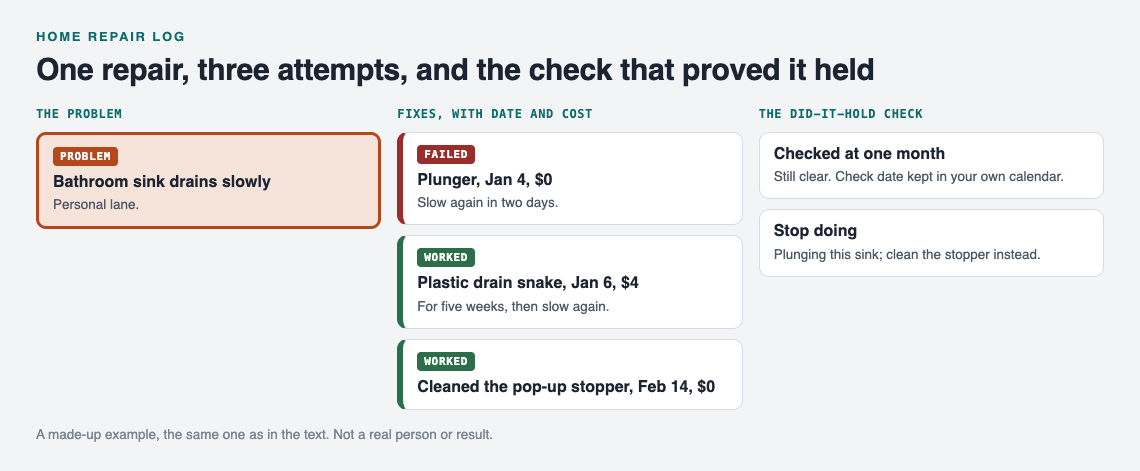
A made-up example: the first entry from the log, drawn as a map.
Problem: Cold draft at back door bottom
- Rolled towel, Nov 20, $0. Partly. Works when someone remembers it.
- Adhesive foam strip, Nov 28, $8. Failed. Peeled off in three weeks.
- Screw-on door sweep, Dec 15, $19. Worked. Checked in the January cold snap.
Problem: Stair third step squeaks
- Talcum powder in the joint, Oct 2, $0. Partly. Quieter for a week.
- Trim screw through tread into stringer, Oct 9, $7. Worked.
Notice what this tells you at a glance. Cheap surface fixes failed. Fixes that addressed the actual part worked. You would not see that from memory.
Not ready to build your own yet? The app's empty graph has a "Load example set" button so you can see how problems and solutions sit on the map before you add anything. Once your log has a few entries, the map works like the boards in visual management at home: you see what is open and what is solved without reading a list.
Spotting patterns: when the same problem keeps coming back
Single entries tell you about one fix. Links between entries tell you about your house.
Say you log "Ceiling stain in upstairs bathroom" in March and "Paint bubbling on hallway wall" in May. They feel unrelated. If you link both to "Shower grout cracked," you can see that one problem may be feeding two others. Problem Graph lets you link problems that belong together, and the pages put it plainly: patterns show up on the map that never show up in a list.
Watch for three signs:
- The same problem with three or more solutions. You are treating a symptom.
- A string of "partly" outcomes. Each fix helps a little, which may mean the cause sits somewhere you have not looked.
- Several problems linked to one spot. A bathroom, a window, a corner of the basement. That spot needs attention as a whole.
When you want a flat view, the app has a List view beside the map. Use the map to find patterns and the list to scan dates.
Deciding DIY vs. calling a pro using your own repair history
Your log turns this decision from a gut call into a quick read. Before you start a repair, look up the problem and ask:
- How many times have I tried? Two failed attempts on the same problem is a good point to stop and get help.
- What have I spent? Add up the costs you wrote down. Four $15 fixes that failed cost $60 plus four weekends.
- Did I ever get "worked" on this type of job? If your plumbing entries are mostly "worked" and your electrical entries are empty, that tells you something.
When you do call a pro, add their visit as a solution too, with the cost and date. Then check it on the same schedule. Paid work deserves the same "did it hold?" check as your own.
If you share a home, you can create a private network, give your household the invite code, and share a main node into it. Only a main node can be shared, and its solutions, outcomes and requirements go with it. Problems you only linked to it stay private. One person keeps the log; everyone else sees what has already been tried on the leaking gutter before they climb the ladder.
Turning failed fixes into a stop doing list
The log keeps failures on the map. That is the point. As the Problem Graph home page says, "A solution that failed three times stays on the map as a failed solution, and that is exactly what the next person needs to know." The next person may be you, a year from now.
Every few months, go through your failed solutions and pull out the ones you will not try again. In the example above, that would be:
- Stop using adhesive foam strips on exterior doors.
- Stop plunging the bathroom sink; clean the stopper instead.
That short list saves money at the hardware store. For more on building one, read stop doing list: drop fixes that never worked. The idea underneath it is the same one in trial and error: learn something from every attempt. A failed fix is information, as long as you write it down.
Frequently asked questions
What should a home repair log include?
Record the problem in one specific line, your guess at the cause, what you did, what it cost, and the date. Then add the outcome after a check date: worked, partly, or failed.
How long should I wait to know if a repair held?
Wait until the repair faces the condition that would break it. That means rain for roofs and sealant, cold weather for drafts, and a few weeks of daily use for plumbing and moving parts.
Is a spreadsheet or an app better for tracking home repairs?
A spreadsheet is fine for a flat list of dates and costs. A graph helps when you want to link related problems and see repeat failures, which is where Problem Graph fits.
Can a repair log help when selling a house?
A log with dates, costs and outcomes makes it easier to answer questions about what was fixed and when. Check with your agent about what you need to disclose.
Get started
Start with the problem that bugs you most right now. Write it in one line, attach what you have already tried, and mark each one honestly. Then set a check date for the newest fix.
Try Problem Graph: it is free, and you can look around the public network without an account. Write one problem down in a line and attach the first thing you will try. It runs in your browser and works on your phone, so you can log the fix while you are still standing at the sink. Open the app to begin.
Comments
No comments yet.
Sign in or make an account to comment.