Houseplant problems journal: what you changed and what happened
Your fiddle leaf fig dropped a leaf last week. You moved it, watered it, and wiped the leaves. Now a second leaf is browning, and you cannot say which of those three things came first. A houseplant problems journal fixes that. It records what you changed and what happened afterward, in one line per problem and one line per change.
This post shows what to write, how to change one thing at a time, and how to read the entries later. The examples are made up for illustration. They are not real results from real users.
Why a houseplant problems journal works better than memory
A change you make on Monday may not show in the leaves for a while. In the meantime you may also move the pot, add fertilizer, and forget both.
Memory keeps the story and drops the order. You remember that the plant "got better after the repot." You do not remember that you also cut back on water that same week. A written log keeps the order, so you can see what actually came before the recovery.
It also keeps the failures. If you tried misting three times and the brown tips kept coming, that is useful. You will not try it a fourth time.
What to write down: a simple template you can copy
Keep each entry small. You need three things:
- The problem, in one line. "Lower leaves on the pothos are yellow."
- The change you made. "Watered every 10 days instead of every 5."
- The date and, later, the outcome. Did it work, work partly, or fail?
The outcome is the part people skip. Do not skip it. A change with no recorded result teaches you nothing. Come back after a week or two and write down what you saw.
Houseplant problems worth logging (yellow leaves, drooping, pests, brown tips)
You do not need to log every leaf. Log the problems that repeat or that you cannot explain.
- Yellow leaves. Note which leaves: old ones at the bottom, or new growth at the top. Note how the soil feels.
- Drooping. Note whether the soil is dry or wet, and what time of day you noticed it.
- Pests. Note what you see, where, and what you did about it. If pests come back, a record of what you tried against them is worth keeping.
- Brown tips. Note whether the tips are crispy or soft, and whether it is one leaf or many.
This post does not say what causes each one. That depends on your plant, your light, and your home. The journal is how you find out for your own plant.
For a fuller entry, use the same shape every time. It makes entries quick and easy to compare.
- Plant: name and where it sits.
- Problem: one line, with the date you first saw it.
- Conditions: light, last watering, anything recent that changed.
- Change I will try: one thing only.
- Check on: a date one to two weeks out.
- Outcome: worked, partly, or failed, plus a short note.
The same structure works for other kinds of trouble. The freelance client problems log uses the same idea: write what you tried, then what happened.
How to change one thing at a time and track the result
This is the rule that does the most work. Change one thing, then wait.
If you change water, light, and fertilizer together and the plant recovers, you have learned nothing. If it gets worse, you have learned nothing either. With one change, a result points to one cause.
A workable routine:
- Write the problem down.
- Pick one change. Write it down before you do it.
- Set a check date. Leave the plant alone until then.
- On the check date, record the outcome: worked, partly, or failed.
- If it failed, keep the entry. Then pick the next single change.
Problem Graph is built around this loop. You write the problem in one line, attach each solution you try as an idea, mark the ones you are trying, and record the outcome as worked, partly, or failed. The page puts it this way: the graph remembers so you do not have to.
How to read your journal and spot patterns
A list of entries shows you each plant on its own. A map shows you links between them. In Problem Graph you can link problems that belong together, even across lanes. The page says patterns show up on the map that never show up in a list.
Here is how that helps with plants. Say three plants all show brown tips. You link those three problems. Now you can see that all three sit on the same windowsill, or all three got the same tap water. You would have missed that reading three separate notes.
Look for these:
- The same change that worked on more than one plant.
- The same change that failed more than once. Failures stay on the map as failures, which is the point.
- Problems that start within days of each other, which can point to something in the room rather than the plant.
Put plant problems in the personal lane. If you want a lane for something else, such as a work problem, the app has work, expert, and scientific lanes too.
Example entries: a pothos, a fiddle leaf fig, and a snake plant
These are invented examples to show the format.
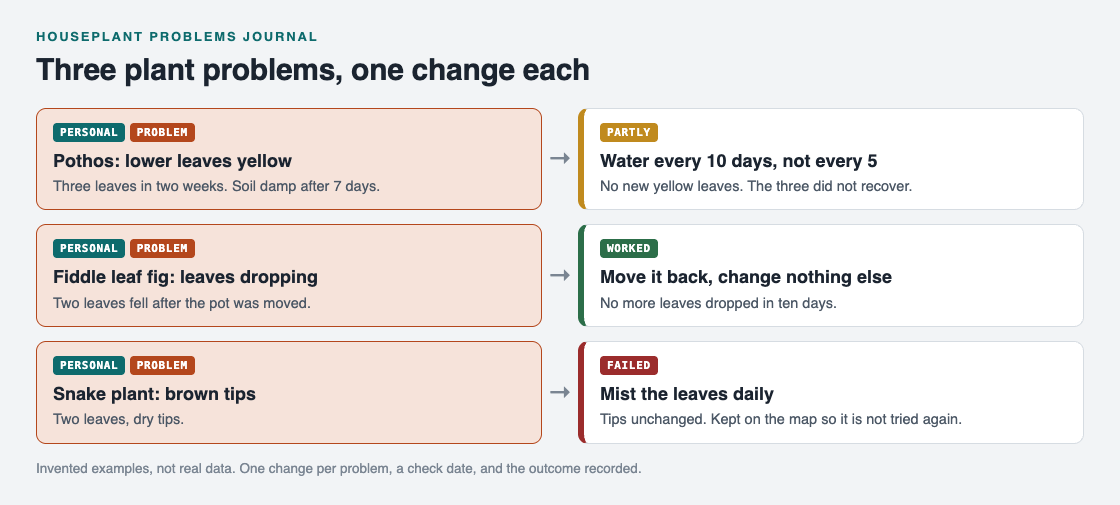
The three example entries as problems and solutions, each with its outcome.
Pothos: yellow lower leaves
- Problem: Three lower leaves turned yellow over two weeks. Soil still damp after 7 days.
- Change: Water every 10 days instead of every 5.
- Check: Two weeks later.
- Outcome: Partly. No new yellow leaves, but the three yellow ones did not recover. This is a result for this plant only.
Fiddle leaf fig: dropping leaves
- Problem: Two leaves fell in one week after I moved the pot across the room.
- Change: Move it back to the original spot and change nothing else.
- Check: Ten days later.
- Outcome: Worked. No more leaves dropped. Next time, move it once and log the date.
Snake plant: brown tips
- Problem: Tips on two leaves are brown and dry.
- Change: Mist the leaves daily.
- Check: Two weeks later.
- Outcome: Failed. Tips unchanged. Keep this entry, so I do not try misting again. Next single change: water less often.
The failed entry is as useful as the good one. It cuts one option from the list for good.
Borrowing from other people
You can keep your plant journal to yourself, which is the default. Only you see your problems. If you want, you can mark one problem as a main node and share it with a private network, such as a family or a plant swap group. Members you gave the invite code to can see it. You can also put a main node out for everyone.
When a problem is shared, its solutions and their outcomes go with it. Other people can then borrow a solution that worked into their own graph with one tap, and it keeps a link back to where it came from. The public network was empty when the home page was last checked, so treat this as how the feature works, not as a promise that there is something to borrow today.
The same sharing idea fits small groups. See how a book club keeps one list for its members, or how makerspace members borrow fixes. A plant group could work the same way.
Frequently asked questions
How often should I check on a plant after making a change?
Pick a date one to two weeks out and write it down when you make the change. A change can take a while to show, so checking every day can tempt you into a second change too soon.
Why change only one thing at a time?
With one change, any result points to one cause. If you change water, light, and food together, you cannot tell which one helped or hurt.
Should I record changes that failed?
Yes. A failed change tells you what not to repeat. In Problem Graph a failed solution stays on the map marked as failed.
Can I keep my plant journal private?
Yes. Private is the default, so only you see your problems. You can share a main node with a private network or make it public later if you choose to.
Get started with Problem Graph
Pick the one plant that worries you most. Write its problem in a line, then write the single change you will try first, and a date to check.
Try Problem Graph: it is free, and you can look around the public network without an account. Write one problem down in a line and attach the first thing you will try.
If you want to see the same habit applied elsewhere, read group project problems: a shared list for students.
Comments
No comments yet.
Sign in or make an account to comment.