How to Ask to Record a Meeting: What to Say and When
If you want a record of a meeting, ask before you press record. This guide covers how to ask to record a meeting: when to ask, the exact words for a manager, a report, a client or a group, and what to do if someone says no. Once you have a yes, our post on recording a one-on-one meeting and keeping the transcript as notes covers the recording itself. It is written for managers and anyone who runs regular check-ins, and its most useful point is this: once both voices are named in the transcript, a raw recording becomes notes you can act on.
When everyone agrees, Cheap Recorder records your voice, your screen, your webcam and the other side of a call in Google Chrome. You get one MP4 saved on your own computer, with a transcript beside it.
How to ask to record a meeting, and why you should ask first
There are three reasons to ask, and each one is enough on its own.
- The law. Rules on recording conversations differ by country and region. Recording calls may need everyone's agreement, depending on where you and they are. You may not know where each person is sitting, so asking everyone covers you.
- Trust. People who find out later that they were recorded tend to stop speaking freely with you. A recording made in secret can cost you more than it saves.
- Better notes. When people know a recording exists, they can tell you if a topic should not be on the file, and you can stop the recording before you get to it. That is better than a file you feel unsure about using.
Cheap Recorder's own guidance says the same thing: recording calls may need everyone's agreement depending on where you and they are, so always tell people you are recording.
When to ask: in the invite, at the start, or both
Ask in both places. Each does a different job.
In the invite, you give people time to think. Someone who would feel put on the spot in a live call can reply privately, or ask you not to record. Add one line to the description, such as "I'd like to record this so I can focus on the conversation instead of typing. Tell me if you'd rather I didn't."
At the start, you confirm. People skim invites. A spoken question in the first minute makes sure everyone actually heard it. It also catches anyone who joined late or was forwarded the invite.
If the meeting is short notice and there is no invite, ask at the start. Never ask halfway through while you are already recording.
What to say: short scripts for a manager, a report, a client and a group
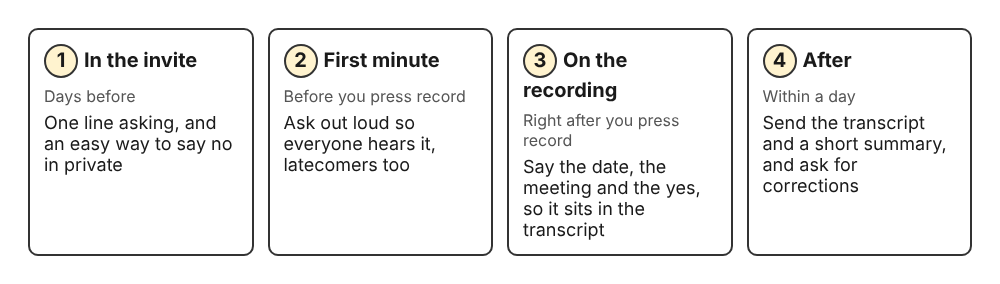
Ask in the invite, confirm at the start, say it on the file, then share what you recorded.
Keep it short. Give one reason, make saying no easy, and say where the file goes. Change the words to sound like you.
To your manager
"Would you mind if I record our one-on-one? I want to catch the feedback properly instead of scribbling. It stays on my laptop, and I can send you the transcript afterwards."
To someone who reports to you
Be careful here. Your report may not feel free to say no to their manager. Make no the easy answer, and do not ask again if they decline.
"I'd like to record today so I can listen properly and not miss what you tell me. It's completely fine to say no, and we can stop any time. If we record, I'll share the transcript with you."
To a client
"Before we start, is it all right if I record this call? It's so I get your requirements exactly right. The recording is saved on my computer, I'll only use it for this project, and I can send you a copy of the transcript."
To a group
In a group, a quiet person may not object out loud. Give them a private route.
"I'm planning to record today's meeting for people who couldn't make it. If anyone would rather I didn't, say so now or message me privately and I won't record."
What to do if someone says no or asks you to stop
Accept it straight away and without fuss. Do not ask for a reason. Then try one of these:
- Take written notes and send them afterwards for the other person to check.
- Offer a narrower recording. Some people object to video but not to sound. In Cheap Recorder, if you switch off Record my webcam and do not pick a screen, the recording is a sound-only M4A file. Offer this once. If they still say no, drop it.
- Offer to skip the transcript. While the live transcript is on, Chrome sends your microphone audio to Google to turn it into text. If someone is uneasy about that, untick Live transcript under Options before you press Start recording.
If someone asks you to stop partway through, press Stop and finish while they watch. Then ask whether they want the part already recorded deleted. The recording is an ordinary file in a folder you chose on your own computer, so you can delete it and show them. Recordings are not uploaded, except when you use Convert or Download MP3, which send the file to the Cheap Recorder server and delete it there as soon as the conversion finishes.
Say it on the recording too: confirm consent in the first minute
After you press record, say the consent out loud so it is part of the file. Try this:
"It's Tuesday the 27th, this is our weekly one-on-one, and we've agreed to record it. Is that still okay?"
Wait for a spoken yes. If Live transcript is on and hears speech, that line is written into the plain-text transcript in the recording's folder with its time (a recording named Weekly 1-1 gets Weekly 1-1 - transcript.txt). Months later you can open a plain text file and see when the agreement was given.
Run a 30-second test before an important meeting, too. Play it back to catch a wrong microphone or a muted tab. If the recording turns out to be silent, the consent line is lost along with everything else.
After the yes: record a one-on-one in Chrome and name both voices in the transcript
For a video call, the other person's voice comes from the call's tab. In the Call audio tile, press Pick the call tab..., choose the Meet or Teams tab in Chrome's sharing window, tick Share tab audio and press Share. Your microphone and the call are mixed into one recording. The Google Meet guide covers the details, including how to avoid doubled voices.
On plans that include speaker detection, each transcript line is labelled with its loudest source. Your microphone appears under its device name, and the other side of the call appears as Meeting. Type real names into the Speaker boxes and press Save captions. Lines then read like Priya: Can we move the launch to Friday? The one-on-one post takes you from there to decisions and action items.
Share the transcript and notes so the other person can trust the recording
The fastest way to make a recording feel fair is to give the other person what you have. Within a day, send them:
- The transcript. The transcript file is plain text with times and speaker names. It opens in any text editor and pastes cleanly into an email.
- A short summary of decisions and next steps, with names and dates. Our post on meeting notes from a call transcript shows a simple template.
- An invitation to correct it. Ask them to flag anything misheard or misquoted, so the notes say what was really agreed.
- Where the file lives. Tell them the recording sits on your computer. The live transcript is made by Chrome's speech recognition, which Google may process on its servers. If you press the AI button, the transcript with speaker names is sent to Anthropic, and nothing is sent unless you press it. The privacy page sets this out if they want to read it.
Most people relax about being recorded once they have seen a copy and know they can check it.
Frequently asked questions
Is it legal to record a meeting without asking?
It depends on where you and the other people are. Some places require everyone in the conversation to agree. The simple, safe habit is to ask everyone every time. If you are unsure about your situation, check with a lawyer.
Do I need to ask again for every recurring one-on-one?
Ask clearly the first time. After that, give a quick spoken check at the start of each session, such as "Recording as usual, still okay?" People can change their minds, and a fresh yes on each file costs you five seconds.
Is a recording notice from the meeting app enough consent?
Do not rely on it. A banner or chime is easy to miss, and someone who joins late may never see it. Ask out loud and get a spoken yes.
How do I ask to record a meeting with my boss without it sounding awkward?
Give a reason that helps them, such as getting their feedback right, and offer to share the transcript. Put it in the invite first, so the spoken question at the start is just a quick confirmation.
Get started
Add one line to your next invite, confirm in the first minute, and say the agreement out loud once you are recording. Then follow the steps in record a one-on-one meeting and keep the transcript as notes. The Free plan includes recording, the live transcript and captions, and 12 hours of recording a month. The free plan needs no card: start recording with the Free plan, and your recordings stay on your own disk.
Screen recording that is cheap and easy.
Visit cheaprecorder.com↗
Comments
No comments yet.