How to Give Code Review Feedback That Authors Act On
If you want to know how to give code review feedback that the author acts on, make every comment answer three things: where, what, and why. Then mark how much it matters and keep the tone about the code, not the person. For feedback that is too big to type, a short spoken walkthrough works better, and our post on recording a code review walkthrough in Chrome shows how to open the diff, talk through your points and send the author an MP4 with a transcript they can skim.
Cheap Recorder records your screen and voice in Chrome as one MP4 saved in a folder on your own computer, and it can make a transcript at the same time, so a spoken review takes you one take and no editing.
Why most code review feedback gets misread
Written comments lose everything that makes speech clear. There is no tone of voice, no pause, no face. A short note like "why is this here?" can read as curiosity or as an accusation, and the author has to guess.
Three other things go wrong again and again:
- The author cannot tell what is required. A style preference and a security bug look the same in a list of twenty comments.
- The reason is missing. "Rename this" gives a task but no principle, so the author fixes one name and repeats the habit elsewhere.
- The comments arrive as a pile. Without a summary, the author does not know where to start or what you think of the change as a whole.
Fixing these costs you a few extra seconds per comment. It saves the author a round trip.
How to give code review feedback: what each comment contains
A comment the author can act on has four parts. You do not need a sentence for each, but each should be present.
- The location. Attach it to the exact line, or name the function if the issue spans several.
- The observation. Say what you see, not what you assume the author meant.
- The reason. Name the risk or the cost: a bug, a slow query, a reader who will be confused in six months.
- A way forward. Offer a fix, an option, or a question that points to one.
If you cannot write the reason, ask yourself whether the comment is worth making. Sometimes it is a personal preference, and that is fine, but then label it as one.
Comment examples: vague versus useful
Here is the same feedback written two ways.
Vague: "This is confusing."
Useful: "I had to read
process()three times to see that it also writes to the cache. Could we split the write intosaveToCache()? Then the name says what happens."
Vague: "Handle errors."
Useful: "If the payment call times out, this loop retries forever and the user sees a spinner. Can we cap it at three tries and show an error after that?"
Vague: "Why not use a map?"
Useful: "Question: this scans the whole list for each order. With a few thousand orders that could get slow. Was there a reason to avoid a map keyed by ID?"
The useful versions are longer, but each one can be acted on without a follow-up message. That is the real measure of a good comment.
Sort comments by blocking, suggestion and question
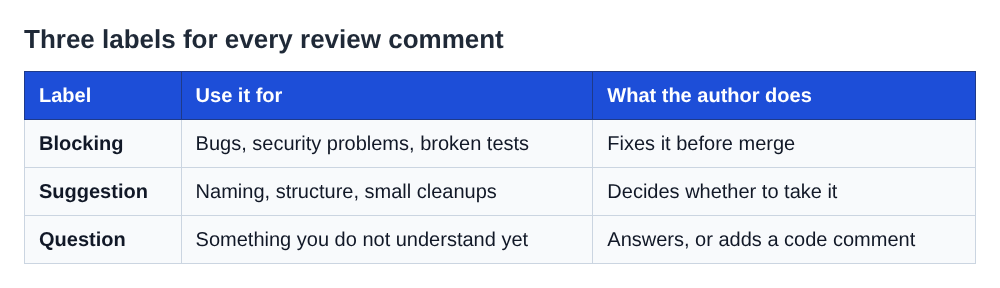
Give every comment a label at the start. Three are enough.
- Blocking: this must change before merge. Use it for bugs, security problems and broken tests.
- Suggestion: you would do it differently, but the author decides. Use it for naming, structure and small cleanups.
- Question: you do not understand something yet. The answer may change your mind, or it may reveal a missing comment in the code.
Write it as a plain prefix: "Blocking: this query is open to injection." Authors can then sort their own work. They fix the blocking items first, take the suggestions they agree with, and answer the questions.
Start the review with one summary comment: what the change does well, how many blocking items there are, and whether you expect to approve once they are fixed. That one paragraph sets the frame for everything below it. If you are collecting feedback on something visual rather than code, the design review notes template uses a similar idea.
Keep the tone kind and specific in writing
You do not need to soften every sentence. You need to remove ambiguity, because ambiguity is read as the worst case.
- Talk about the code, not the person. "This function does two things" instead of "you wrote a function that does two things."
- Ask when you are unsure. "Is this intentional?" gives the author room to explain. "This is wrong" does not.
- Praise specific things. "Nice catch on the empty list case" teaches the author what to repeat. "Looks good" teaches nothing.
- Say "we" for shared code. "Could we pull this out?" reads as teamwork.
- Skip sarcasm and rhetorical questions. They are the first things to be misread in text.
When to talk it through instead of typing it
Typing is right for small, line-level points. Switch to speaking when:
- A thread has gone back and forth more than twice without agreement.
- The problem is the design of the whole change, not one line.
- Your feedback would take more than a screen of text to explain.
- The author is new, or the change is big, and you want them to hear that you are supportive.
You can do this live on a call, but the author and you then need the same free hour. A recorded walkthrough lets the author watch when they have time, pause on a hard point and replay it.
Record a short walkthrough of the diff in Chrome and send the transcript
Here is a worked example for a pull request called "Add retry to payment client". It takes about as long as the review itself.
- Name it. Type "PR 482 review" in Name this recording. That name is used for the file and its folder, along with the date and time.
- Choose a folder. Under Where to save, press Choose folder... and allow Chrome to edit files there. Start recording stays greyed out until you do, and the words next to the button tell you why.
- Share only the diff. Under What to capture, pick A browser tab and choose the tab that holds the pull request. Sharing one tab keeps your email, chat and other tabs out of the file. Close anything private and silence notifications first, since whatever is on the shared screen goes into the recording.
- Check Live transcript. It is ticked by default under Options. It is on the Free plan too.
- Do a 30 second test. Record a few words, play them back, and catch a muted tab or the wrong microphone before the real take.
- Talk in the same order as your labels. Start with the summary. Then say each file and line aloud before you comment, so the transcript carries the location: "In
payment_client.py, line 41. Blocking: this retry loop has no cap." - Press Stop and finish. The recording is already in your folder as an MP4, and the transcript is saved next to it as a plain-text file with the time of each line.
Send the author the MP4 and the transcript file together. They can watch the parts that need your tone and skim the text for the line numbers. If you want to send a single package, the publish page guide describes a page that bundles the video and its transcript, but it needs a paid plan and a setting ticked before you record.
Things worth knowing before you hit record
- Markers need one setting. Pressing M during the recording marks a moment, but the marks are only saved when Also save every source separately is ticked. With the default single MP4 they only show on screen, so jot down times for the points you want the author to find.
- Speech to text can garble names. It may mishear
saveToCache. Say file names slowly, and put exact identifiers in a written summary comment as well. - The transcript passes through Google. While Live transcript is on, Chrome sends your microphone audio to Google to turn it into text. If the review must not leave your machine in any form, untick it before you start. The transcript guide explains the details.
- Speak close to your microphone. The transcript is made from what Chrome hears, so a headset beats a laptop microphone in a noisy room.
Keep it short. Five minutes covers most pull requests. If you need more, split the review into two recordings.
Frequently asked questions
How long should a code review comment be?
As long as it takes to give the location, the observation, the reason and a way forward, which is usually two to four sentences. If you need more, that is a sign to talk it through instead.
Should I approve a pull request with open suggestions?
Yes, if nothing is marked blocking. Say so in the summary, for example "Approving, the suggestions are optional," so the author does not wait for a second review.
How do I give feedback to a senior developer?
Use the same structure, and lean on questions and reasons. "Is there a reason we avoid a map here? I see a possible slowdown with large lists" invites an answer without assuming you are right.
Is a video review better than written comments?
Neither always wins. Written comments suit small, line-specific points, and a recorded walkthrough suits design concerns, long threads and cases where tone matters.
Get started
Write your next review with labels and reasons, and when a point needs more than a paragraph, record it. Cheap Recorder runs in Chrome, saves the MP4 and transcript to a folder on your own computer, and the Free plan gives you 12 hours of recording a month with no card needed. You can start on the Free plan here, and the code review walkthrough post shows what a spoken review of a diff looks like from the author's side.
The free plan needs no card. Try Cheap Recorder in Chrome, and your recordings stay on your own disk.
Screen recording that is cheap and easy.
Visit cheaprecorder.com↗
Comments
No comments yet.
Sign in or make an account to comment.