How to keep a list of open problems in your field
If you work in research, engineering, or any expert field, you carry a pile of unsolved questions in your head. Learning how to keep a list of open problems in your field turns that pile into something you can read, rank, and share. This guide gives you a simple template, a way to see how problems connect, and a review habit that keeps the list honest. The examples use Problem Graph, a journal that draws your problems and solutions as a map, but the method works anywhere.
Why keep a list of open problems in your field
An open problems list does three jobs. It stops good questions from vanishing after a seminar or a late night in the lab. It shows you where your attention actually goes. And it gives students and collaborators a real starting point instead of "come talk to me sometime."
The bigger payoff is memory of failure. It is easy to remember what worked and forget the three approaches that failed, and why. Those failures can save the next person a month. A good list keeps them in plain view.
What counts as an open problem (and what does not)
The Lean Enterprise Institute defines problem solving as identifying and closing gaps between current and target conditions. An open problem is a gap like that: a question you could state in one sentence, where you can say what an answer would look like, and where nobody you know has settled it. Some tests:
- It has an end state. "Understand protein folding better" is a theme. "Does method X predict fold Y within 2 angstroms on dataset Z?" is a problem.
- It is open for you or for the field. Both are worth tracking, but label which one. A problem solved elsewhere that you cannot yet reproduce is still open for you.
- It is not a task. "Rerun the benchmark" is a to do. If you want a home for those, see how to track work problems without a ticket system.
- It is not a complaint. "Reviewers are slow" is not on this list.
What to record for each problem: statement, status, sources, attempts
Here is the template. Keep every field short. If a field takes more than a few lines, the problem is probably two problems.
- Statement. One line. What is unknown, and what would count as an answer.
- Status. Open, partly solved, or solved. Add the date you last checked.
- Sources. The two or three papers, threads, or conversations that define the problem. Not a full bibliography.
- Attempts. Each approach tried, by you or by others, with its outcome: worked, partly, or failed. One line on why.
- Requirements. What an attempt needs: data, equipment, a skill, a collaborator.
- Links. Other problems this one depends on or feeds into.
A worked example, from a hypothetical materials lab:
- Statement: Can we grow film type A on substrate B without cracking above 300 nm?
- Status: Open, checked this week.
- Attempts: Slower cooling rate: partly (cracks start later). Buffer layer C: failed (delamination). Doping with D: idea, not tried.
- Requirements: Access to the deposition chamber, a second substrate supplier.
- Links: Thermal mismatch between A and B (open).
In Problem Graph, this maps directly onto the app. You write the statement in one line, put it in the expert or scientific lane, and press Enter. It lands on the graph right away. Then you attach each approach as a solution, mark the ones you are trying, and record the outcome as worked, partly, or failed. The app's map key also names a requirement, so "deposition chamber access" can sit next to the solutions that need it.
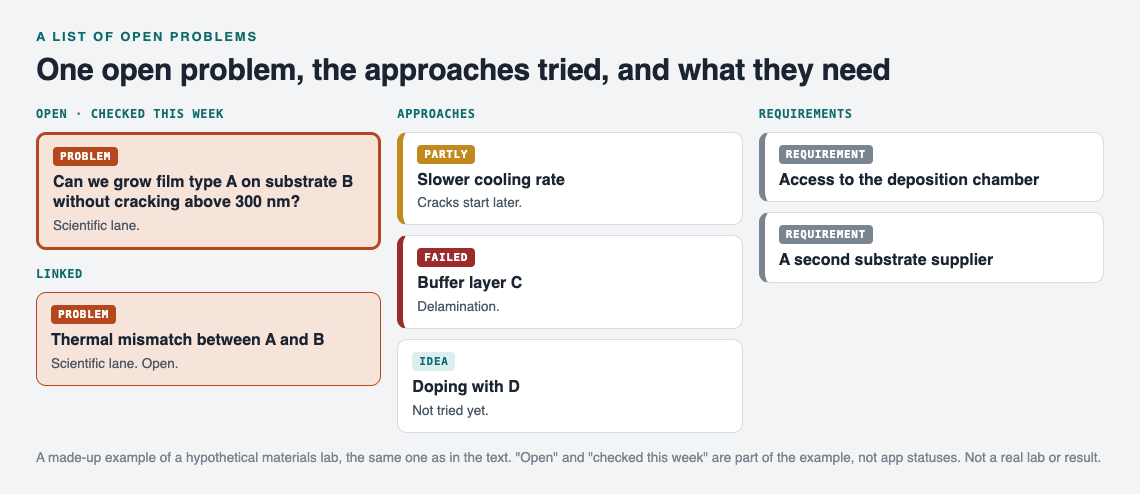
The made-up lab example above, kept as a map.
How to organize problems so you can see how they connect
A flat list hides structure. Open problems in a field rarely stand alone. One is blocked by another. Two share a hidden cause. A method that failed on one problem partly works on a neighbor.
So link problems that belong together. In the example above, "cracking above 300 nm" links to "thermal mismatch between A and B." Once you have a dozen problems, the links start to show clusters. Problem Graph lets you link across lanes too, which matters when a scientific question is tied to a practical one, like a funding or equipment problem sitting in your work lane. As the home page puts it, patterns show up on the map that never show up in a list.
Use the map to spot hubs. A problem with many links is often the one worth solving first, because it unblocks others.
Ranking problems by importance, tractability, and fit for you
Not every open problem deserves your next six months. Score each one on three questions, low, medium, or high:
- Importance. If this were solved tomorrow, who would care, and how much would it change?
- Tractability. Is there a plausible next attempt? A problem with zero untried ideas is low here, even if it matters.
- Fit. Do you have the skills, data, and requirements on hand? Check the requirement nodes you already wrote down.
Work on problems that score high on at least two and are not low on any. Park the rest without deleting them. A parked problem with a clear statement and a record of failed attempts is a gift to a future student.
Your attempt history helps here. A problem where every solution is marked failed and you have no new ideas is telling you something. A problem with one "partly" result is often the most tractable thing on your list.
Keeping the list current: a simple weekly and quarterly review
A list that is not reviewed becomes a graveyard. Keep two habits.
Weekly, 15 minutes
- Record the outcome of anything you tried this week: worked, partly, or failed.
- Add any new problem that came up, one line each.
- Add one new solution idea to your top problem, even if you will not try it yet.
In Problem Graph, filter by the Expert or Scientific lane and switch to the List view beside the map. It is a quick way to scan everything without the visual noise.
Quarterly, one hour
- Rescore importance, tractability, and fit.
- Check sources for new work that changes a problem's status.
- Merge duplicates and split problems that turned out to be two.
- Look at the map for new clusters and links you missed.
Do not delete failed attempts during review. The Problem Graph home page says it well: "The graph is honest. A solution that failed three times stays on the map as a failed solution, and that is exactly what the next person needs to know." If your group already runs retros, the same habit applies; see how to keep the lessons after a team retrospective.
Sharing your open problems list with collaborators and students
Sharing is where an open problems list earns its keep. A new student can read the statement, see what failed, and pick a starting point on day one. A collaborator can see where your work and theirs overlap.
In Problem Graph, everything you write is private by default. Your problems are saved to your account, follow you to any phone or computer you log in on, and nobody else sees them. Most of your list stays that way.
Sharing works only through main nodes. You mark one problem as a main node, and only a main node can be shared. When you share it, its solutions, their outcomes, and the requirements they need go along. A problem you only link to it stays home, like the rest of your graph. That lets you share "cracking above 300 nm" with your lab while a sensitive linked problem, say an unpublished idea, stays private.
A main node can go to one of two places:
- A private network. Create a network for your lab or reading group, give members the invite code, and share the main node into it. Members see it; nobody else does. Note that anyone with the invite code can join, so treat the code like a key.
- Public. Put the main node out for everyone in the app. Others can link their own problems to it and borrow the solutions that worked.
Sharing also works the other way: Problem Graph shows similar problems others have shared and which solutions worked, and a borrowed solution keeps a link back to where it came from, which helps when you cite it. AI suggestions are proposals to test, not answers.
For more on running a shared list with a small group, read building a small team knowledge base for problems and fixes.
Frequently asked questions
Should my open problems list be public or private?
Keep the list private, which is the default, and share only what you mark as main nodes. Share an active project's main node with your group through a private network, and make a main node public when outside help would be welcome. Unpublished ideas that you only link to a main node stay private.
How many open problems should I track at once?
Track as many as you like, but actively work on two or three. The rest can sit on the list, parked, with clear statements and recorded attempts.
How do I mark a problem as partially solved?
Record the outcome on the solution, not just the problem. In Problem Graph you mark an attempt as "partly," so the problem stays open while the map shows which approach got you closest.
Get started
Open the app and, if the graph is empty, press "Load example set" to see how problems, solutions, and requirements fit together. Then write your first open problem in one line, put it in the expert or scientific lane, and attach the last two things you tried with their outcomes. That is your template, already filled in.
Try Problem Graph: it is free, and you can look around the public network without an account. Write one problem down in a line and attach the first thing you will try.
Comments
No comments yet.
Sign in or make an account to comment.