How to keep track of the solutions you tried
If a problem keeps coming back, you have probably tried more fixes than you remember. You try something, it seems to help, life moves on, and a month later you are standing in front of the same problem trying the same fix again. The way out is simple: keep track of the solutions you tried, one short record per attempt, with an honest outcome. This guide shows you what to write, how to mark each result, and a worked example you can copy.
Why keep track of the solutions you tried
Memory is bad at failed attempts. You remember the problem clearly, because it hurts. You remember the fix that worked, because it was a relief. The attempts in between fade, and those are the ones you are most likely to repeat.
A written record does three things for you:
- It stops you from trying a fix you already know does not work.
- It shows you which guesses about the cause were wrong, so the next fix aims somewhere new.
- It keeps the fix that worked, with what it needed, so you can do it again quickly when the problem returns.
The Lean Enterprise Institute describes a plan as "a theory" of what will address a problem's cause (Lean Enterprise Institute, Problem Solving). Every fix you try is a small theory. Keeping track is how you find out which theories held up.
What to write for each solution
Start with the problem itself, in one line, written as what you can see. "The kitchen sink drains slowly every two weeks" is better than "the plumbing is bad", because you can tell whether a fix changed it.
Then, for each solution you try, write five short things:
- What you did. Plain and specific: "used a plunger for two minutes", not "tried to unblock it".
- The guess it tests. Every fix assumes a cause. A plunger assumes a blockage near the plughole. Writing the guess down is what makes a failed attempt useful.
- How you will judge it. Decide before you start: "still draining fast in two weeks" is a clear test.
- The outcome. One word, then one line of detail. More on the words below.
- What it needed. Tools, money, time, another person. This is what you will want to know when the problem comes back.
Add a date to each attempt. It turns "I tried that once" into "I tried that in March and it lasted a week".
Give every attempt a status
A status is a one word label that tells you where each solution stands. Keep the list short, so you use it every time:
- Idea: you have not tried it yet.
- Trying: it is in progress, and you are waiting to judge it.
- Worked: it met the test you set.
- Partly: it helped, but did not meet the test, or did not last.
- Failed: it made no real difference.
"Partly" is the most useful word on the list. A fix that helps for a week is telling you something about the cause, even if it is not the answer. Without that word, you would mark it failed and lose the clue, or mark it worked and be surprised when the problem returns.
Never delete a failed attempt. Problem Graph's home page puts it well: "A solution that failed three times stays on the map as a failed solution, and that is exactly what the next person needs to know." Often the next person is you.
A worked example: a slow kitchen sink
Here is the record for one everyday problem. The example is made up to show the shape, and it is not plumbing advice.
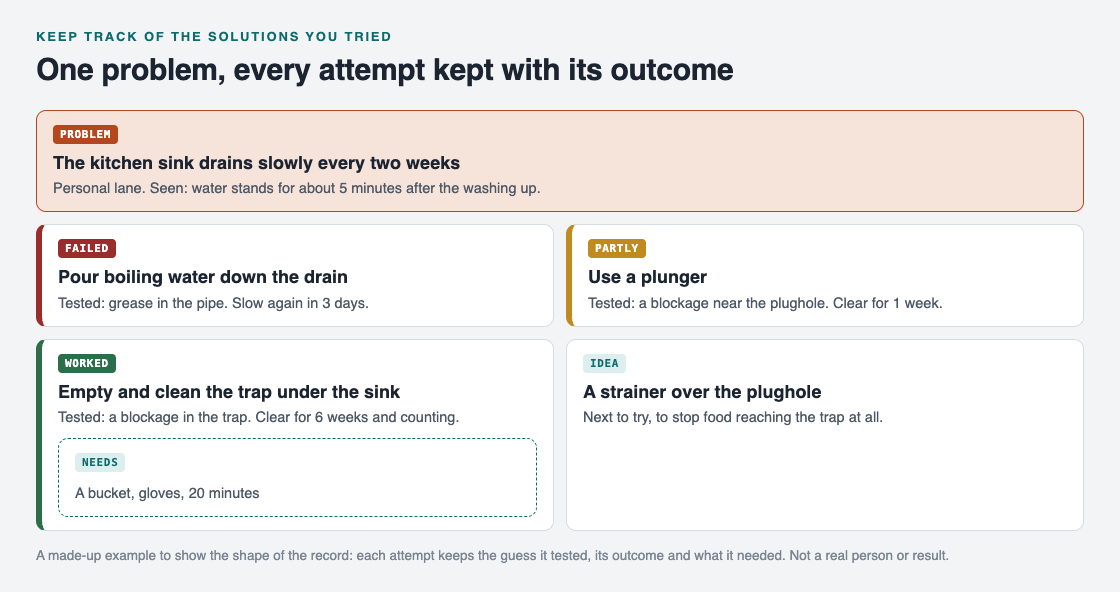
One problem, every attempt kept with the guess it tested, its outcome and what it needed.
- The problem. "The kitchen sink drains slowly every two weeks." What you see: water stands for about five minutes after the washing up.
- Attempt 1: boiling water. Guess: grease in the pipe. Test: fast for two weeks. Outcome: failed, slow again in three days. Now you know grease alone is probably not it.
- Attempt 2: a plunger. Guess: a blockage near the plughole. Outcome: partly, clear for one week. Something is blocking the water, but the plunger is not removing all of it.
- Attempt 3: empty and clean the trap under the sink. Guess: the blockage sits in the trap. Needs: a bucket, gloves and 20 minutes. Outcome: worked, clear for six weeks and counting.
- Idea for later: a strainer over the plughole. If food is what fills the trap, stopping it at the top could mean you never need attempt 3 again.
Look at what the record gives you. When the sink slows down next spring, you skip the boiling water, skip the plunger, and go straight to the trap with the right things in hand. The failed and partly attempts are not clutter. They are the reason you can trust the one that worked.
Check the record before you try something new
The record only helps if you read it. Make one habit out of it: before you try any fix, look at what you already tried for that problem.
Ask three questions:
- Have I tried this, or something close to it? If it failed, what would be different this time?
- Which guesses about the cause have the failed attempts already ruled out?
- Is there a "partly" that points at the real cause?
Once a week, mark anything still on "trying" as worked, partly or failed. The Lean Enterprise Institute calls this kind of looking back hansei, a practice used so that mistakes are not repeated (Lean Enterprise Institute, Hansei). In its plan, do, check, act cycle, the check step measures a change against the target, and a change that brings a real gain becomes the new standard (Lean Enterprise Institute, PDCA). For your sink, the new standard is simply: clean the trap.
If you already keep a problem solving journal, this attempt record slots straight into it. If you keep a lessons learned log at work, use the same five notes for each fix.
Keep the record in Problem Graph
A notebook works. The trouble starts when you have a dozen problems and the attempts are spread across pages. Problem Graph keeps each attempt attached to its problem, using the same words as this guide.
- You write the problem down in one line and put it in a lane: personal, work, expert or scientific. It lands on the graph the moment you press Enter.
- You add solutions as ideas, mark the ones you are trying, and record the outcome as worked, partly or failed. In the home page's words, "the graph remembers so you do not have to".
- The map has three kinds of node: problem, solution and requirement. A requirement is a place for what a solution needs, like the bucket and gloves above.
- If you prefer reading a list to reading a map, the app has a List view beside the map.
Your problems are private by default. The home page says they are saved to your account, follow you to any phone or computer, and nobody else sees them.
There is one more way to fill your list. Problem Graph can show you similar problems that other people have shared, in any lane, and which of their solutions worked. You can borrow one into your own graph with one tap, and it keeps a link back to where it came from. Then it becomes one more attempt on your record, judged by your own test.
Frequently asked questions
What is the simplest way to keep track of the solutions you tried?
Write the problem in one line, then one line per attempt: what you did, and whether it worked, partly worked or failed. Add the date and what it needed if you can.
Should I record a fix that did nothing?
Yes. A failed attempt rules out a guess about the cause and stops you from trying it again. Mark it failed and keep it.
How long should I wait before marking a solution as worked?
Decide before you start, based on how often the problem shows up. If it comes back every two weeks, wait at least two weeks before calling it worked.
Can I track solutions on my phone?
Yes. Problem Graph runs in the web browser and its home page says it works on your phone. Any notes app also works if you keep the same five notes for each attempt.
Get started
Pick one problem you have tried to fix at least twice. Write it in one line, list every attempt you can remember, and put worked, partly or failed next to each. If a guess about the cause appears more than once, you have found the attempt to stop repeating.
Try Problem Graph: it is free, and you can look around the public network without an account. Write one problem down in a line and attach the first thing you will try.
Comments
No comments yet.
Sign in or make an account to comment.