How to make a quiz from lecture slides, step by step
Most courses hand out the lecture slides, and most students reread them before the exam. Rereading slides feels like studying, but it asks very little of your memory. A better use is to make a quiz from lecture slides and answer it before you look at them again. This post shows how to do that step by step, what the research on quizzing during lectures shows, and where a slide quiz falls short.
Why make a quiz from lecture slides
Slides are a summary of what the lecturer thought mattered. That makes them a good map of what will be tested. But reading a summary again and again mostly builds a sense that it looks familiar. Answering questions on it makes you pull each point out of memory, which is what you will have to do in the exam. Our post on retrieval practice sets out why that works.
It also works for understanding, not only facts. In Karpicke and Blunt (2011), students learning from science texts did better by practising recall than by drawing concept maps, even on questions that asked them to draw conclusions, and even when the final test asked them to make a concept map.
What research says about quizzing on lectures
Several studies have tested what happens when a recorded lecture is broken up by short quizzes.
- Attention and anxiety. In Szpunar, Khan and Schacter (2013), quizzes between parts of an online lecture cut mind wandering, led to more note-taking and improved learning. Students who were quizzed often also felt less anxious about the final test.
- Linking ideas. In Jing, Szpunar and Schacter (2016), students who were tested during a 40-minute recorded lecture learned more than students who spent the same time restudying, and were better at connecting related points from different parts of it.
- Quiz questions or review slides. In a study of 703 university and community college students (Chan and colleagues, 2025), short quiz questions between parts of an online lecture helped both groups more than review slides did. There was a surprise: with short videos playing on the screen as a distraction, the review-slides group did about as well as the quiz group.
- It has to be the lecture's own content. In Assadipour, Ahn and Chan (2025), recalling the lecture's earlier parts helped people learn the next part. Recalling unrelated things did not.
These studies used recorded lectures and quizzes set by the researchers. They do not test a quiz you make from slides afterwards. But they point the same way: questions on the lecture's own content beat looking at it again.
Pick the right page to photograph
A slide with five words on it gives very little to ask about. Before you make a quiz, give it more to work with:
- A printed slide page with your notes on it. Write what the lecturer said beside the slide it belongs to. Your notes often hold the explanation the slide leaves out.
- A dense slide on its own. A slide with a diagram, a process or a definition can carry a quiz. Our post on studying diagrams covers figures.
- Your own notes from the lecture. If the slides are thin, photograph your notes instead. Our post on turning notes into a quiz shows how.
Study Shot does not take PDF files. If your slides came as a PDF, take a screenshot of a dense slide and choose it as a photo, or print the slide pages and photograph them flat. It accepts JPEG, PNG, WebP or GIF pictures up to 5 MB. If a photo has too little to work with, it says it couldn't write questions for this photo, and asks you to try a different page.
Worked example: one lecture, one quiz
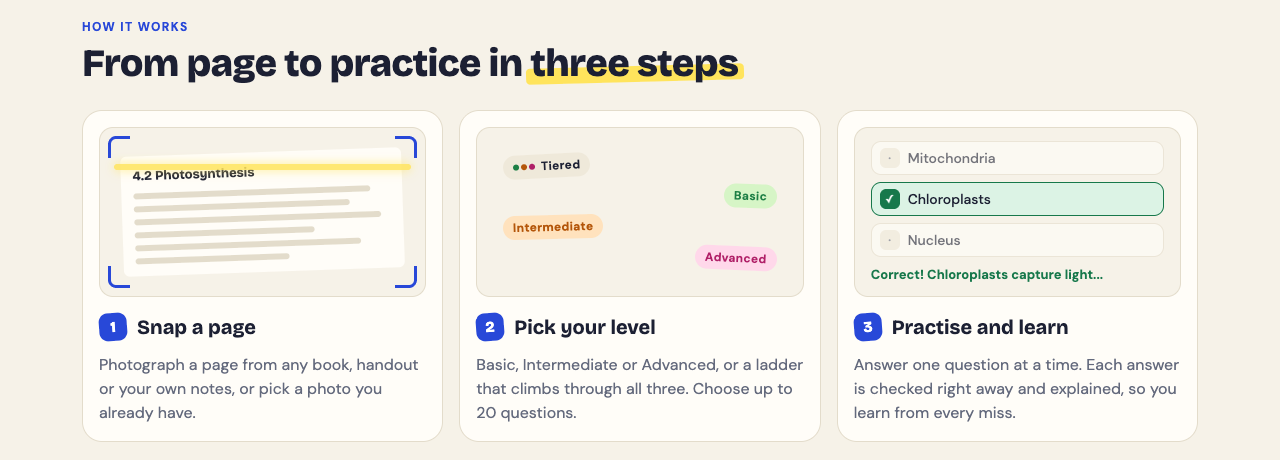
Say you had a lecture on the heart this morning and the slides are online. Here is how to make a quiz from it with Study Shot, which turns a photo of a page into multiple-choice questions and explains every answer.
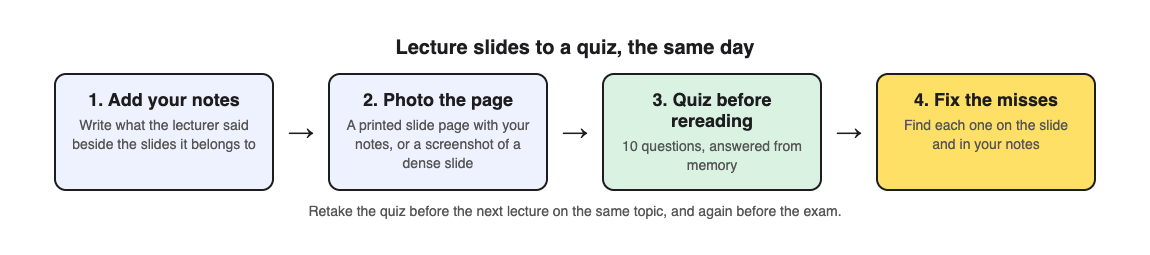
- Add your notes the same day. Print the slide pages, or open them next to your notebook, and write what the lecturer said beside each slide.
- Photograph the page. Choose Take photo, hold the page flat and fill the frame. Or choose Choose photo and pick a screenshot of the densest slide.
- Make 10 questions on the ladder. The default level climbs from basic to advanced, so you get key terms first, then questions that ask you to explain and apply.
- Answer before you reread. Check answer shows Correct! or Not quite., the correct answer and a short explanation. If you need to see the slide during the quiz, Show page brings your photo back.
- Fix the misses. The results list every miss under Look at these again, with your answer and the right one. Find each point on the slide and in your notes.
The questions are written by an AI model and can contain mistakes. If a question does not match what the lecturer said, trust the lecture and use Report a problem under it.
When to take the quiz: after, between and before
- The same day. Quiz yourself while your notes are fresh, and fix the misses.
- Before the next lecture on the topic. Every quiz is saved in your library with its page photo and your best score. Press Retake quiz. The research above found that recalling the earlier part of a lecture helped people learn the next part.
- In the weeks before the exam. Retake each lecture's quiz on spaced days. Our post on spaced repetition for exams has a schedule.
If your class has a study group, Share this quiz makes a link you can send. Each person needs a Study Shot account and gets their own copy of the questions, without your photo.
What a slide quiz will miss
A quiz can only ask about what is on the page. If the lecturer explained a point out loud and you did not write it down, the quiz will not cover it. That is one more reason to add your notes before you photograph.
The questions are multiple choice, so they test whether you can pick the right answer. If the exam asks you to write answers or work through problems, practise those on paper as well.
Frequently asked questions
Can I upload my lecture slides as a PDF?
No. Take a screenshot of a slide or photograph a printed page, then choose it as a photo.
How many slides should one quiz cover?
One photo makes one quiz, so pick a page with real content: a printed slide page with your notes, or one dense slide.
Is it better to quiz myself or reread the slides?
In a 2025 study, quiz questions between parts of a lecture beat review slides, except when short videos on the screen distracted students; then reviewing did about as well.
When should I quiz myself on a lecture?
The same day, again before the next lecture on the topic, and on spaced days before the exam.
Get started
Try Study Shot: it is free to start and works on your phone and computer. After your next lecture, add your notes to the slides, photograph the page and take a 10-question quiz before you reread anything.
Comments
No comments yet.
Sign in or make an account to comment.