How to present your design portfolio in an interview
If you want to know how to present your design portfolio in an interview, the short answer is this: show three projects instead of ten, tell each one as a story with a clear decision in the middle, and rehearse on camera until you can hit your time without reading notes. This post is about the live interview, where someone is watching and can cut in. If the company asks for a recorded video instead, our post on recording a design portfolio video that walks a hiring manager through your work covers that case. It helps designers who apply to roles with a take-home or async step, and the part worth borrowing is its list of start times, so a busy reader can jump straight to the project they care about.
For the rehearsal part, Cheap Recorder runs in Google Chrome and records your screen, your voice and your webcam as one MP4 on your own computer, with a transcript, so you can watch yourself present before anyone else does.
How to present your design portfolio: what a hiring manager listens for
A hiring manager has usually seen your portfolio before the call. They are not there to look at pictures again. They are listening for how you think.
In practice that means a few things:
- Your reasoning. Why you chose this direction over the others you tried.
- Your constraints. Deadlines, budgets, tech limits, stakeholders who disagreed. Good designers name them.
- Your part. What you did, as opposed to what the team did. Say "I" when it was you.
- Your judgement after the fact. What you would change now. This shows you learn.
Polished screens matter less than you think. A rough sketch with a clear "here is why we dropped this" often lands better than a perfect mockup with no story.
Pick three projects, not ten, and put your strongest one first
Ask the recruiter how long your slot is. In a 45-minute slot, questions eat a big share of the time, so three projects at about eight minutes each leaves room to talk.
Choose them like this:
- Lead with your strongest project. Attention is highest in the first minutes. Do not save the best for last; the call may run out before you get there.
- Pick projects that show different skills. For example, one research-heavy project, one visual or systems project, and one where you shipped under pressure.
- Match the role. If the job is product design for a B2B tool, a dashboard project beats a poster series.
- Keep a fourth in your back pocket. If they ask "do you have anything with mobile?", you can open it without fumbling.
Tell each project in four beats: problem, process, decision, result
A simple structure keeps you from rambling. Each project gets four beats, and you can say each one in under two minutes.
- Problem. One or two sentences. Who had the problem and why it mattered.
- Process. Two or three artefacts, not twenty. A research note, a sketch, a test.
- Decision. The trade-off you made and why. This is the beat interviewers remember.
- Result. What changed. If you have no numbers, say what you learned or what the team did next.
Here is how the four beats might sound for an imagined checkout redesign. The details are made up for the example; swap in your own project's facts and numbers:
Problem: "Shoppers were dropping off at the address step, and support kept getting tickets about it." Process: "I watched five recorded sessions, then sketched three layouts and tested two with the support team." Decision: "We kept a single page instead of splitting it into steps, because the tests showed people lost track of where they were. That meant pushing back on a design the product lead liked." Result: "Support tickets about addresses went down after launch, and the pattern became part of our form guidelines."
Notice there is no long tour of every screen. The decision beat carries the weight, so never skip it to save time.
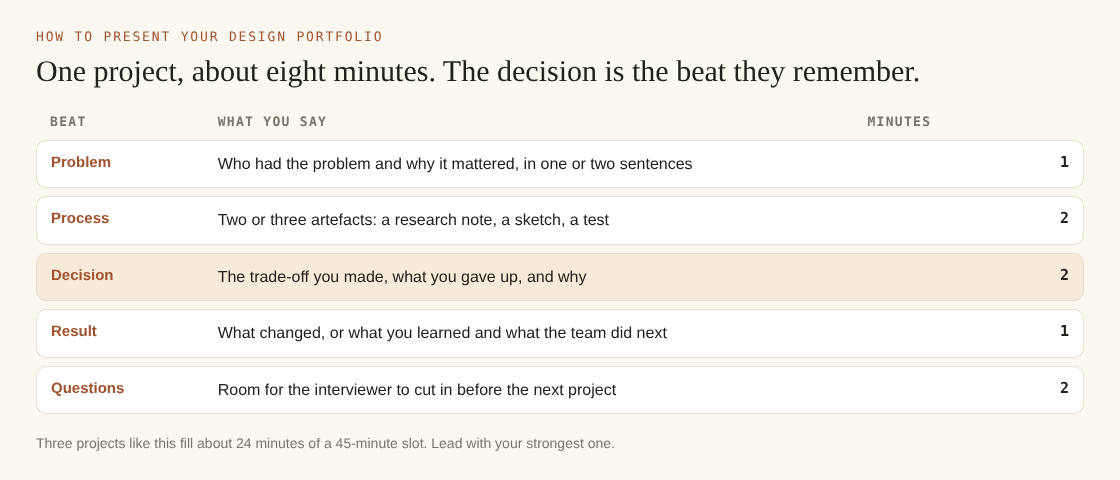
One project in about eight minutes, with room for questions.
Show the work on screen while your face stays in the corner
In a video interview, the interviewer sees your shared screen most of the time. Your face shrinks or vanishes. When you rehearse, it helps to see both at once, the way a viewer will.
In Cheap Recorder, open What to capture and pick A browser tab or A window rather than the whole screen. Sharing one tab or window keeps your other tabs, apps and private things out of the recording. Turn on Record my webcam. The default layout is Picture in picture, bottom right, and you can drag the camera anywhere in the preview, nudge it with the arrow keys, and set its size with the Size slider from 12% to 50% of the picture's width.
The preview is the recording. Where the camera sits in the preview is exactly where it sits in the file, so move it off any part of your work you need people to see. The screen and webcam recording guide covers the other layouts.
Before you start, close tabs you do not need and silence notifications. Anything on the shared screen ends up in the file, and the same is true in the real interview.
Rehearse on camera and watch the recording back before the interview
Practising in your head is not the same as hearing yourself. A recorded run shows you where you rush, where you lose the thread and how long each project really takes.
A simple rehearsal workflow:
- Under Where to save, press Choose folder... and allow Chrome to edit files there. Start recording stays greyed out until you do, and the note beside it says why.
- Type a name in Name this recording, such as
Portfolio rehearsal 01. The name is used for the file and its folder, so numbering keeps your takes in order. The guide to where recordings are saved explains the folder names. - Record a 30-second test first and play it back. It catches a wrong microphone before you waste a full take.
- Start the real run. Press M or Add marker at the start of each project. A short note confirms the time.
- Press Stop and finish when you are done. Do not use Chrome's own Stop sharing bar; that also finishes the recording, often before you meant to.
One thing to know about markers: with the default single MP4, the marker notes show while you record but are not saved to a file. Jot down the times as they appear. The course and tutorial guide explains when markers are written out.
Then watch it back. Check three things:
- Time per project. If project one ran fourteen minutes, cut process slides.
- The decision beat. Did you say it out loud, or did you just show the final screen?
- Filler. If Live transcript was on under Options, the folder holds a plain-text transcript with the time of each line. Skim it and you will spot long, wandering answers fast. The transcript and captions guide covers the language menu and other settings.
The Free plan gives you 12 hours of recording a month with no card, which is plenty for a week of rehearsals. If your interview includes a formal presentation slot, a speaker's checklist for presentation videos is a useful second pass on your setup.
Send a recorded walkthrough with start times for each project
Some teams ask for a recorded walkthrough before or after the interview. Even when they do not, a short follow-up video can help a hiring manager share your work with people who were not on the call.
The key is start times. Nobody wants to scrub through 20 minutes. Put a short list in your email, like this:
0:00Who I am and what I focus on1:10Checkout redesign8:40Design system for the admin tool15:20Onboarding research
Use the times you noted from your markers. If you are on Creator or above and want a page with chapters, tick Also save every source separately under Options before you record. The recording's Separate sources folder then includes a publish page where each marker becomes a chapter and clicking its time jumps the player there. Send the whole recording folder as a zip, not just the page. You cannot add the page afterwards if the option was off.
Frequently asked questions
How long should a design portfolio presentation be?
Aim for 20 to 25 minutes of talking in a 45-minute slot, which leaves room for questions. Three projects at about eight minutes each fits that well. Ask the recruiter for the exact format beforehand.
Should I present from Figma, slides or my portfolio website?
Slides or a simple deck give you the most control over pacing and order. A live Figma file can work for showing one detailed flow, but it is easy to get lost in it. Whatever you pick, rehearse in that exact tool so you know where everything is.
How do I show work that is under NDA?
Ask your former employer what you may show, and when in doubt, blur names, swap real data for placeholders and describe the problem in general terms. Share a single window or tab rather than your whole screen, so nothing private slips into view.
What if the interviewer interrupts with questions mid-project?
Welcome it; a question means they are engaged. Answer briefly, then say which beat you are returning to, for example "back to the decision we made". If time runs short, skip the process beat and go straight to the decision and result.
Get started: record your portfolio walkthrough in one Chrome tab
Pick your three projects, write the four beats for each on a single page, and record one full rehearsal tonight. Watch it back tomorrow and cut whatever ran long. When you are ready to send a recorded version, the post on walking a hiring manager through your work on video takes you from rehearsal to a finished file with start times.
The free plan needs no card. Try Cheap Recorder in Chrome, and your recordings stay on your own disk.
Screen recording that is cheap and easy.
Visit cheaprecorder.com↗
Comments
No comments yet.