How to write a getting started guide for your product
How to write a getting started guide for your product comes down to one choice: pick one result a new user can reach in about ten minutes, then write the shortest ordered path to it. List what the user needs first, number the steps, and end with proof that it worked. Everything else belongs in other docs.
If you want somewhere to publish the guide, Electrified gives you your own page for your articles, with topic pages and a feed for each writer.
A getting started guide is the first document a new user follows. It does not explain your whole product. It takes one person from "I just found this" to "I made it do one useful thing."
It matters because it is where people decide whether your product is worth their time. A reader who gets stuck on step three does not read your reference pages. They leave. A reader who reaches a working result in one sitting has a reason to keep going.
Keep the scope small. A getting started guide is not a manual, a feature tour or a sales page. If you are unsure whether something belongs, ask: does the reader need this to reach the first result? If not, link to it at the end.
Define the first win your user should reach
Before you write a word, finish this sentence: "After this guide, the reader will have ___."
The blank should be something you can see or check. "Understand how our API works" is not checkable. "Sent one request and got a 200 response with their own data" is.
Imagine a made-up product, a command line tool called acme that turns a folder of notes into a website. Weak first wins:
- Learn about the configuration system.
- Explore the main features.
Strong first win:
- Run
acme buildon a folder with two notes and open the generated page in a browser.
The strong one tells you what to include. Install, make a folder, add two files, build, open the result. Nothing else is needed. Write that sentence down and keep it at the top of your draft. Every time you feel like adding a section, check it against the sentence.
Know your reader and what they already have
Decide who is reading. A developer who has used similar tools needs less than someone who has never opened a terminal. You cannot write for both in one guide, so choose one.
Then list what that reader already has on their machine or account. Be honest about it. If your guide assumes Node is installed, say so. If it assumes they have an API key, say where to get one. Most "this guide did not work" complaints come from an unstated assumption.
A quick way to find these gaps: write down every noun in your steps (a file, a key, a version, an account, a folder) and ask where the reader gets each one. If the guide does not say, add a line.
How to write a getting started guide for your product in three parts
Use the same three parts every time.
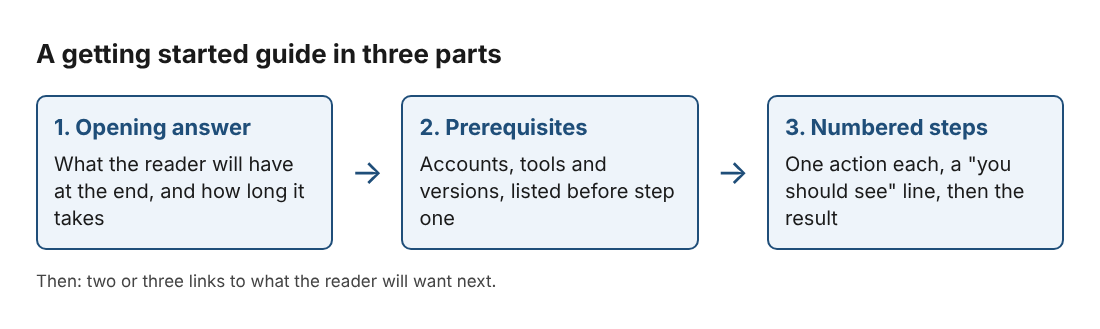
1. Open with the answer
Start with one or two sentences saying what the reader will have at the end and how long it takes. Do not open with the history of your company. The same rule helps any short piece of writing, and our post on how to write a short article people finish reading covers it in more detail.
2. List the prerequisites
Put them in a short bulleted list before step one. Include versions, accounts and anything that costs the reader time to set up. If a prerequisite is slow, such as waiting for an account to be approved, say so up front.
3. Give the steps, then the result
Number the steps. After the last one, show what the reader should now see: the output, the screen, the file. Then add a short "Next" section with two or three links, such as the full reference or the guide for the second most common task.
Write steps that are short, ordered, and testable
Each step should be one action. If a step has "and then" in it, split it. The reader is switching between your guide and their own screen, so short steps make it easy to find their place again.
Start each step with a verb. Put the exact command, button name or file name in the step, not a description of it. Our post on how to write a step-by-step list in an article goes deeper on this.
Here is how the made-up acme guide could read:
- Install the tool with
npm install -g acme-cli. - Make a folder called
my-notesand open it. - Create a file called
hello.mdwith one line of text in it. - Create a second file called
second.md. - Run
acme build. - Open
site/index.htmlin your browser. You should see links to both notes.
Notice step six. It ends with something the reader can check. Add a check like that after any step that can fail quietly. "You should see a version number" after the install step saves a lot of confusion later.
Name the most likely failure right where it happens. If the install often fails because of permissions, put one line under that step with the error text and the fix. Do not collect all problems into a troubleshooting section the reader will not find in time.
Add screenshots, code, and examples that help
Add a screenshot or code sample only when it shows something the words cannot. A screenshot is useful when the reader must find a button in a busy screen. Code is useful when the exact text matters. Show real output next to real input, so the reader can compare.
Use one running example from start to finish, not a new one in every step. The reader then sees a single thing grow. Use realistic names, not foo and bar.
If you publish the guide on Electrified, know how the editor handles this. There is no picture button in the editor. Pictures (PNG, JPEG or WebP, at most 2 MB) are uploaded through the site's images API with a personal token, then shown in your article. Inline code and numbered lists work directly in the body, and the Preview tab shows how the page will look before you publish.
Test the guide with a real new user
You cannot proof your own guide, because you already know the product. Ask someone who has never used it to follow the guide on their own machine while you watch and say nothing.
Take notes on three things:
- Where they stop and re-read.
- Where they ask you a question.
- Where the screen does not match the guide.
Each of those is a bug in the guide. Fix the guide, not the person. Then run the test again with someone else. Two or three rounds is usually enough to get a guide that works.
Test it again whenever you ship a change that touches the first-run path. A guide that was right at launch can break after a rename or a new required field. Writing your release notes at the same time helps; see how to write a changelog for your project, and keep a line in your release checklist to rerun the guide.
Getting started guide template you can copy
Copy this outline and replace the brackets. In the Electrified editor, start each heading with ##.
Title: Get started with [product] in [number] minutes Opening: By the end of this guide you will have [the first win]. It takes about [time]. ## Before you begin: a bulleted list of accounts, tools and versions the reader needs. ## Steps: a numbered list. One action each. Exact commands or button names. A "you should see" line after any step that can fail. ## What you built: show the final output and say in one sentence what it means. ## If something went wrong: the two or three errors you see most often, with the fix for each. ## Next steps: two or three links to the next task the reader will want.
When you save an article on Electrified you can choose up to 5 topics for it, each under 40 characters. Pick the ones a new user would search for. Each topic links to a page listing every post about it, such as writing guides.
Frequently asked questions
How long should a getting started guide be?
Long enough to reach the first win and no longer. For most products that means six to twelve steps that take about ten minutes to follow.
Should a getting started guide cover every feature?
No. Cover the one path to the first result and link to the rest. A guide that tries to teach everything makes the first result harder to reach.
Where should I publish my getting started guide?
Put it where a new user will look first, such as your product's docs or site. You can also write it as an article on your own Electrified page and link to it from your product.
How often should I update the guide?
Rerun it whenever you change the install, sign-up or first-run steps. If you cannot rerun it every time, do it before each release.
Can an AI tool write and publish the guide for me?
On Electrified, a personal token lets a tool start and edit drafts on your account. It cannot publish, so you read the draft and publish it yourself.
Get started
Pick your first win, write the numbered steps, then watch one new user follow them. If you want a place to publish the result, make an account on Electrified. The form asks for a name, handle, email and password, and your page will be at /@handle. You can save the guide as a draft, check it in Preview, and publish it when it is ready.
Comments
No comments yet.
Sign in or make an account to comment.