Idea backlog: fixes you have not tested yet
An idea backlog is the list of fixes you think might solve a problem but have not tested yet. It often lives in your head, in a notes app, or scattered across chat messages. Once there are a dozen, it is easy to forget which idea was for which problem and which ones you already tried. This post shows you how to capture untested fixes so they stay useful, how to rank them, and how to test them cheaply enough that the backlog actually shrinks.
What an idea backlog of untested fixes is (and why it beats a to-do list)
A to-do list holds tasks. You know what to do, and you either do it or you do not. An idea backlog holds guesses. Each item is a bet that some change will fix some problem, and you do not know yet if the bet is good.
A task is done when you finish it. A fix is done when you know the result: it worked, it partly worked, or it failed. If you put fixes on a to-do list, you tick them off when you try them and the result disappears. Next month you try the same failed idea again because nothing told you it failed.
So a useful idea backlog has three things a to-do list lacks:
- A link from each fix to the problem it is meant to solve.
- A status that says untested, being tried, or tested.
- A recorded outcome once you test it.
Why untested fixes pile up and quietly go stale
Ideas are cheap to have and expensive to test. You can come up with five fixes for a slow morning routine in the shower. Testing even one takes a week of mornings. The gap between those two speeds is why the backlog grows.
Ideas also go stale without you noticing. A fix that made sense in March may not fit in June because the problem changed, or because you solved it another way. If the idea sits alone in a list with no problem attached, you cannot tell that it is now pointless. It just keeps taking up attention.
How to capture a fix so you can test it later: problem, hypothesis, signal
Every untested fix needs three short parts. Keep each to one line.
- Problem. What is going wrong, in plain words. "Team standup runs 40 minutes instead of 15."
- Hypothesis. What you will change and why you think it helps. "Post written updates before the call so the meeting only covers blockers."
- Signal. What you will see if it works. "Standup under 20 minutes for four of five days."
The signal is the easy part to skip, and it is the part that makes testing possible. If you cannot say what success looks like, you cannot tell a partial win from a failure. Writing it down also forces the idea to be specific. "Make standups better" has no signal. "Cap each person at 90 seconds" does.
Link every fix to the problem it is meant to solve
A fix with no problem attached is the main source of a stale backlog. So the rule is simple: no orphan ideas.
In Problem Graph, this is how the journal is built. You write the problem in one line, put it in a lane (personal, work, expert or scientific), and press Enter. It lands on the graph. Then you attach solutions to it as ideas. Each idea sits on the map connected to the problem it targets, so you can see at a glance which problems have five untested fixes and which have none.
Here is the standup example as a workflow:
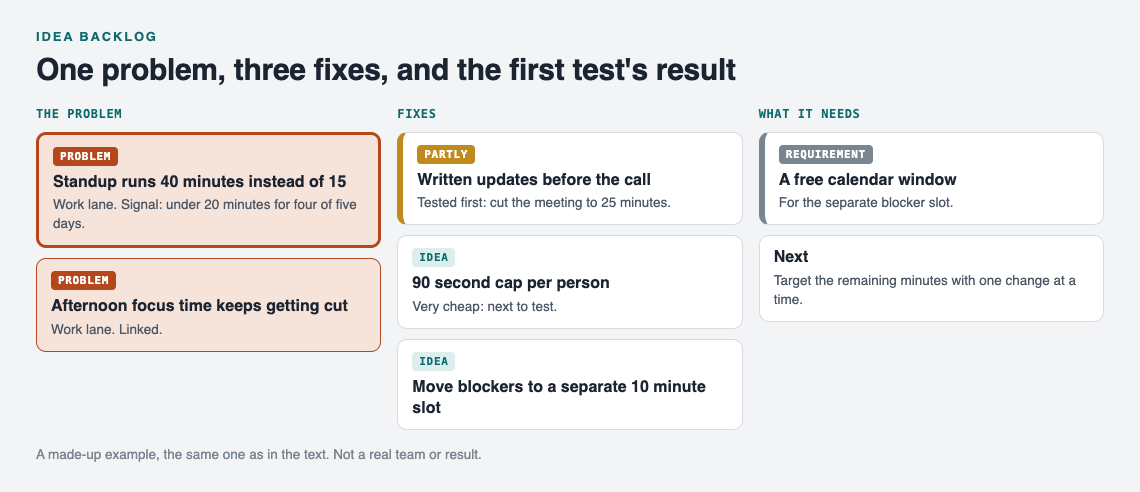
The standup example as a map, after the first week's test.
- In the work lane, add the problem: Standup runs 40 minutes.
- Attach three solutions as ideas: Written updates before the call, 90 second cap per person, Move blockers to a separate 10 minute slot.
- One fix needs something first. A separate slot needs a free calendar window. Add that as a requirement on that solution, so you remember the dependency.
- Link this problem to a related one, such as Afternoon focus time keeps getting cut. They belong together, because long meetings eat focus time.
Linking across problems is where the backlog becomes more than a list. You can link problems even across lanes, so a work problem can connect to a personal one. If one fix shows up as a candidate for three linked problems, that fix probably deserves to be tested first.
Triage the backlog: rank untested fixes by cost, confidence and impact
You cannot test everything. Triage means picking the next one or two fixes to try and leaving the rest as ideas. Score each untested fix on three questions, using a rough 1 to 3 scale:
- Cost. How much time, money or goodwill does a test take? Lower is better.
- Confidence. How sure are you it will work? Base this on evidence, not hope. Did it work for you before, or for someone you trust?
- Impact. If it works, how much of the problem goes away?
For the standup: written updates are low cost, medium confidence, high impact. The 90 second cap is very low cost, low confidence, medium impact. The separate blocker slot is higher cost because of the calendar requirement. Written updates win. The cap is a close second because it is so cheap you could run it in parallel.
Be strict with confidence. A gut feeling that an idea is right is worth noting, but it is not the same as a track record.
One way to raise confidence honestly is to look at what other people tried. Problem Graph is built to show similar problems other people have shared publicly, in any lane, along with which of their solutions worked. You can borrow one into your own graph with one tap, and it keeps a link back to where it came from. You can also ask for suggestions, and the AI proposes new solutions grounded in what worked for others on problems like yours. Treat these as more ideas for the backlog, not as answers. They still need your own test.
Design the smallest test that can prove a fix wrong
Once a fix is at the top, mark it as one you are trying. Then design a test aimed at finding out fast if it fails. A test that can only confirm your idea teaches you little.
Good small tests share a few traits:
- Short. One week, not one quarter. Five standups is enough to see a pattern.
- One change at a time. If you add written updates and the 90 second cap together, and meetings get shorter, you do not know which one did it.
- A signal set in advance. You already wrote it at capture time. Hold yourself to it.
- A known baseline. Time the meeting for a few days before you change anything.
The post on how to test a solution before you commit to it goes further into small tests.
When the test ends, record the outcome on the solution: worked, partly, or failed. Partly is a real result. "Written updates cut the meeting to 25 minutes" is a partial win, and it tells you the next fix should target the remaining 10 minutes.
Prune, merge and retire ideas without losing what you learned
A backlog that only grows is a backlog nobody reads. Review it every few weeks and do three things.
Prune. If a problem is solved, its remaining untested fixes are probably not needed. If a problem no longer matters, the same goes for its ideas.
Merge. Two ideas that are really the same change in different words should become one. "Async updates" and "post notes before standup" are the same fix.
Retire, but keep the record. Do not delete a fix that failed. Mark it failed and leave it on the map. Problem Graph puts it this way: "A solution that failed three times stays on the map as a failed solution, and that is exactly what the next person needs to know." The next person is often you, six months later, about to try the same thing.
Frequently asked questions
How is an idea backlog different from a product backlog?
A product backlog usually holds features and tasks a team has agreed to build. An idea backlog of untested fixes holds guesses about what might solve a problem, and each one needs a test and a recorded outcome before you know if it is worth keeping.
How many untested fixes should I keep at once?
There is no fixed number, but test only one or two per problem at a time. If one problem has more than five or six untested ideas, merge the similar ones and prune the weakest.
What do I do when two fixes target the same problem?
Attach both to the same problem, score them on cost, confidence and impact, and test the winner first. Avoid testing both at once, or you will not know which one caused the change.
When should I delete an idea instead of testing it?
Drop an idea when its problem is solved or no longer matters, or when it duplicates another idea. If you already tested it and it failed, keep it marked as failed instead of deleting it.
Get started
Pick one problem that keeps coming back. Write it in one line, attach every fix you have been meaning to try as an idea, and mark the single cheapest one as the one you are trying this week. Your problems are private by default, so only you see them unless you choose to share a main node with a private network or the public. If you want to see how a filled graph looks first, the app offers a "Load example set" button on an empty graph, and a List view beside the map when you want the backlog as plain rows.
Try Problem Graph: it is free, and you can look around the public network without an account. Write one problem down in a line and attach the first thing you will try.
Comments
No comments yet.
Sign in or make an account to comment.