Java application security: a practical checklist
Java application security starts with a short list from OWASP. The OWASP Java Security Cheat Sheet picks out the risks that are specific to Java, then points to fuller sheets: Deserialization, Query Parameterization and Bean Validation. This checklist puts those four sheets together so you can work through one Java service in an afternoon and know which findings matter.
Running a Java service that has to be safe? Book a meeting with whitehatstoic: it tests web apps and APIs for weak spots, writes up what it finds, and retests after you fix it.
Java application security: what the OWASP sheet covers
The Java sheet is short on purpose. It names two topics and sends you elsewhere for the detail:
- Serialization. Java serialization can be used to trigger arbitrary code execution. The sheet cites section 8 of Oracle's Secure Coding Guidelines for Java SE.
- SQL and JPA injection. Using an ORM such as JPA or Hibernate does not protect you from injection. JPQL and HQL can be injected too, so you still need query parameters.
It also lists the JAAS and Bean Validation sheets under "see as well". Input validation is where most Java teams already have a tool in hand, so this post covers Bean Validation and leaves JAAS, an authentication framework built from configured login modules, for another day.
Rule one: do not deserialize untrusted data
The Java sheet gives two lines on this, and both are strict. Do not deserialize untrusted data. And even data you trust, read back from your own database, could be a risk: if the database is compromised, an attacker can use it to run code in your application.
The Deserialization Cheat Sheet explains why. Native formats like Java's Serializable offer more features than JSON or XML, and those features can be turned to harm. Attacks against deserializers have been found to allow denial of service, access control attacks and remote code execution.
To find where your code does it, the sheet gives a list for a code review:
XMLDecoderwith parameters a user can set- XStream's
fromXML(version 1.4.6 and earlier is vulnerable) ObjectInputStreamwithreadObject, andObjectInputStream.readUnshared- Any
readObject,readObjectNoData,readResolveorreadExternal - Classes that implement
Serializable
Without the source, look at traffic. The sheet says AC ED 00 05 in hex, rO0 in Base64, or a response with Content-Type: application/x-java-serialized-object suggest Java serialization. Our insecure deserialization post covers testing for it in any language.
If you must read Java objects: filters and limits
Sometimes you cannot remove serialization this quarter. The sheet's first advice then is to configure serialization filters with an allowlist of the classes your application expects, plus resource limits, before you read any object. Limit graph depth, references, array lengths and stream bytes. Bound the size of the input separately too, because filters are not called for strings or primitives encoded directly in the stream.
The sheet is clear that this lowers the risk and does not remove it: filtering does not make arbitrary untrusted deserialization safe.
Three smaller controls from the same sheet:
- Mark private fields
transient. A field users should never set or see, such as a profit or margin figure in its example, is declaredprivate transientso it is left out of serialization. - Block domain objects. If a class has to implement
Serializablebecause of its parent, give it aprivate final void readObject(ObjectInputStream in)that always throws anIOException. - Treat
resolveClass()as a partial check. OverridingObjectInputStream.resolveClass()to allow only expected classes is the classic approach, but it does not see every object: strings are handled separately and proxy classes go throughresolveProxyClass(). A class check alone does not bound memory or CPU either.
For code you do not own, the sheet describes a Java agent added with -javaagent that hardens every ObjectInputStream. Because a global change cannot know which classes each application expects, it is only safe for blocking known bad classes. The sheet also warns that more of these "gadget" classes will be found, and that the real fix may mean redesigning how services exchange messages.
JSON and YAML libraries: check the setting, not the name
Moving off Serializable helps only if the new library is set up safely. The sheet sorts common Java libraries into three groups, and most of the advice is about one setting.
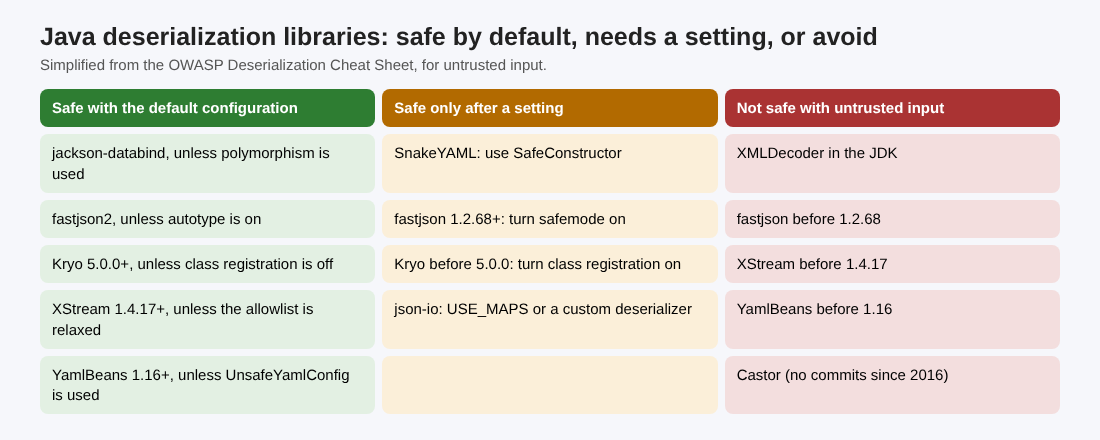
Simplified from the OWASP Deserialization Cheat Sheet.
- Safe with the default configuration: jackson-databind as long as you do not use polymorphism, fastjson2 unless autotype is turned on, Kryo 5.0.0 and later unless class registration is turned off, YamlBeans 1.16 and later unless
UnsafeYamlConfigis used, and XStream 1.4.17 and later unless its allowlist is relaxed. - Safe only after you set something: SnakeYAML with
SafeConstructor, fastjson 1.2.68 and later with safemode on, json-io withJsonReader.USE_MAPSor a custom deserializer, and Kryo before 5.0.0 with class registration on. - Not safe with untrusted input: the JDK's
XMLDecoder, XStream before 1.4.17, fastjson before 1.2.68, YamlBeans before 1.16, and Castor, which the sheet says has had no commits since 2016.
So the review question is never just "which library?" but "which version, and is that one flag on or off?"
SQL and JPA injection: parameterize anyway
The Query Parameterization sheet says SQL injection is best prevented with parameterized queries, done on the server. Its Java examples are worth copying into your review notes:
- Plain JDBC: a
PreparedStatementwith?in the query andsetString(1, custname)for the value. - Hibernate HQL: a named query such as
FROM Inventory i WHERE i.productDescription = :productDescription, filled withsetParameter. - The Criteria API:
Restrictions.eq("productDescription", userSuppliedParameter).
Each sample carries the same comment: the value should still be validated. What you are hunting for is any JPQL, HQL or SQL string joined with + or built with String.format from request data. Our SQL injection testing post shows how to confirm one from the outside.
Validate input with Bean Validation
The Bean Validation sheet calls it one of the most common ways to validate input in Java. You put constraints on the model and add @Valid where the data comes in. Useful constraints include @Pattern, @Size, @Min and @Max, @Digits, @Past and @Future, @Email and @URL.
- Constraints can sit on fields, properties and classes, and since Bean Validation 1.1 on parameters, return values and constructors.
- Nested objects are not checked unless you cascade: put
@Validon the nested bean too. - Give each constraint a message ID, such as
message="article.title.error", so error text comes from your message source. - Do not use
@SafeHtml: the sheet notes it is deprecated. - The sheet's examples use the older
javax.validationpackage; Jakarta Validation 3.0 usesjakarta.validation, so match your imports to your framework version.
Validation narrows what reaches your queries and parsers. It does not replace parameters or the deserialization rules above. See our input validation post for the general approach.
A one-afternoon Java review
Here is how you could run the checklist on one Spring service with an API, a search endpoint and a message queue consumer. This is an example to practice on, not a client, and the order is ours; the sheets supply the checks.
- Hour 1, search the code. Grep for
ObjectInputStream,readObject,XMLDecoder,fromXMLandimplements Serializable. For each hit, write down where its input comes from: a user, a queue, a cache or the database. - Hour 2, check the libraries. List every JSON, YAML and XML library and its version from your build file. Compare each against the three groups above, and check whether Jackson polymorphic typing, fastjson autotype or SnakeYAML's constructor is in use.
- Hour 3, queries. Search for
createQuery,createNativeQueryandStatementwith string joins. Each one that takes request data gets rewritten with parameters. - Hour 4, input. Pick the three endpoints that take the most fields. Confirm each request object has constraints, each controller uses
@Valid, and nested objects cascade.
Write each result as one line: what you checked, what you found, who fixes it. This is a start, not a full test, and no review finds every weakness.
Frequently asked questions
Is Java deserialization safe if I use an allowlist?
Safer, not safe. The OWASP sheet says serialization filters with a class allowlist and resource limits reduce the risk, but filtering does not make deserializing arbitrary untrusted data safe.
Does Hibernate prevent SQL injection?
No. The OWASP Java sheet says JPA and Hibernate apps can still be open to JPQL and HQL injection, so you still need named or positional parameters.
Is Jackson safe to use?
The Deserialization sheet lists jackson-databind as safe with its default configuration as long as polymorphism is not used. Check whether your code turns on polymorphic typing.
Is Bean Validation enough to stop injection?
No. It limits what data your app accepts, but the query samples in the OWASP sheets still use parameters and still validate. Use both.
Get started
Run the four-hour review on one Java service this week. whitehatstoic tests web apps and APIs for weak spots, with a written report and a retest after fixes, and gives independent codebase reviews. Book a meeting with whitehatstoic and tell us about your product, your deadline and your biggest worry; work is scoped after a short call.
Build it right. Test it thoroughly. Keep it safe.
Visit whitehatstoic.com↗


Comments
No comments yet.