Job search journal: what you tried and what worked
A job search journal records what you tried and what worked: which applications you sent, how you sent them, what came back, and what you changed next. A list of companies and dates says where you applied, and not much else. A short entry for every attempt, with an honest result and one line on what you learned, shows you which moves get replies and which ones waste your week. This post shows you what to log, gives you a template you can copy, and explains how to turn the notes into your next experiment.
Why a job search journal beats a spreadsheet of applications
A spreadsheet of applications answers one question: where did I apply? A journal answers a better one: what did I try, and did it work?
The difference shows up around week three. You have 40 rows, a handful of replies, and no idea why. Was it the resume? The channel? The kind of role? A list of dates can't tell you. Notes on your choices can.
A journal also catches the attempts that never fit in a row. The coffee chat that led nowhere. The cover letter you rewrote at midnight. The recruiter who said your title confused her. These are the details that change your next move.
What to log: every attempt, the result, and what you learned
Treat each application, message, or interview as one attempt. For each one, write down three things:
- The attempt. What you did, in one line. "Applied to backend role at a logistics company through the careers page, resume v2."
- The result. Pick one: worked, partly, or failed. "Worked" means you got the next step. "Partly" means a reply with no next step, or a step that stalled. "Failed" means a rejection or silence after two weeks.
- What you learned. One sentence, even if it is a guess. "The careers page form sent no confirmation, so try a referral at the next company like this."
Three outcomes are enough. More categories make you hesitate, and hesitation makes you stop logging. If you have kept a learning journal where you note where you got stuck, this works the same way: the stuck points are the useful part.
A simple job search journal template you can copy today
Copy this into any notebook or notes file. One block per attempt.
- Date: 2026-10-11
- Company and role: Mid-size retailer, data analyst
- Channel: referral, cold application, recruiter, job board, direct message to hiring manager
- Version: resume v3, cover letter A
- Outcome: worked / partly / failed
- Days to reply: 6
- What I learned: They asked about SQL in the first call, so lead with it.
- Next action: Prep two SQL stories by Thursday.
Keep a separate short list of your versions. "Resume v3: moved projects above experience, cut summary." Without it, "v3" means nothing in a month.
Tracking what worked: response rates by channel, resume version, and role
Once you have 15 or 20 entries, count. You don't need software for this. Take a sheet of paper and tally outcomes three ways.
- By channel. Of your referrals, how many got a reply? Of your cold applications? Divide replies by attempts. If referrals got 4 replies from 6 tries and cold applications got 2 from 30, you know where your hours should go.
- By resume version. Compare only attempts in the same channel. Otherwise you're comparing referrals to cold applications and calling it a resume test.
- By role type. Senior versus mid-level, analyst versus engineer, startup versus large company. Silence on one group is information.
Small numbers lie a little. Two replies from five tries isn't a law. Treat every rate as a hint to test, not a verdict.
Logging interviews, rejections, and feedback without spiraling
Rejections can be hard to write down. Log them like a lab result, not a judgment.
Bad entry: "Rejected again. I'm not good enough for this."
Useful entry: "Failed after second interview. They said another candidate had more stakeholder experience. Learned: I didn't mention the vendor project. Next: add it to my stories list."
For interviews, write notes within an hour, while you still remember the questions. List each question, how you answered, and where you felt shaky. Shaky answers become prep items.
Put a limit on it. Five minutes per entry, then close the notebook. The journal is there to help you decide the next step, not to replay the call all evening. If the search is wearing you down, the NHS has tips to reduce stress; a journal is a record, not a cure.
Turning your notes into patterns and your next experiment
Every two weeks, read your entries in one sitting and answer three questions:
- What got the most "worked" outcomes?
- What keeps failing in the same way?
- What one change will I test for the next two weeks?
Then pick one experiment. Only one, so you can tell if it mattered. For example: "For the next 10 applications, I'll message the hiring manager directly before applying." Log it like any other attempt and compare the result.
A garden problems journal works the same way: change one thing, note what happened, and keep what held up.
Job search journal: what you tried and what worked, as a problem graph
A list shows attempts in order. A job search, though, is a set of blockers that feed each other. "No replies" may come from "resume reads as junior," which may come from "titles don't match the work I did." A map shows those links better than a list.
Problem Graph is a personal problem and solution journal drawn as a knowledge graph. Here is how a job search fits into it.
Write each blocker as one problem
Open the app and type a problem in one line, such as "Cold applications get no replies." Put it in the work lane. It lands on the graph as soon as you press Enter. Add the others the same way: "Recruiters think I'm too senior," "I freeze on salary questions."
Attach what you try and mark the outcome
Under "Cold applications get no replies," add solutions as ideas: "Rewrite resume summary," "Ask for referrals first," "Message hiring manager before applying." Mark the one you're trying now. When the results come in, record the outcome as worked, partly, or failed. Those are the same three outcomes from the template above, so your paper notes move over cleanly.
A failed solution stays on the map as failed. That matters. In week six you won't remember you already tried rewriting the summary, and the graph will.
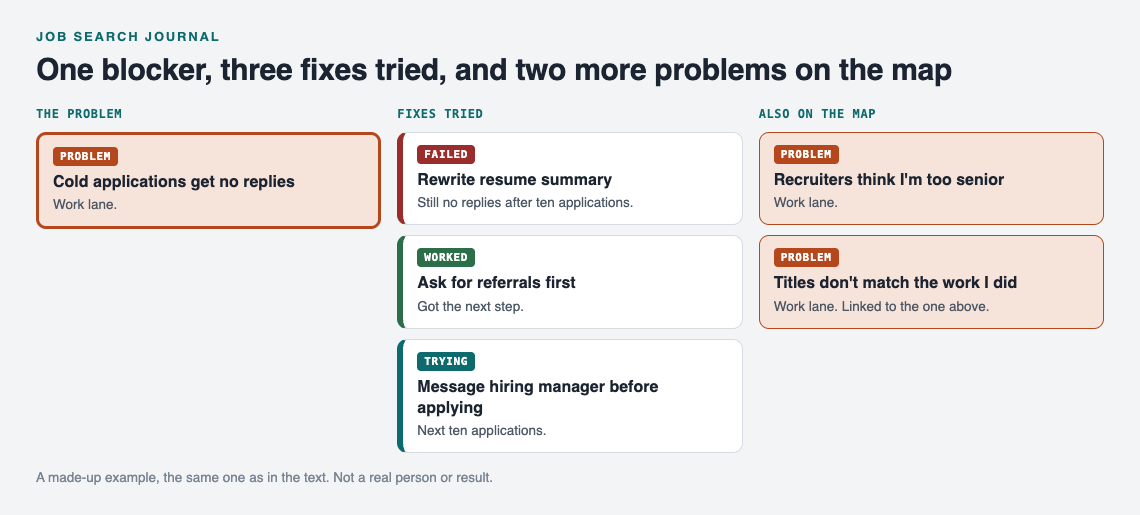
A made-up example: one blocker, what was tried, and two more problems on the map.
Link problems that belong together
Link "Recruiters think I'm too senior" to "Titles don't match the work I did." Links can cross lanes too, so a personal problem like "No time to prep after work" can connect to a work problem it affects. Patterns show up on a map that you would miss in a list. The app also has a List view next to the map and filters by lane when you want a plain view.
Ask for suggestions, then test them
You can ask the AI to suggest new solutions. It proposes ideas based on what worked for others on problems like yours. Treat each one as a proposal, add it as an idea, and only mark it worked once your own results say so.
Decide who sees it
Problems are private by default. They're saved to your account, follow you to any phone or computer you log in on, and nobody else sees them. If you want a few people involved, like a job search buddy or a career group, create a private network, give them the invite code, and share a main node into it. Only a main node can be shared. When you share it, its solutions, their outcomes, and the requirements they need go with it. Problems you only linked to it stay private.
Frequently asked questions
How often should I update my job search journal?
Log each attempt the same day you make it, and log interviews within an hour. Then review everything every two weeks to choose your next experiment.
Should I use a notebook, a spreadsheet, or an app?
Use whatever you will open every day. A notebook is fast, a spreadsheet makes counting easy, and a graph app like Problem Graph helps when your blockers connect to each other.
What should I do if nothing in my journal is working?
Look at the attempts marked "partly" first, since they show something almost worked. Change one variable at a time, such as channel or resume version, and test it for 10 attempts before judging.
Can I share my job search journal publicly?
In Problem Graph you can make a main node public so others can link their own problems to it and borrow solutions that worked. Leave out company names and anything personal, and keep the rest private, which is the default.
Get started
Start with the blocker that costs you the most time this week. Write it as one line in the work lane, attach the next thing you plan to try, and mark the outcome when you know it. In two weeks you'll have a map of what you tried and what worked.
Try Problem Graph: it is free, and you can look around the public network without an account. Write one problem down in a line and attach the first thing you will try.
Comments
No comments yet.
Sign in or make an account to comment.