Learning journal: note where you got stuck
A learning journal is most useful when it records the moments things went wrong, not only what you covered. If your learning journal notes where you got stuck, what you tried and what finally worked, you end up with a record of how you learn. This post gives you a simple template for stuck points, a worked example, and a way to turn those notes into a map so recurring blocks become visible.
Why a learning journal should note where you got stuck
Most learning journals turn into summaries. You write "Read chapter 4 on recursion" and move on. A week later that line tells you nothing. You already knew you read chapter 4.
The stuck points are where the learning actually happened. They show you three things a summary hides:
- What your real gap was. It is often not the topic you thought. You get stuck on recursion, but the real gap turns out to be how function calls return values.
- Which fixes work for you. Rereading might never help you, while drawing a diagram works every time. You only learn that if you write it down.
- Where the same block keeps coming back. One stuck point is an event. Five similar ones are a pattern you can deal with directly.
What counts as a stuck point (and what to write down)
A stuck point is any moment you could not move forward without stopping to think, search, or ask. Count these:
- You read a paragraph three times and still cannot restate it.
- An exercise gives the wrong answer and you do not know why.
- You understand each step but cannot see why they go in that order.
- You can follow a worked example but freeze on a blank problem.
- You keep postponing one section because it feels heavy.
For each one, write down four things. First, the stuck point itself, in one plain sentence. Second, each thing you tried. Third, what happened with each attempt. Fourth, what you understood once it cleared, if it did.
Keep the first line short. "I don't get pointers" is too vague to act on. "I can't tell when to use *p and when to use p" is something you can test.
A simple learning journal template for stuck points
Copy this structure into whatever you write in. Each stuck point gets its own entry.
- Stuck on: one sentence, as specific as you can make it.
- Context: the subject, the source (book, course, lesson), and the date.
- What I expected: what you thought would happen or what you thought it meant.
- Tried: each attempt on its own line.
- Result of each: worked, partly, or failed.
- What clicked: the explanation in your own words, two or three sentences.
- Related to: any earlier stuck point that felt similar.
The "What I expected" line matters more than it looks. When the result surprises you, the expectation you wrote down is the first thing to check, because a wrong assumption is one place confusion can hide.
The three outcomes, worked, partly, and failed, keep you honest. "Partly" is a useful one: it tells you the attempt moved you forward but was not enough on its own.
Worked example: one stuck point from confusion to breakthrough
Say you are learning SQL and hit a wall with joins. Here is how the entry builds up over one evening.
Stuck on: My LEFT JOIN returns more rows than the left table has.
Context: SQL course, lesson on joins. Customers table with 50 rows, orders table with 120 rows.
What I expected: A LEFT JOIN keeps every row from the left table, so I expected exactly 50 rows back.
Tried:
- Reread the lesson's definition of LEFT JOIN. Failed. The definition says it keeps all left rows, which I already believed.
- Ran the query with only 3 customers. Partly. Got 7 rows. Something was multiplying, but I could not see what.
- Printed the 7 rows and drew lines between each customer and their orders on paper. Worked. One customer had 4 orders and showed up 4 times.
What clicked: LEFT JOIN keeps every left row at least once, not exactly once. If a customer matches several orders, you get one row per match. To get one row per customer, I need to group or aggregate the orders first.
Related to: Last week I was stuck on why COUNT gave a bigger number than expected. Same cause.
Notice what this entry gives you that a summary would not. Your actual misconception was "at least once" versus "exactly once." Your best fix was drawing it out by hand. And there is a link to an earlier problem with the same root. The same habit for any kind of mistake is in the post on keeping a mistake log.
Turn stuck points into a map of problems with Problem Graph
A paper or text journal works fine for single entries. Where it struggles is the "Related to" line. Links between entries get buried as the pages pile up. Problem Graph is a personal problem and solution journal drawn as a knowledge graph, and its structure lines up closely with the template above.
Here is how the SQL example maps onto it:
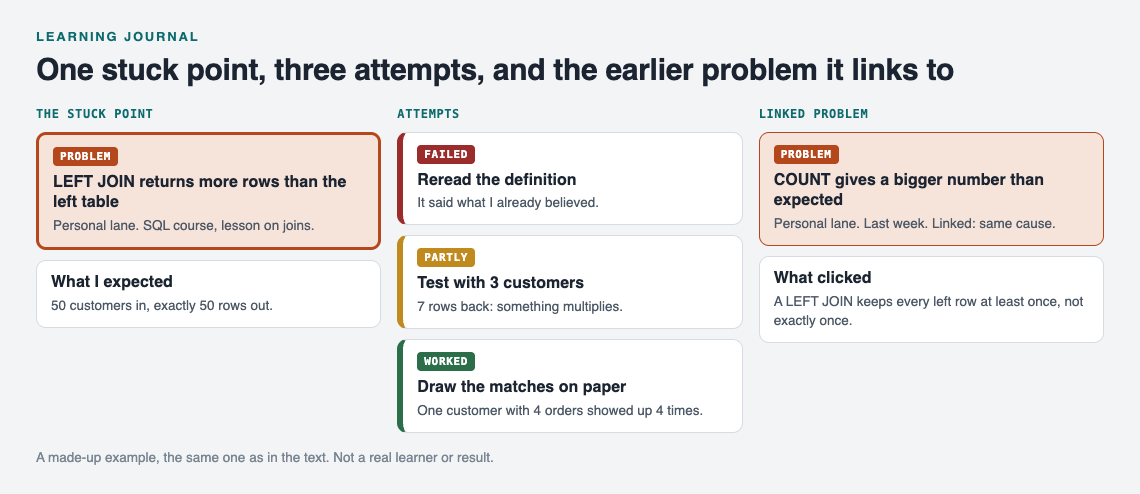
The worked example as a map: the stuck point, each attempt and its outcome, and the earlier problem it links to.
- The stuck point is a problem. You write it in one line, for example "LEFT JOIN returns more rows than the left table." You pick a lane. A course might go in personal; something you are learning for your job fits work. It lands on the graph as soon as you press Enter.
- Each attempt is a solution. Add "Reread the definition," "Test with 3 customers," and "Draw the matches on paper" as solutions, then mark each one's outcome as worked, partly, or failed.
- The "Related to" line is a link. Link the JOIN problem to the earlier COUNT problem. Links can cross lanes too, so a stuck point from a work training can sit next to one from a weekend course.
Failed attempts stay on the map. That sounds minor, but it is the point of the journal. As the app's own page puts it, a solution that failed three times stays on the map as a failed solution, and that is exactly what the next person needs to know. Often the next person is you.
Your problems are private by default. Only you see them, and they follow you to any phone or computer you log in on. It runs in the web browser, so you can log a stuck point on your phone right when it happens.
If you study with others, you can create a private network, give your study group the invite code, and share a problem you have marked as a main node. Its solutions and their outcomes go along with it. Anyone with the invite code can join, so share it only with people you want in. Problems you only linked to the main node stay private.
You can also ask the app for suggestions. Its AI proposes new solutions grounded in what worked for others on problems like yours. Treat each proposal as an idea to test, then record the outcome like any other attempt.
If you are new to it, open the app and press "Load example set" to see a filled graph before you add your own.
Review your journal weekly to spot recurring blocks
Writing stuck points down is half the habit. Reading them back is the other half. Set aside fifteen minutes once a week and ask three questions:
- Which stuck points look alike? Link them if you have not already. In the SQL case, two separate problems pointed at the same root cause.
- Which fix keeps working? If "draw it on paper" shows up as worked again and again, try it first next time instead of last.
- Which problems are still open? An open stuck point from two weeks ago is worth a fresh attempt or a question to someone else.
On Problem Graph, the List view sits beside the map and you can filter by lane, which makes this review quick. The page notes that patterns show up on the map that never show up in a list. A cluster of linked problems around one concept is hard to miss.
If a weekly review feels like too much, start smaller. Review just one lane, or just the last three entries. The post on a weekly review that closes the problems you solved walks through the same routine for any problem list.
Over time your stuck points also tell you what to study next: a cluster of linked blocks around one idea is the topic to go back to.
Frequently asked questions
How often should I write in a learning journal?
Write an entry whenever you get stuck, while the confusion is fresh. Then do one short review each week to link related entries and revisit open ones.
What if I don't know why I'm stuck?
Write down what you expected to happen and what actually happened. The gap between the two is usually where the wrong assumption hides, even if you cannot name it yet.
Should I note stuck points even after I solve them?
Yes. A solved stuck point shows you which fix worked and what the real misconception was. That is the part you will want when the same block comes back.
Is a digital or paper learning journal better?
Paper is fine for single entries. A digital journal makes it easier to link related stuck points and find them later, which matters once you have dozens.
Get started
Think of the last thing you got stuck on while learning. Write it as one specific sentence, then list the first thing you will try. That is a full entry, and it is enough to start.
Try Problem Graph: it is free, and you can look around the public network without an account. Write one problem down in a line and attach the first thing you will try.
Comments
No comments yet.
Sign in or make an account to comment.