LLM Temperature Explained: What the Setting Really Changes
LLM temperature is the setting that decides how adventurous a language model is when it picks its next word. At a low temperature it almost always takes the word it rates most likely. At a higher temperature it gives less likely words a real chance. That one number changes how repeatable, how varied and sometimes how coherent your AI product's answers are.
The How Modern AI Actually Works course on Age of AI Entrepreneur explains next-token prediction, the step temperature acts on, in short lessons with their sources; sign in with your email and an emailed code to open it. This post covers what the setting does, what research says it changes and what it does not, and how to choose one for each job in your product.
What LLM temperature does to the next word
A language model writes one token at a time. A token is a word or a piece of a word. For each step, the model gives every possible next token a score. Those scores are turned into chances that add up to 100 percent, and then one token is drawn from those chances.
Temperature sits inside that conversion. The scores are divided by the temperature before they become chances. The math comes from the softmax function: a higher temperature makes the chances more even, which means more randomness, and a lower temperature makes them sharper, so the top choice wins more often.
In practice:
- Low temperature: the favourite token wins almost every time. Answers repeat closely from one run to the next.
- Middle temperature: the favourite usually wins, but close runners-up appear now and then. Wording varies.
- High temperature: long-shot tokens get picked more often. Answers vary a lot and can drift off track.
This is the same machinery behind why ChatGPT gives different answers to the same prompt: the model draws from a set of chances, and temperature shapes that set.
A worked example with real numbers
Take the start of a sentence, "The coffee was", and imagine the model scores four next words: hot 3.0, great 2.5, cold 1.5 and purple minus 1.0. These scores are made up for the example, but the conversion is the real softmax formula.
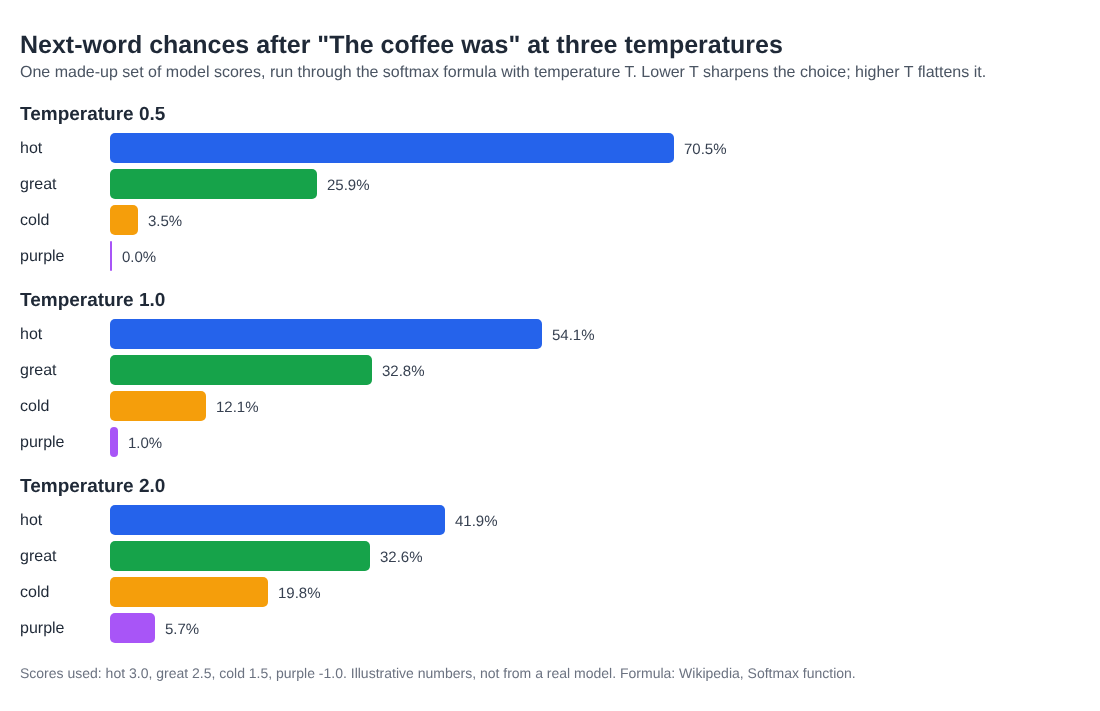
Here is what happens at three settings:
- Temperature 0.5: hot 70.5 percent, great 25.9, cold 3.5, purple almost 0. The model nearly always says "hot".
- Temperature 1.0: hot 54.1 percent, great 32.8, cold 12.1, purple 1.0. "Great" shows up about one time in three.
- Temperature 2.0: hot 41.9 percent, great 32.6, cold 19.8, purple 5.7. Now "The coffee was purple" appears about once in every 18 runs.
Notice two things. The order never changes: hot stays the favourite at every setting. Temperature does not make the model know anything new. It only changes how often the model leaves its first choice. And the strange option, purple, grows fastest in relative terms as the temperature rises. That is where odd or broken text comes from at high settings.
Now picture this over a 300-token answer. One odd pick early on changes every word after it, because each next token is predicted from everything before. Small changes in chance add up to very different answers.
What research says temperature changes, and what it does not
Temperature is often called the creativity dial. Two studies on arXiv test parts of that idea, and they point in a more modest direction.
A 2024 paper, Is Temperature the Creativity Parameter of Large Language Models?, generated stories with a fixed prompt and model at different temperatures. It found temperature was weakly linked to novelty and moderately linked to incoherence, with no link to cohesion or typicality. The authors call its effect on creativity far more nuanced and weak than the claim suggests.
Another 2024 study, The Effect of Sampling Temperature on Problem Solving in Large Language Models, gave nine popular models a multiple-choice exam drawn from standard benchmarks, at temperatures from 0.0 to 1.6. Between 0.0 and 1.0, the change had no statistically significant effect on scores, across models, prompting styles and subjects.
These are two studies with their own tasks, so read them as evidence, not as a rule for every product. Some builders still see clear differences in their own use case. The honest takeaway is that temperature mostly changes variety and risk, and that you should test it on your own examples rather than trust a folk setting.
Temperature, top-p and other ways to pick a word
Temperature is one of several decoding settings, the rules for turning chances into an actual word. The best known paper here is The Curious Case of Neural Text Degeneration, published at ICLR 2020. It found that always taking the most likely text leads to output that is bland and strangely repetitive, and that the decoding strategy alone can change text quality a lot, even with the same model.
Its answer was nucleus sampling, often called top-p. Instead of letting every token compete, it keeps only the smallest set of top tokens that together cover most of the chance, and drops the unreliable tail. In the coffee example, a top-p setting could cut "purple" out of the running entirely while still letting "hot", "great" and "cold" compete.
So the two settings do different jobs. Temperature reshapes all the chances. Top-p removes the long shots. If your model API offers both, change one at a time, or you will not know which one moved your results.
How to choose a temperature for each job
A product rarely has one right setting. It has jobs, and each job wants something different. A simple way to decide:
- Extraction and classification (pull a date from an email, tag a support ticket): you want the same answer every time. Use the lowest setting your model allows.
- Answers from your own documents: keep it low, so the wording stays close to the source. Temperature will not stop a model from making things up, as the AI hallucination examples show, but a high one adds risk you do not need.
- Drafting and rewriting (emails, product copy): a middle setting gives some variety without drifting.
- Brainstorming many options: a higher setting helps you get different ideas across runs. Expect more of them to be unusable.
Then test it. Run the same 20 prompts at two settings, five times each, and look at what changes: how often the answer is right, how often it repeats, and how often it goes off track. The checklist in test LLM prompts before release fits this well, and an LLM as a judge can help score the free-text runs.
One warning: a temperature of zero makes answers far more repeatable, but you should not promise users identical output from it. Write your product so that a slightly different answer never breaks it, for example by checking the format of the output before you use it.
Frequently asked questions
What is a good LLM temperature?
There is no single good value. Use a low setting for tasks with one right answer, such as extraction, and a higher one when you want varied ideas. Test two settings on your own prompts before you decide.
Does a higher temperature make AI more creative?
It makes answers more varied. A 2024 study found only a weak link between temperature and novelty in stories, and a moderate link to incoherence, so more random is not the same as more creative.
Does temperature affect accuracy?
One 2024 study of nine models found no statistically significant change in multiple-choice scores between 0.0 and 1.0. Other tasks may behave differently, so measure it on yours.
What is the difference between temperature and top-p?
Temperature reshapes the chances of every possible next token. Top-p keeps only the most likely tokens that together cover most of the chance and drops the rest.
Get started
Open Age of AI Entrepreneur, sign in with your email and an emailed code, and take the How Modern AI Actually Works course: next-token prediction, how a raw model becomes a helpful assistant, and what AI gets wrong, in lessons of about 9 minutes that list their sources.
Building a business in the age of AI, from a first project to a company.
Visit aientrepreneur.vlvd.net↗

Comments
No comments yet.