Meal planning problems log: what you tried each week
A meal planning problems log is a simple record of what you tried each week. You write down what went wrong with your meals, what you changed, and what happened. Without it, it is easy to start over every Sunday with the same plan. A log breaks that loop.
Why meal plans fail without a record of what you tried
A meal plan is a guess. You guess how much time you will have, how hungry you will be, and what the fridge will hold. Some guesses are wrong. That is normal.
The trouble is that wrong guesses vanish. By next Sunday you have forgotten that the Tuesday stir-fry never happened, or that the batch-cooked lentils sat untouched until Friday. So you plan the same week again.
A record fixes this. It shows you which fixes you already tried, which ones helped, and which ones you can stop repeating. The same idea works for other areas of life. You can see it in a budget problems log or a home repair log. The habit is the same: name the problem, note the attempt, record the result.
What a meal planning problems log is
It is a short list of problems, each with the solutions you tried and an outcome. It is not a recipe collection and it is not a menu. The menu says what you hoped to eat. The log says what got in the way.
Each problem gets one line. For example:
- We throw out half the spinach every week.
- I am too tired to cook on Thursdays.
- The shopping trip takes over an hour.
Under each problem you attach the things you tried. Next to each attempt you mark one of three outcomes: worked, partly, or failed. That is all the structure you need.
What to write down each week
Keep the weekly step small. Five minutes on Sunday is enough. Ask yourself four questions:
- What went wrong? Name one or two problems, not ten. Write each in one line.
- What did I try? Note the change you made this week, even if it was tiny.
- What happened? Mark it worked, partly, or failed.
- What will I try next? Pick one new idea for the problem that is still open.
Write failures down too. A failed attempt is useful. It tells you what not to repeat, and it narrows the options.
A sample weekly log entry
Here is one made-up week, written the way you might enter it.
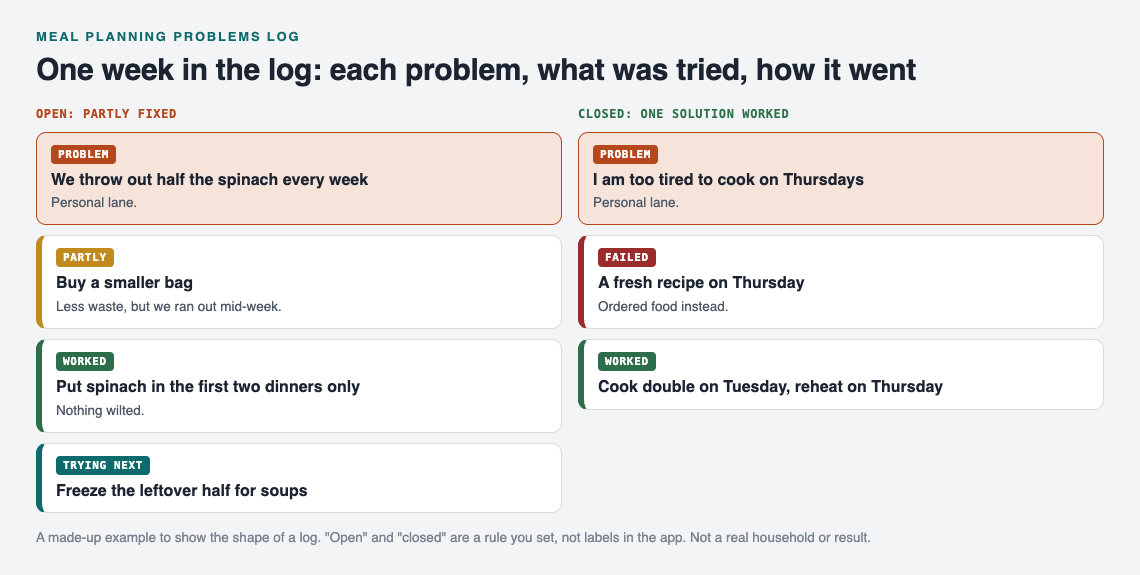
Problem: We throw out half the spinach every week.
- Tried: Buy a smaller bag. Partly. Less waste, but we ran out mid-week.
- Tried: Put spinach in the first two dinners only. Worked. Nothing wilted.
- Idea for next week: Freeze the leftover half in a bag for soups.
Problem: I am too tired to cook on Thursdays.
- Tried: A fresh recipe on Thursday. Failed. Ordered food instead.
- Tried: Cook double on Tuesday and reheat on Thursday. Worked.
Notice what the entry gives you. Next month you will not wonder whether a smaller bag helps. You will already know it helped partly, and that front-loading the spinach helped more.
Common meal planning problems and fixes to test
These are starting ideas, not answers. Treat each one as something to try and then mark worked, partly, or failed.
Food waste
- Plan perishable items into the first half of the week.
- Check the fridge before you write the shopping list.
- Plan one "use it up" meal for the end of the week.
Too tired to cook
- Cook a double batch on a lighter day.
- Keep two no-cook dinners on a standing list.
- Move the hardest recipe to the day you have the most energy.
Long shopping trips
- Sort the list by the order of the aisles.
- Reuse the same base list each week and edit it.
- Repeat two or three dinners so the list shrinks.
Everyone wants something different
- Plan a base meal with two toppings or sides to choose from.
- Let each person pick one dinner a week.
How to review your log and spot patterns
Once a month, read back through your entries. You are looking for three things.
- Solutions that worked more than once. Make these your defaults.
- Solutions that failed more than once. Drop them.
- Problems that look related. Wasted spinach, a tired Thursday and a long shopping trip might all trace back to over-ambitious plans.
That last point is where a flat list falls short. Problems rarely stand alone. A late-week energy slump may cause the takeout, which may cause the budget leak. When you can link problems that belong together, patterns show up that a list hides. The weekly rhythm is the same one described in weekly review: close the problems you solved.
Share the log with a partner or household
Meals are rarely a one-person problem. If you share a kitchen, the shopping, cooking and leftovers affect everyone. A shared record keeps the household working from the same facts. It is the same logic as solving roommate problems with a shared list.
Problem Graph is built for this kind of log. You write each problem as one line and put it in a lane, such as personal or work. You attach the solutions you try and record whether each one worked, partly worked, or failed. You can link related problems, even across lanes.
By default, everything stays private. Only you see it. If you want to involve others, you can mark one problem as a main node and share it into a private network. You create the network and give a few people the invite code. Members see the shared problem, along with its solutions, their outcomes and the requirements they need. Nobody outside the network sees it. Keep in mind that anyone with the invite code can join, so share the code only with people you trust.
A problem you only link to the main node stays at home, like the rest of your graph. So you can share "dinner planning for the house" without sharing every private note around it.
You can also put a main node out for everyone. Others can then link their own problems to it and borrow the solutions that worked. The feature is there if you want it, but you do not need it. A private log is a good place to start.
Frequently asked questions
How long should the weekly review take?
Five to ten minutes is enough. Name one or two problems, note what you tried, and mark the outcome. A short habit you keep beats a long one you drop.
Should I log solutions that failed?
Yes. A failed attempt tells you what not to repeat. Over a few weeks, your failures are as useful as your wins.
Do I need to share my meal planning log with anyone?
No. In Problem Graph, your problems are private by default and only you see them. Sharing is optional and you choose what goes into a network.
Is Problem Graph free?
The home page says it is free, and you can look around without an account. You create an account with a username and password when you want to add a problem.
Get started
Pick the one meal problem that annoyed you most this week. Write it in a line. Then add the first thing you will try and come back next Sunday to mark how it went.
Try Problem Graph: it is free, and you can look around the public network without an account. Write one problem down in a line and attach the first thing you will try.
Comments
No comments yet.
Sign in or make an account to comment.