Mistake log: how to learn from your own errors
A mistake log comes down to one habit. You write down each error, what caused it, and what you will do differently, and then you read it back. The reading back is the step that is easiest to skip. This post shows you what to record, how to sort errors so patterns appear, and how to turn each one into a fix you can test and keep or throw away.
What a mistake log is and why it works
A mistake log is a running record of errors you made and the changes you tried in response. It is not a diary of regret. It is a working document.
It works for a plain reason: a big, painful error is hard to forget, but a small one that repeats every week slips by. A log keeps the small ones visible, so "why do I keep doing this?" gets an answer you can read. The Lean Enterprise Institute describes the same practice in factories as hansei, Japanese for self-reflection: looking back at how a process or personal shortcoming can be improved, so mistakes are not repeated.
The second reason is that a log forces a decision. Writing "I forgot the units again" is a note. Writing "Next time I circle the units before I start" is a test. You can check a test.
What to record for every mistake
Keep each entry short. If logging takes ten minutes, you will stop doing it. Aim for five fields:
- The mistake in one line. "Mixed up beta blockers and ACE inhibitors on question 14." Specific beats general.
- The context. Where, when, under what pressure. Timed exam, end of a long shift, third match of the night.
- The cause. Your best honest guess, not the first excuse.
- The fix you will try. One concrete change.
- The outcome. Filled in later: did the fix work, partly work, or fail?
That last field is the one most logs lack. Without it, you collect fixes but never learn which ones did anything.
Sort mistakes by type: knowledge, process, or attention
Every error fits roughly one of three types. Tagging each entry makes the fix easier to pick.
Knowledge mistakes
You did not know the thing. You confused two drug classes or never learned what a term meant. The fix is study: a flashcard, a summary table you write by hand, a re-read.
Process mistakes
You knew the material but your method failed. You ran out of time, skipped a check step, or answered before reading the whole question. The fix is a changed routine, like a checklist or a time rule.
Attention mistakes
You knew it and your method was fine, but you slipped. A misread number, a missed minus sign. The fix is usually about conditions: sleep, breaks, a slower final pass.
The type matters because the wrong fix wastes effort. Studying harder will not cure an attention slip. A checklist will not teach you a fact you never learned.
How to find the patterns behind repeated errors
Patterns show up when you read entries side by side. Once a week, scan the log and ask three questions:
- Which type shows up most?
- Which context shows up most? Late at night, under time pressure, after a certain kind of task?
- Which mistakes repeat even after a fix?
The third question is the most useful. A mistake that repeats after a fix tells you the cause was wrong. Go back and rewrite the cause, and see hansei: how to reflect on a solution that failed for a short way to do it.
Links between entries help here. Two errors in different parts of your life can share a root. Misreading exam questions and misreading emails at work may both trace back to rushing when tired. In a flat list, those sit pages apart. On a map, you can draw the line between them.
This is where Problem Graph fits. It is a personal problem and solution journal drawn as a graph. You write a problem in one line, put it in a lane (personal, work, expert or scientific), and it lands on the map when you press Enter. You can link problems that belong together, even across lanes. As the home page puts it, patterns show up on the map that never show up in a list.
Turn each mistake into a fix you can test
A good fix is small, specific, and checkable. "Be more careful" fails all three. "Underline every negative word in the question stem" passes.
Here is a worked example in Problem Graph. Say you keep losing marks on multiple choice questions with "NOT" or "EXCEPT" in them.
- Open the app and write the problem: Missed the NOT in exam questions, lost 3 marks this week. Put it in the Personal lane.
- Attach solutions as ideas. Underline negative words before reading options. Reread the stem after choosing. Slow down on the last 10 questions.
- Mark the one you are trying now.
- After the next practice test, record the outcome: worked, partly, or failed.
- If it failed, leave it on the map and mark the next idea as the one you are trying.
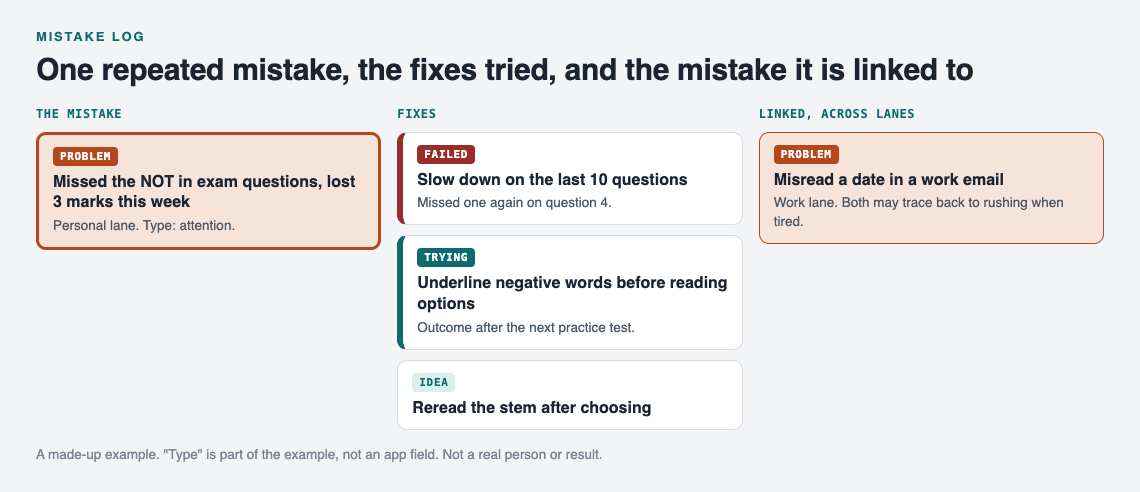
The made-up example as a map, a week in.
That fourth step is the habit to build. It is the "act" of plan, do, check, act: keep the change, or begin the cycle again, depending on the results. The home page says it well: a solution that failed three times stays on the map as a failed solution, and that is exactly what the next person needs to know. The next person is often you, six months later, about to try the same useless fix again.
If you are not sure what to try, Problem Graph can ask its AI for suggestions. It proposes new solutions grounded in what worked for others on similar problems. Treat these as proposals to test, not answers. Your outcome field decides whether they stay.
Build a review routine so lessons stick
The log only pays off if you read it. Keep the routine light:
- Daily, one minute. Log any mistake from today. One line plus a fix.
- Weekly, fifteen minutes. Fill in outcomes. Look for repeats. Link related entries. Our guide to keeping track of the solutions you tried covers this step.
- Before a big event, ten minutes. Read only the fixes that worked. That is your pre-exam or pre-match checklist.
In Problem Graph, filters help the weekly review. You can filter by lane, so you can review only work mistakes, and switch to a List view beside the map when you want to read entries one by one. Private is the default, so your errors are saved to your account and nobody else sees them.
Mistake log examples for exams, games, and work
Exams
Mistake: Confused two antibiotic classes on a practice quiz. Type: knowledge. Fix: Make one comparison card per class pair. Outcome: worked, no repeat in two quizzes.
Games
Mistake: Drove into the open and got flanked, again. Type: process. Fix: Check the minimap before leaving cover. Outcome: partly; still happens late in matches. That "partly" points to a second, attention cause: fatigue.
Work
Mistake: Shipped a log message that let user input fake a new line. Type: knowledge. Fix: Strip line breaks from user input before logging. Outcome: worked.
Notice how the game entry and a late-night study entry might share a fatigue cause. Linking them across lanes makes that visible.
If a fix works well for a team, you can share it. In Problem Graph you mark one problem as a main node, and only a main node can be shared. Its solutions and their outcomes go with it. You can share it into a private network, like a study group with an invite code, or put it out publicly so others can link their own problems to it and borrow the solutions that worked. Anything you only link to the main node stays private.
Frequently asked questions
How is a mistake log different from an error journal?
They are mostly the same idea. A mistake log tends to focus on short, structured entries with a fix and an outcome, while an error journal can include longer reflection.
How often should I review my mistake log?
Log daily and review weekly. Add a short review of your working fixes right before an exam, match, or important deadline.
Should I log small mistakes or only big ones?
Log the small ones too. The ones that repeat are where the useful patterns are, and a small one can repeat for months unnoticed.
Can I use a mistake log for exam prep?
Yes. Tag each wrong answer as knowledge, process, or attention, and study only the fixes that match the type.
Get started
Pick the mistake you made most recently. Write it in one line, add one fix you will try, and mark the outcome after your next attempt. If you want to see how a map looks first, the app has a "Load example set" button on an empty graph. It runs in your web browser and works on your phone.
Try Problem Graph: it is free, and you can look around the public network without an account. Write one problem down in a line and attach the first thing you will try.
Comments
No comments yet.
Sign in or make an account to comment.