Music for a product launch video: how to pick the track
Picking music for a product launch video looks like a small job: open a library, play a few tracks, grab the one that sounds bright. Then it sits under your demo and the video feels rushed, or flat, or like an ad for something else. This guide gives you a method instead: match the tempo and mood to the product, cut the track to the shape of your story, mix it under your voice, and get the license right for where the video will run.
Why the track matters in a launch video
A launch video has to make a stranger care about something they have never seen. Music sets the pace before anyone reads a word. A slow pad says relax; a driving beat says something is moving. If the music says one thing and the product says another, viewers feel it even when they cannot name it.
Music also hides the seams. Launch videos are stitched from screen recordings, title cards and a voiceover recorded on another day, and a steady track makes those cuts feel planned. If you are writing the announcement too, see how to write a product launch post people actually read, so the post and the video tell the same story in the same order.
Wavecrate, the music library used as the example in this guide, lets you filter tracks by tempo, mood and energy, and every download comes with a license certificate and a code.

Choosing music for a product launch video: tempo, mood, brand
Ask three questions. How fast is your story? How should the viewer feel at the end? What does your brand already sound like in its words?
Tempo is beats per minute (BPM). Wavecrate's music filters split it into Slow (under 90), Mid (90 to 120) and Fast (over 120). A middle tempo usually leaves room for a calm voice and quick screen cuts at the same time.
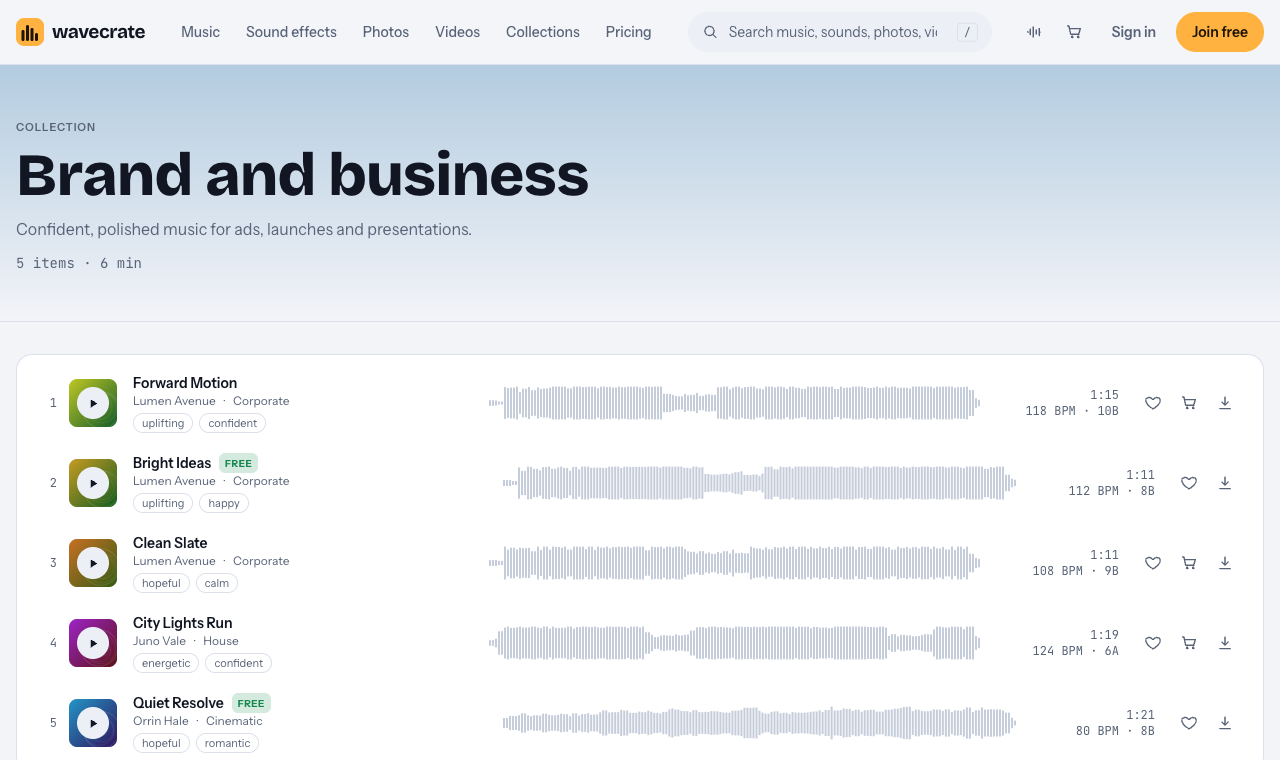
Mood should match the change your product makes. A tool that removes a chore suits calm and hopeful; a tool that makes people faster suits confident and driving. The Brand and business collection ("Confident, polished music for ads, launches and presentations") shows the spread:
- Forward Motion: 118 BPM, energy Driving, "Uplifting and Confident, good for ads and presentation." For a launch that promises speed.
- Bright Ideas: 112 BPM, energy Steady, "Uplifting and Happy, good for ads and tech."
- Clean Slate: 108 BPM, energy Relaxed, "Hopeful and Calm, good for tutorial and podcast." For when the voice carries the story.
Brand: read your home page headline out loud, then play the track. If your words are plain and calm, a loud track full of claps will feel like someone else's company.
Cutting the track to hook, demo and ending
- Hook, the first 5 to 10 seconds. Show the problem or the result. Start the music on the first cut, not after a long fade in.
- Demo, the middle. Keep the music steady. A big build in the middle fights your screen recording.
- Call to action, the last seconds. Land on a real ending, not a fade that trails off under your web address.
Track versions make this easy. Forward Motion comes as a full track (1:15), a 30 second edit (0:31) and an 8 bar loop (0:16). For a 60 second video, repeat the loop under the demo, and finish on the last seconds of the full track. For a 30 second social cut, drop in the 30 second edit and trim your footage to it.
For the moment your logo appears, a short sting can beat a swell. Logo Sting, Long, Warm is "a short boom with a bright synth chord and bell shimmer for a logo reveal", 5 seconds long; its page listed Standard at $5 and Extended at $19.
Mixing music under your voice
- Voice first. Set the voiceover, then bring the music up until you can just feel it. If you notice it while someone talks, it is too loud.
- Lower it under speech and let it rise in the gaps, with keyframes or your editor's automatic setting.
- Pick instrumental. Lyrics compete with your words. Track pages list vocals; all three tracks above are instrumental.
- Cut on the beat. Scene changes on the downbeat read as polish.
Which license a launch video needs
You get a license to use a track; Wavecrate keeps the copyright. The license cards on a track page say:
- Free, only on tracks marked Free: online videos and podcasts (YouTube, TikTok, Instagram, Twitch, podcasts, monetized channels), with credit text in the description. A free account gets 3 free downloads a month.
- Standard: no credit, and it adds your own business and brand videos. Track pages listed it at $15.
- Extended: paid ads, broadcast, apps, games and client work. Track pages listed it at $49.
Paid licenses are not on sale yet: Wavecrate says purchases open soon, so those are the listed prices for when sales open. Tracks marked Free can already be downloaded with a free account.
Pro (listed at $99 a year, or $12 month to month, and not on sale yet) gives Standard on the whole catalog, never Extended. The pricing page says that, once purchases open, Standard can be upgraded to Extended for the difference.
Worked example: one track, three cuts
Say you are launching a budgeting app. Your rough cut is 60 seconds, your voice is calm, and you want something bright but not loud.
- Open the music page, set tempo to Mid and mood to uplifting, and play three tracks against your rough cut.
- Keep the one you stop noticing after ten seconds: say Bright Ideas, 112 BPM, marked Free on the day this was written (read the page on the day you download, because items change).
- Loop its 8 bar version under the demo and end on the full track's last bar.
Now follow that one track through three uses:
- A tutorial on your personal channel, with the credit line in the description: the Free license covers online videos with credit.
- Your launch video, on your site and your company's channels: that is your own business and brand video, which starts at Standard. So it needs Standard (listed at $15) or Pro, even though the track is marked Free.
- The same video run as a paid ad, or a launch video an agency makes for a client: Extended (listed at $49). Pro does not cover it.
Every download comes with a certificate and a code. Paste the code in the description; anyone, including a reviewer or your client, can check it on the verify page and see who holds the license, for which track and what it covers.
Frequently asked questions
How long should the music be?
As long as the video, with a real ending on your call to action. A 30 second edit fits a 30 second cut; for longer videos, loop the steady middle and finish on the full track's ending.
What tempo suits a launch video?
A middle tempo usually works, because it moves without rushing the voice. Wavecrate's Mid filter covers 90 to 120 BPM, and the three tracks above sit between 108 and 118.
Is a track marked Free enough for my launch video?
Usually not. Your own business and brand videos start at Standard, and a paid ad or client work needs Extended.
Should a launch video have music at all?
Usually yes, kept low. It hides edit seams, but in a long walkthrough lower it under speech or drop it so the voice stays clear.
Get started
Set the tempo to Mid, pick a mood, play three tracks against your rough cut, keep the one you stop noticing, and match the license to where the video will run.
Browse Wavecrate: you can join free and download items marked Free now, paid licenses are not on sale yet (purchases open soon), and every download comes with a license certificate and a code anyone can check on its verify page.


Comments
No comments yet.
Sign in or make an account to comment.