Personal knowledge graph: how to start one for your problems
Most guides to a personal knowledge graph are about notes: books you read, ideas you had, links between them. This one is about something smaller and more useful on a bad week. A personal knowledge graph of your problems puts every problem you carry on one map, with the fixes you tried and how each went, and links the problems that belong together. Once the links are drawn, you often find that four small problems are really one. This guide shows you how to start one in an evening, with a worked example you can copy.
What is a personal knowledge graph?
A knowledge graph stores things as points, called nodes, and the relationships between them as lines, called links. A personal knowledge graph is one you build for yourself, about your own life and work.
For problems, you need only three kinds of node:
- Problem. Something that goes wrong, written in one line. "Two bills paid late this year."
- Solution. A fix you thought of or tried, with its outcome: worked, partly or failed.
- Requirement. What a solution needs to work: a tool, some time, another person.
The links do the rest. A solution links to the problem it tries to fix. A requirement links to the solution that needs it. And one problem links to another when they belong together, because one causes the other or because they keep turning up side by side.
Why a graph helps more than a list
A to-do list or a journal page shows problems one after another. Each one looks separate, so you fix each one on its own. You set a reminder for the late bill. You turn the house upside down for the passport. You stay late on Monday to find receipts. Each fix is real, and none of them stops the next problem.
A graph shows the same problems side by side, with lines between them. When three or four problems all point to the same place, you can see it at a glance. That place is usually the problem worth your time.
A graph also keeps the history. A list item gets crossed off and forgotten. On a graph, a fix that failed stays on the map with its outcome, so the next time the problem comes back you can see what you already tried. If you have read our guide on keeping track of the solutions you tried, this is the same habit, drawn as a map.
How to start a personal knowledge graph in one evening
You do not need to map your whole life. Start with what is bothering you this month, and give it about an hour.
- Write five problems, one line each. Pick things that went wrong more than once. Write what happens, not how you feel about it: "20 minutes every Monday hunting for receipts", not "I am so disorganised".
- Give each one a lane. Lanes keep the parts of your life apart, so personal problems and work problems do not blur. In Problem Graph the lanes are personal, work, expert and scientific.
- Add what you already tried. Under each problem, add the fixes you have tried, with an honest outcome. Even "I meant to, but did not" is worth writing down.
- Draw the links. For each pair of problems, ask: does one make the other worse, or do they share a cause? If yes, link them. Do not force it. Some problems stand alone.
- Look at the map. Find the node with the most links. If several problems point the same way and nothing sits there yet, write the shared problem down as a new node.
If a problem feels too big to write in one line, split it first. Our guide on breaking a big problem into smaller problems shows how.
A worked example: four problems that were one
Here is one made-up evening, to show the shape. Four problems went onto the graph:
- Personal: two bills paid late this year.
- Personal: could not find my passport for a trip.
- Work: 20 minutes every Monday hunting for receipts.
- Personal: car insurance renewal nearly lapsed.
On a list, these are four chores. When the links were drawn, each one pointed to the same gap: the papers had no single home. Bills sat in a pile, the passport was in a drawer nobody remembered, receipts were in coat pockets, and the renewal letter was under the bills. So a new problem went in the middle: "Paperwork has no single home." It sits in the personal lane and links to the work problem too, because the graph lets links cross lanes.
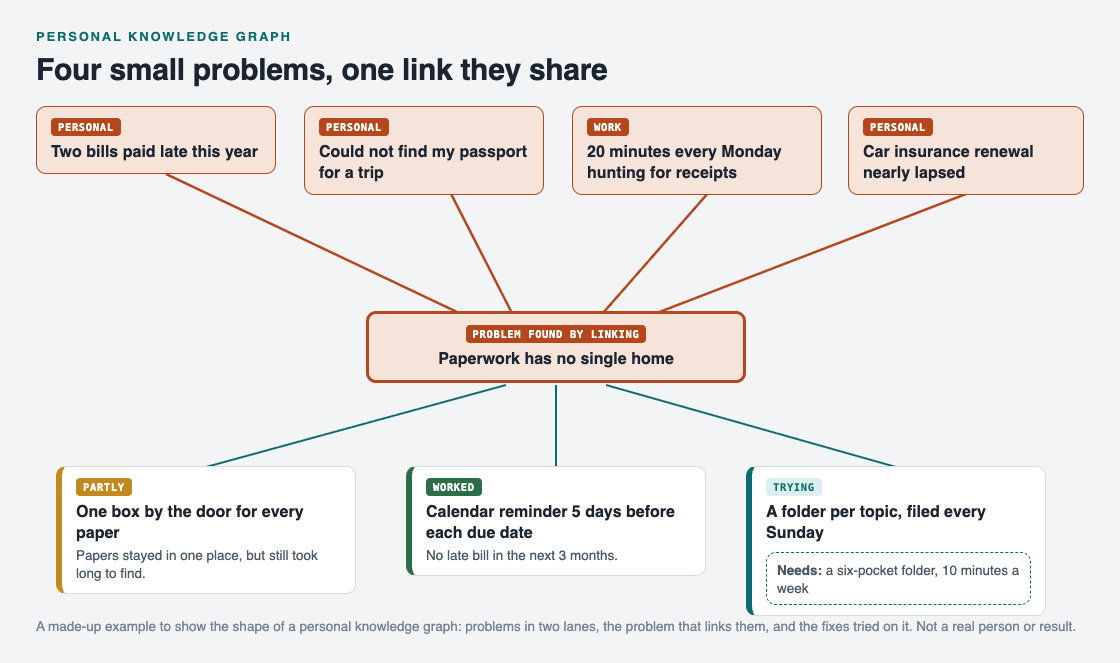
Four problems, the shared problem they point to, and the fixes tried on it.
Then the fixes went under the shared problem, each with its outcome:
- One box by the door for every paper. Papers stayed in one place, but finding one still took a long time. Outcome: partly.
- A calendar reminder five days before each due date. No late bill in the next three months. Outcome: worked, for the bills.
- A folder per topic, filed every Sunday. Still being tried. Its requirements are on the map too: a six-pocket folder and ten minutes a week.
The point is not the folder. The point is that the four old problems are now one problem with a clear next step, and the box that only partly worked is still on the map, so nobody suggests it again as if it were new.
Keep the graph honest as it grows
A graph is only as useful as its outcomes are true. Three habits help.
- Record failures. A failed fix is the most useful node on the map, because it saves you from trying it again.
- Use facts for outcomes. "No late bill in three months" beats "seems better".
- Look back once a week. The Lean Enterprise Institute describes hansei as the practice of "looking back and thinking about how a process or personal shortcoming can be improved", the Japanese term for self-reflection (Lean Enterprise Institute, Hansei). Ten minutes on Sunday, marking each fix worked, partly or failed, is enough.
If you already keep a problem solving journal, you can build the graph from its pages: each entry becomes a problem node, and each thing you tried becomes a solution.
Build your personal knowledge graph in Problem Graph
You can draw a graph on paper, but it gets crowded fast and is hard to change. Problem Graph is built for exactly this: its home page calls it "a journal that draws itself".

The three steps from Problem Graph's home page.
- You write a problem in one line and put it in a lane. It lands on the graph the moment you press Enter.
- You attach solutions as ideas, mark the ones you are trying, and record the outcome: worked, partly or failed.
- You link problems that belong together, even across lanes. In the home page's words, "patterns show up on the map that never show up in a list."
- The map has the three kinds of node from this guide: problem, solution and requirement. If you prefer rows, the app has a List view beside the map.
- Your graph is private by default. It is saved to your account, follows you to any phone or computer you log in on, and nobody else sees it.
If you want to see what a filled graph looks like before you start, an empty graph in the app offers a "Load example set" button.
Frequently asked questions
What is a personal knowledge graph?
It is a map you build for yourself, where things are nodes and the relationships between them are links. For problems, the nodes are problems, the solutions you tried and what those solutions need.
How is a personal knowledge graph different from a journal?
A journal records things in the order they happened. A graph records how they connect, so problems with a shared cause sit next to each other even if you wrote them months apart.
How many problems should I start with?
Five is plenty for the first evening. Add more as they come up; the links get more useful as the graph grows.
Can other people see my graph in Problem Graph?
Not unless you share it. Private is the default, and only a problem you mark as a main node can be shared at all.
Get started
Tonight, write down five problems that went wrong more than once this month, one line each. Draw a line between any two that belong together, and see which one ends up in the middle.
Try Problem Graph: it is free, and you can look around the public network without an account. Write one problem down in a line and attach the first thing you will try.
Comments
No comments yet.
Sign in or make an account to comment.