Problem log template: what to write for each problem
A problem log template gives every problem the same short set of fields, so you can see what you tried, what happened, and what to do next without starting from memory. Most logs fail because each entry is written differently: one is a paragraph, the next is a single word, and none says whether the fix worked. This guide gives you a seven-field template you can copy today, shows one entry filled in, and covers the habits that keep a log useful after the first week.
Why a problem log needs a template
A blank page invites a diary. A diary is fine for feelings, but it is hard to search when the same problem comes back three months later. A template does three jobs:
- It makes entries comparable. When every problem has an outcome field, you can scan for the ones still open.
- It asks the question you would skip. Nobody remembers to write down what a fix needed until a field asks for it.
- It keeps failures. A failed attempt is useful information. A template with a place for it stops you from quietly deleting it.
If you want the bigger picture first, our guide to keeping a problem solving journal explains why writing problems down helps at all.
The problem log template: seven fields
Copy these seven fields into a notebook, a document or an app. Keep each answer short.
- The problem in one line. What happens, when, how often, and what should happen instead. "Phone battery is under 20% by 3 pm on 4 of 5 workdays; it should last until 8 pm."
- Lane and date. Which part of your life it belongs to (for example personal or work) and when you first noticed it.
- What you saw. Facts you checked, not guesses. A guess about the cause can go here too, as long as it is marked as a guess.
- Attempts and outcomes. Every fix you tried, each with one of three outcomes: worked, partly or failed. Add what you learned in a few words.
- What the fix needs. The tool, the step, the time or the person that makes the working fix repeatable.
- Status. Open, trying a fix, or worked.
- Linked problems. Other problems that may share a cause or a fix.
Field 1 does most of the work. If you struggle with it, our guide on how to write a problem statement in one line walks through it.
Why each field earns its place
Facts before guesses. The Lean Enterprise Institute says that everything in problem solving, from the problem itself to its root cause, "should be based on verifiable facts, not assumptions and interpretations" (Lean Enterprise Institute, Problem Solving). Field 3 is where that happens. "The map app used most of the battery" is a fact you can read in your phone's settings. "My battery is getting old" is a guess until you check.
Three outcomes, not two. Worked and failed are easy. Partly is the honest middle: the fix helped, but not enough. Partly is often the most useful outcome, because it tells you that you are close.
Needs. A fix that worked once and then stopped often worked because of something you forgot to write down. This field turns a lucky week into a habit.
Status. This is the "check" in plan, do, check, act. The Lean Enterprise Institute describes check as evaluating "the results in terms of performance", and act as to "standardize and stabilize the change or begin the cycle again, depending on the results" (Lean Enterprise Institute, PDCA). Status is where you record which of those two you chose.
One entry filled in
Here is the template filled in for a made-up phone battery problem. Read it top to bottom, the way you would read your own log a month later.
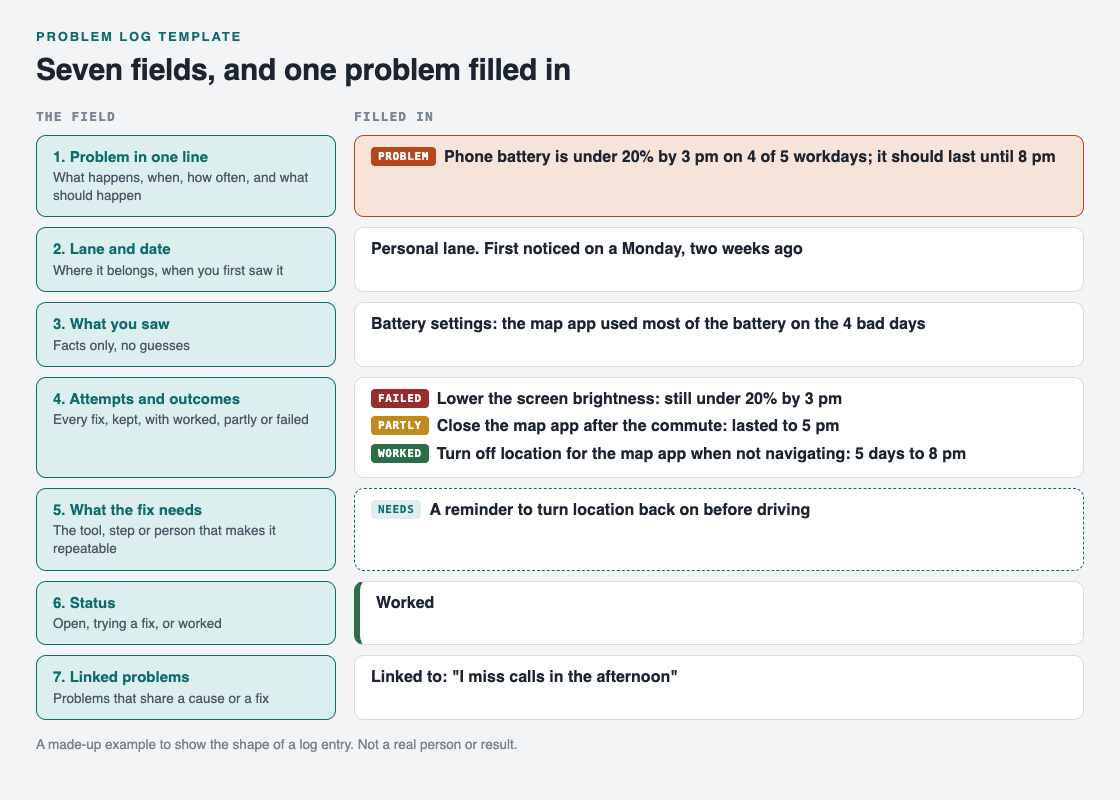
The seven fields, with one made-up problem filled in.
- Problem: phone battery is under 20% by 3 pm on 4 of 5 workdays; it should last until 8 pm.
- Lane and date: personal, first noticed on a Monday two weeks ago.
- What you saw: the battery settings show the map app used most of the battery on the 4 bad days.
- Attempt 1, failed: lower the screen brightness. Still under 20% by 3 pm.
- Attempt 2, partly: close the map app after the morning commute. The battery lasted to 5 pm.
- Attempt 3, worked: turn off location for the map app when not navigating. The battery lasted to 8 pm on all 5 workdays the next week.
- Needs: a reminder to turn location back on before driving.
- Status: worked.
- Linked: "I miss calls in the afternoon", which may have the same cause.
Notice that attempt 1 stays in the log. Next time someone suggests the brightness setting, you already know it did not help this problem. For more on recording attempts in depth, see our guide on keeping track of the solutions you tried.
Mistakes that make a problem log useless
- Writing the fix as the problem. "Need a new phone" is a solution. Write what is going wrong, then list the new phone as one attempt.
- Deleting failed attempts. The failures are the part you will forget first and need most.
- No numbers. "Battery is bad" cannot be checked. "Under 20% by 3 pm on 4 of 5 days" can, and it tells you when the fix has worked.
- One giant entry. If a problem has three separate parts, give each its own line and link them.
- Never closing anything. A log where nothing is marked worked feels like a list of failures. Mark wins when they happen.
A two-minute weekly routine
A log only helps if you read it. Once a week, take two minutes:
- Read every entry whose status is open or trying.
- Add the outcome of anything you tried this week.
- Pick one next attempt for one open problem.
- Mark anything that has held for a week as worked, and check that its needs field is filled in.
That is it. The routine is short on purpose, because a long one is the first thing you skip.
Use the template in Problem Graph
A notebook works. Problem Graph is a problem and solution journal drawn as a map, and its parts line up with the template:

How it works, from Problem Graph's home page.
- Fields 1 and 2: write the problem in one line and put it in a lane: personal, work, expert or scientific. It lands on the graph when you press Enter.
- Fields 4 and 6: add each fix as a solution. Add it as an idea, mark it when you are trying it, and record the outcome as worked, partly or failed. A solution that failed stays on the map as a failed solution.
- Field 5: what a fix needs goes on as a requirement, one of the three kinds of node on the map.
- Field 7: link problems that belong together, even across lanes.
The app has a List view beside the map and can filter by lane, so the weekly routine can start from a plain list. Problems are private by default: they are saved to your account, follow you to any phone or computer, and nobody else sees them.
Frequently asked questions
What should a problem log template include?
The problem in one line, its lane and date, what you saw, each attempt with its outcome, what the working fix needs, the status, and any linked problems. Keep the failed attempts.
How is a problem log different from a to-do list?
A to-do list tracks tasks you plan to do. A problem log tracks what is going wrong, every fix you tried and how each one turned out, so you learn from the attempts.
How often should I update my problem log?
Write an attempt down when you try it, and read the open entries once a week. Two minutes a week is enough for a personal log.
Can I use the same template for work and personal problems?
Yes. The lane field keeps them apart, so you can look at one lane at a time and still link a work problem to a personal one.
Get started
Pick one problem that has bothered you this week and fill in the first four fields now. Leave the rest until you have tried something.
Try Problem Graph: it is free, and you can look around the public network without an account. Write one problem down in a line and attach the first thing you will try.
Comments
No comments yet.
Sign in or make an account to comment.