Procrastination log: what you tried to start a task
A procrastination log is a short written record of what you tried each time you sat down to start a task, and what happened. If you keep putting something off, a procrastination log turns a vague feeling of "I just can't start" into a list of specific attempts you can learn from. This post shows what to record, gives you a template, walks through three example entries, and tells you how to read the result.
What a procrastination log is and why it beats willpower
Willpower is a plan with no memory. You tell yourself to try harder, you fail, and tomorrow you make the same promise again. You never find out which part of starting was the problem.
A log fixes the memory part. Each time you try to start, you write down the approach and the result. After a week you have evidence. Maybe starting at your desk fails every time, but starting on the sofa with a single paragraph works twice out of three. You could not have known that without writing it down.
The same idea works for other stuck areas. If you already track what you tried for food or money, the pattern will feel familiar. See the meal planning problems log and the budget leak log. The method is the same: one problem, several tries, honest outcomes.
What to record when you try to start a task
Keep each entry small. If logging takes longer than the start itself, you will quit logging. Five things are enough.
- The task. Name it in one line. "Write the quarterly report" is better than "work stuff".
- The blocker. What stopped you? Unclear first step, boredom, fear of doing it badly, a noisy room, a phone within reach.
- What you tried. The specific move. Not "focus harder" but "opened the document and typed the heading only".
- The outcome. Use three words: worked, partly, or failed. Partly means you started but stopped fast, or started late.
- One note. A single sentence on why you think it went that way.
Be honest about failures. A failed try is not a bad entry. It is the most useful kind, because it tells you what to stop repeating.
A simple procrastination log template you can copy
Paste this into any notes file. Fill one block each time you try to start.
Task: Blocker: What I tried: Outcome (worked / partly / failed): Note:
Add the date if you like, but it is optional. What matters is that every attempt gets an outcome. An entry with no outcome is just a wish.
If you want the habit to stick, tie it to a fixed moment, such as the end of your work session. For tips on keeping a log going week after week, read the weekly review post.
Example entries: three tries at starting the same task
Here is a made-up example: one task tried three ways. The task is "write the project proposal".
Try 1: Wait until I feel ready
Task: Write the project proposal Blocker: I do not know how to open it What I tried: Waited for a good block of free time in the afternoon Outcome: failed Note: The good block never came. I checked email instead.
Try 2: Shrink the start
Task: Write the project proposal Blocker: The blank page What I tried: Opened the file and wrote only three bullet points of what the proposal must cover Outcome: partly Note: I started in under two minutes, but stopped after the bullets.
Try 3: Shrink the start and set a limit
Task: Write the project proposal Blocker: Fear it will not be good enough What I tried: Set a 20 minute timer, wrote the worst possible first draft of section one, phone in another room Outcome: worked Note: Permission to write badly removed the pressure. I wrote for the full 20 minutes.
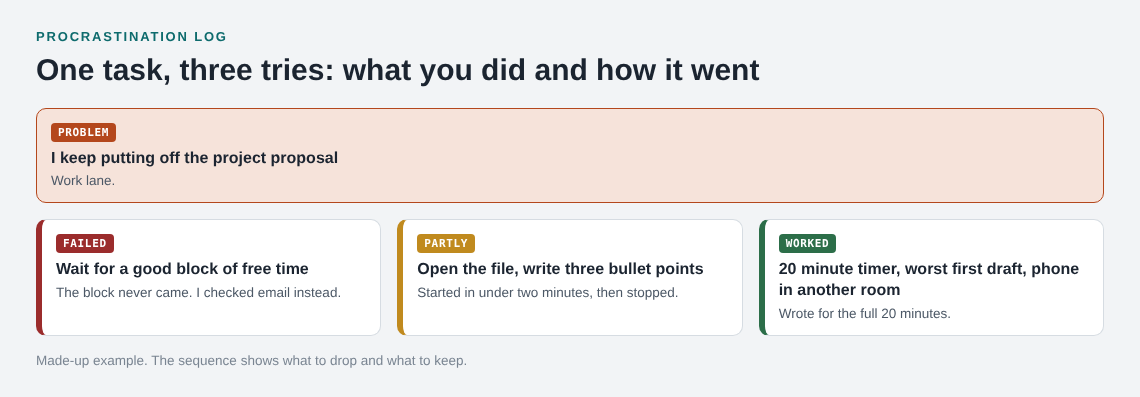
No single entry is magic. The value is the sequence. You can see that waiting failed, a tiny start got you moving, and a tiny start plus a time limit kept you going.
How to read your log and spot patterns
After five to ten entries, read them in one sitting. Look for these things:
- Repeated blockers. If "unclear first step" shows up four times, your problem is planning, not motivation.
- Repeated winners. Find the approaches marked worked. What do they share? Small size, a time limit, a certain place?
- Repeated failures. Anything that failed twice should not get a third try in the same form. Change it or drop it.
- Partly outcomes. These are close. Ask what single change would turn one into a worked.
Also check whether different tasks share a blocker. Putting off a work report and putting off a hard phone call can both come from fear of getting it wrong. Spotting that link tells you one fix may cover both.
Fixes to test next: smaller starts, timeboxes, and fewer choices
Your log tells you what to test, but three fixes are worth trying early.
Smaller starts
Make the first action so small it feels silly. Open the file. Write the heading. Put on your shoes. The goal is not to finish. The goal is to cross the line from not started to started.
Timeboxes
Set a limit before you begin, and stop when it ends. A fixed end makes starting less scary because you know you can leave. For a full method, see timeboxing a fix: set a limit before you start.
Fewer choices
Decide the night before what you will work on first, where, and with what open. Every decision you leave for the moment of starting is a place to stall. Write the plan in your log as the next entry's "what I tried".
Run each fix for a few days, record the outcome, and keep the ones marked worked.
Keeping the log on a map with Problem Graph
A plain notes file works fine. A list does get long, though, and it hides links between problems. Problem Graph is a journal drawn as a graph. You write the problem in one line, such as "I put off the project proposal", and put it in a lane: personal, work, expert or scientific. Then you attach each solution you try and mark the outcome as worked, partly, or failed. That maps directly onto the log above.
You can also link problems that belong together, even across lanes. If "put off the proposal" and "put off the hard phone call" both turn out to come from fear of doing it badly, linking them lets the pattern show up on the map instead of staying buried in a list. A failed solution stays on the map as failed, which is exactly the memory a willpower plan lacks.
Your problems are private by default. If you want, you can share a main node with a private network of people you choose, or put it out publicly so others can borrow solutions that worked. The app can also propose new solutions based on what worked for others on similar problems. Those are proposals to test, not answers you can trust blindly.
Frequently asked questions
How long should a procrastination log entry be?
A few lines. Record the task, the blocker, what you tried, and the outcome. If an entry takes more than a minute or two, it is too long.
Should I log the days I did not try at all?
Yes, briefly. Write the blocker and mark the outcome as failed. Days with no attempt can show a pattern too, such as a certain time of day or a certain place, so they are worth a line.
How many entries do I need before I see a pattern?
Five to ten entries is usually enough to notice repeated blockers and repeated winners. Fewer than that, and you are mostly guessing.
Is a procrastination log a replacement for professional help?
No. It is a way to track what you try and learn from it. If putting things off is tied to something heavier, talk to a qualified professional.
Get started with Problem Graph
Try Problem Graph: it is free, and you can look around the public network without an account. Write one problem down in a line and attach the first thing you will try.
Comments
No comments yet.
Sign in or make an account to comment.