Side project log: what blocked you and why
A side project that stalls leaves a trail, and it is easy never to write it down. Three months later you remember that the project "just fizzled," and you blame yourself. A side project log fixes that. It is a short record of each wall you hit, what was really behind it, and what you tried. This post shows you what to record, how to dig past "I lost motivation," and how to review the log so the next project goes further.
Why a side project log beats memory when you get stuck
Memory is a poor record of details. You remember being stuck on the weekend app. You do not remember that the real wall was a login flow you had never built, or that you stopped after the third failed attempt at deployment.
A log keeps the details. When you get stuck again, you can look back and see that you have hit this exact wall before. Sometimes you will even see what got you past it last time.
There is a second benefit. Writing the blocker down makes it concrete. "The project is stalled" is vague and heavy. "I don't know how to send email from the server" is one line, and one line is something you can search for, ask about, or break into steps.
What to record for each blocker: the problem, the cause, the fix
Keep each entry small. Aim to write it in under a minute. Record three things:
- The problem. One line, in plain words. "Can't get the image upload to work on my phone." Not "everything is broken."
- The cause. Your best guess at why. You can update this later. "File size limit on the server, I think."
- The fix and its result. What you tried and how it went: worked, partly, or failed. Write down failures too. A failed fix tells you what not to try again.
That last point matters more than it looks. A failed fix is easy to forget, and easy to try again. If you log it, you see it before you repeat it.
Common side project blockers and the real reasons behind them
Blockers on side projects tend to look different from the cause underneath. Here are some common ones, with a reason that can sit behind each.
- "I got bored." Sometimes the fun part was done and only the dull part was left: settings pages, error handling, deployment.
- "I didn't have time." Sometimes the next step was too big to start in a 30 minute window, so you never started.
- "I got stuck on a bug." Sometimes the bug was in a part of the stack you had never touched, and you had no one to ask.
- "I wasn't sure it was worth it." Sometimes you never wrote down who the project was for, so there was no reason to push through.
- "I started something new." Sometimes the new idea shows up right after a hard blocker, and the new project is an escape hatch.
These are about the shape of the work, and the shape of the work is something you can change.
How to find the why behind a stall instead of blaming motivation
When you notice a project has gone quiet, do not write "lost motivation." Ask a few direct questions instead:
- What was the last thing I actually did on it?
- What was the next thing I meant to do?
- Why didn't I do that next thing? Be specific.
- If I sat down right now, what would I need first?
Here is a worked example. Say your recipe app has not been touched in three weeks.
- Last thing done: built the recipe list screen.
- Next step: let users save favorites.
- Why not: saving favorites needs user accounts, and you have never built auth.
- What you need first: a simple guide on adding login to your framework.
Now your log entry is no longer "lost motivation." It is "Can't add favorites because I've never built login." That is a problem with a fix. Your first try might be a tutorial. If that fails, the second might be a hosted login service. Either way, you are moving again.
The same habit works outside code, for fixes on their own devices and for home repairs and whether they held. The idea is the same: name the problem, guess the cause, record what you tried and how it went.
A side project log template you can copy
You can keep this in any notes app. Copy these fields for each entry:
- Date: when you hit the wall
- Project: which side project
- Blocker: one line, plain words
- Likely cause: your best guess
- What I tried: one line per attempt
- Result: worked, partly, or failed
- Related to: any earlier blocker this looks like
A filled entry might read: "Oct 3. Recipe app. Can't add favorites. Never built login. Tried a framework tutorial: partly, login works but sessions drop. Related to: the habit tracker stall in spring."
Reviewing your log: spotting patterns across projects
Once a month, read back through your entries. Look for blockers that show up on more than one project. You might find that three of your last four projects stalled at deployment. Or that every stall came right after the core feature was done.
Those patterns tell you what to fix before your next project starts. If deployment is your wall, set up deployment on day one, while you still have energy. If the dull middle is your wall, plan small, boring tasks you can finish in one sitting.
Patterns are hard to see in a flat list, though. A list shows entries one after another. It does not show that entry 4 and entry 19 are the same problem in different clothes. That is where a map helps.
Turning your blocker log into a shared Problem Graph
Problem Graph is a problem and solution journal drawn as a knowledge graph. It fits this kind of log well, because it is built around the same three parts: a problem, the solutions you try, and how each one turned out.
Here is how the recipe app example would look. You open the app and type "Can't add favorites, never built login" as one line. You put it in a lane. There are four: personal, work, expert and scientific. A hobby project might go in personal. When you press Enter, it lands on the graph.
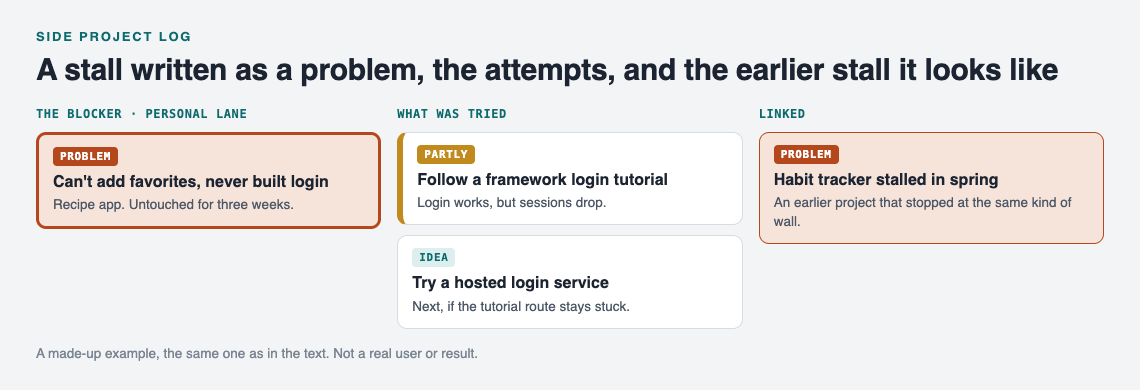
The recipe app example on the graph. A made-up project, not a real user or result.
Then you attach what you try. Add solutions as ideas, mark the one you are trying now, and record the outcome: worked, partly, or failed. The tutorial attempt would go on as "partly." The page puts it well: "The graph is honest. A solution that failed three times stays on the map as a failed solution, and that is exactly what the next person needs to know."
Now the part a list cannot do. You link problems that belong together, even across lanes. Link the recipe app login problem to the habit tracker stall from spring. If you also have a work problem about authentication, link that too. As you add more, clusters form on the map. In the home page's words, "Patterns show up on the map that never show up in a list."
Your graph is private by default. Only you see it. If you want help, you can mark one problem as a main node and share it. Only a main node can be shared, and its solutions, outcomes and requirements go with it. Problems you only linked to it stay private. You can share into a private network by creating one and giving a few people the invite code, such as a study group or a coding friend circle. Or you can make it public, where others can link their own problems to it and borrow the solutions that worked.
Borrowing works the other way too. Problem Graph shows you similar problems other people have shared and which of their solutions worked. You can borrow one into your own graph with one tap, and it keeps a link back to where it came from. You can also ask the AI for suggestions. It proposes new solutions based on what worked for others on similar problems. Treat those as ideas to test, then log the result like any other fix.
If your graph is empty and you want to see how it all fits, the app has a "Load example set" button to fill it with a sample.
Frequently asked questions
How often should I update a side project log?
Add an entry each time you hit a wall that stops you for more than one session. Then read back through the log once a month to look for repeats.
Why do side projects stall?
The reasons differ from person to person, which is why a log helps. Two to check first: a next step too big for the time you have, or a step that needs a skill you have not used before.
Should I log blockers for projects I abandoned?
Yes. An abandoned project can hold a clear lesson, because the blocker won. Log what stopped you and what you tried, even if every attempt failed.
Can a side project log help with team or hackathon projects?
It can. A shared list of blockers and fixes keeps a team from solving the same problem twice. See this guide to a shared fix list for hackathon teams for a time-boxed version.
Get started
Pick the side project you most want to restart. Ask yourself what the next step was and why you did not take it. Write that down as one line. That is your first entry.
Try Problem Graph: it is free, and you can look around the public network without an account. Write one problem down in a line and attach the first thing you will try.
Comments
No comments yet.
Sign in or make an account to comment.