Stock photos for a website hero banner: how to pick one
A hero banner is the big picture at the top of a home page, behind the headline and the first button. Picking stock photos for a website hero banner is not the same as picking a nice photo. The picture has to leave room for words, survive a phone crop, load quickly, and carry a license that fits a business site. This guide walks through each check, with one photo followed from a blog header to a client's site.
Wavecrate licenses royalty-free photos, including wide 4K landscapes that work behind a headline, and every download comes with a license certificate and a code anyone can check on its verify page.

What makes a photo work as a hero banner
A hero photo sets the mood while the headline does the talking. Photos that look great on their own often fail here, because they compete with the text.
Look for these traits:
- One clear subject, off center. A mountain on the right third leaves the left two thirds for your headline.
- Calm areas. Sky, water, a wall or a soft gradient. Text needs a quiet surface.
- Few small details. Busy textures turn to noise under white letters.
- A color that does not fight your button. An orange button on an orange sunset is hard to see.
- A large original, so you can crop for a wide screen and a phone from the same file.
A quick test: squint at the photo. If you can still point to where the headline would go, keep it on the list.
Sizes and files for a hero image
Your layout decides the exact size, but a few habits cover most sites. Plan for a desktop banner at least 1920 pixels wide. A 16:9 shape (1920 x 1080) fills a wide screen; a wider, shorter strip lets the page start sooner.
Start from the biggest file you can get and export smaller copies yourself. On Wavecrate, each photo page lists the files you get. Golden Hour Peaks comes as an Original at 4000 x 2667, a Medium at 1920 x 1280 and a Small at 1024 x 683, all JPG. The Original is a 3:2 shape, so a 16:9 crop from it is still 4000 pixels wide. Growth chart in Yellow comes at 3840 x 2160, which is already 16:9.
Export the banner at the size it shows on screen and compress it. Many sites also serve a WebP copy, which is often smaller than a JPG of the same quality, and keep the JPG as a fallback.
Finding stock photos for a website hero banner
Search by the feeling you want, then narrow by shape and color. The photos browse page has ten categories (Nature, City and architecture, People, Food and drink, Business, Travel, Technology, Abstract, Textures and backgrounds, Illustrations) and filters for orientation, color, resolution, mood and access (All, Free or Premium).
A few starting points by kind of site:
- Software and services: Business and Technology, for charts, dashboards and desks.
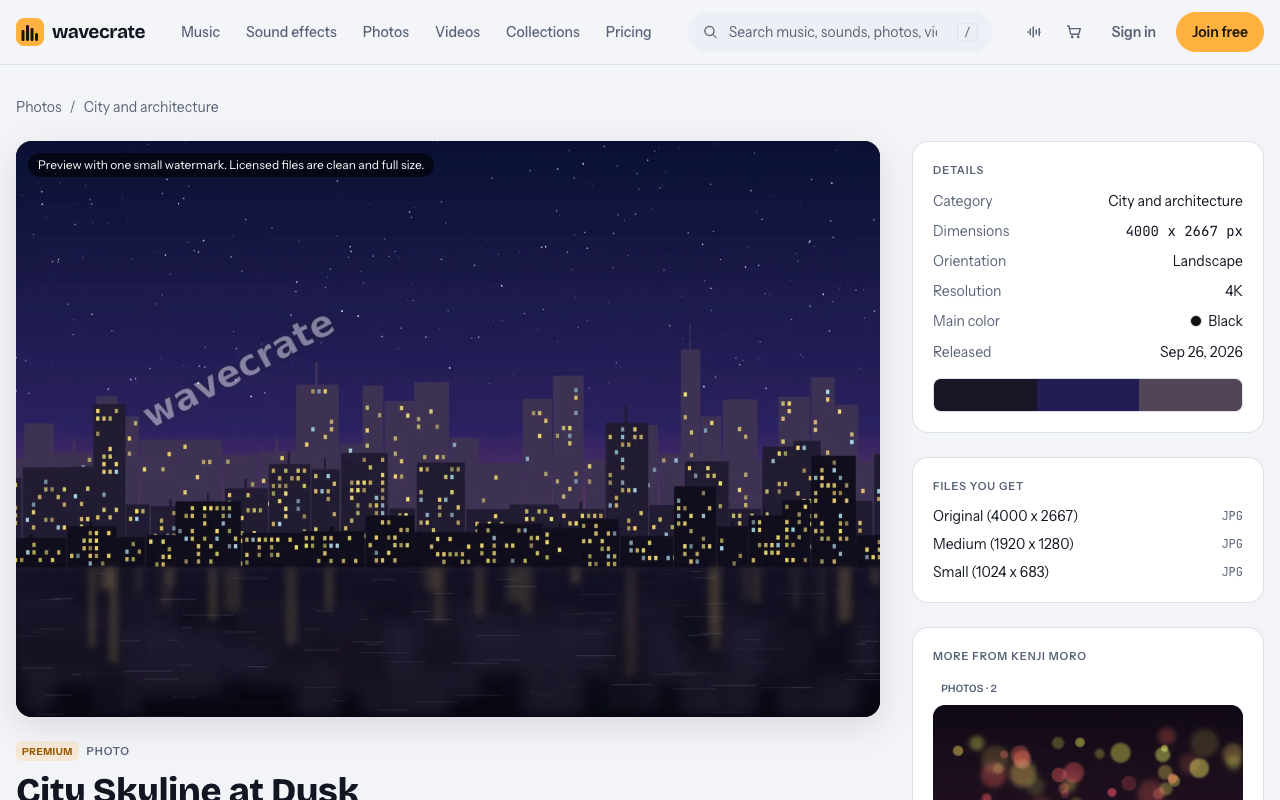
- Local businesses: City and architecture or Nature. City Skyline at Dusk shows lit skyscrapers against an orange and violet sky, with a dark band of water below that can hold white text.
- Studios and portfolios: Abstract and Textures and backgrounds.
The collections page also has Backgrounds for designers: gradients, textures and motion loops picked to sit behind titles. It is a fast way to find calm pictures that take text.
Previews show one small watermark. Licensed files are clean and full size, so use the preview for mockups only.
Leaving room for your headline
Sketch your layout before you browse. Write down how long the headline is, where it sits, and where the button goes. Then drop two or three candidates behind your real words in a quick mockup. Do not judge a photo alone: a picture that looks dull by itself often makes the best background, because it gives the words space.
If no photo has enough empty space, add a dark fade on the text side. Keep it light enough that the photo still reads as a photo.
Cropping so the hero holds up on a phone
A wide banner on a phone becomes a tall, narrow slice. If your subject sits on the far right and the phone shows the middle, the subject disappears. Three ways to handle it:
- Set a focal point. Most site builders, and CSS with
object-position, let you choose which part stays visible. - Serve a separate phone crop. Cut a tall version from the same large original and show it on small screens.
- Put the text below the photo on phones, so the photo only needs empty space on a desktop.
Check the result on a real phone, not only a narrow browser window.
Which license a hero banner needs
The hero is usually the most visible picture on a business site, so match the license to the site before launch. With Wavecrate you get a license to use the photo; Wavecrate keeps the copyright. Here is what the pricing page table says for photos and videos:
- Free, only on items marked Free: websites, blogs, social media posts and monetized channels, with credit text next to the photo or in the description. A free account gets 3 free downloads a month.
- Standard: adds no credit line, apps, presentations and your own marketing, and print up to 500,000 copies. Pro (listed at $99 a year, or $12 month to month, and not on sale yet) gives Standard on the whole catalog.
- Extended: adds paid advertising and TV broadcast, products for resale (merchandise, templates, prints, packaging), unlimited print runs and client work. Pro never includes it.
The trap is the word "websites". The Free card lists websites, but "your own marketing and brand content" starts at Standard, and Wavecrate's pages do not say where a website ends and marketing begins. A home page that sells your services is marketing, so plan for Standard. A Free license also needs the credit line next to the photo, which most heroes do not want.
Paid licenses are not on sale yet (Wavecrate says purchases open soon), so the prices below are the listed prices for when sales open, while photos marked Free can already be downloaded with a free account.
Worked example: one photo, three sites
Say you run a small mountain guiding business, and your hero reads "Small group hikes in the high country" with a "See this season's trips" button on the left.
- Open the photos page, pick Nature, set orientation to Landscape and resolution to 4K.
- Pick a cool main color, so your orange button stands out.
- Open Golden Hour Peaks: warm light over blue mountain ridges, 4000 x 2667, marked Free on the day this was written. Items change from Free to Premium, so read the page on the day you download.
- Mock it up behind your headline and check the phone crop.
Now follow the same photo through three uses:
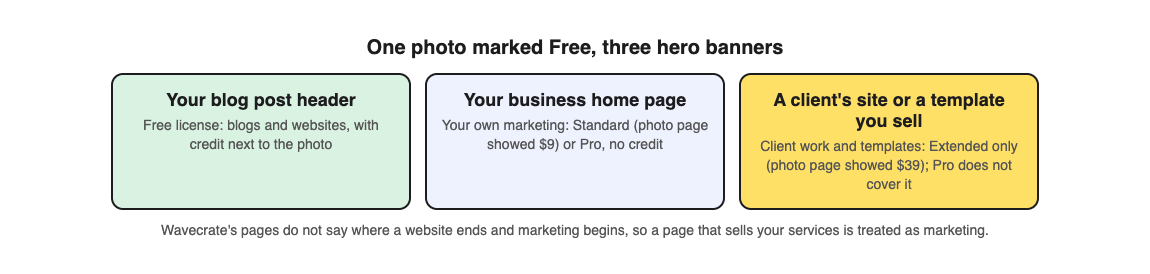
- A header on your trip-report blog post, with a credit line under it: the Free license lists blogs, with credit.
- The hero on your business home page: that is your own marketing, so Standard, listed on the page at $9 for when sales open, or Pro once it is on sale. No credit line needed.
- A hero you build for a client's site, or a website template you sell: client work and templates are Extended only, listed on the page at $39. Standard and Pro do not cover it.
Every download comes with a license certificate and a code. Anyone can enter the code on the verify page to see who holds the license, for which item and what it covers, with no account. Keep the code with your site files. If you are writing the page around the hero, see how to write about your small business without sounding like an ad.
Frequently asked questions
What size should a hero banner photo be?
Plan for at least 1920 pixels wide on a desktop. Start from a larger original, such as a 4000 x 2667 file, so you can crop a wide banner and a phone version from the same photo.
Can I use a photo marked Free on my business home page?
The Free license lists websites with a credit line, but your own marketing starts at Standard, and Wavecrate's pages do not draw the line between them. For a home page that sells your services, plan for Standard or Pro.
Does Pro cover a hero I make for a client?
No. Pro gives Standard licenses only, and client work is Extended only. The pricing page says that, once purchases open, Standard can be upgraded to Extended for the difference.
Can I use the watermarked preview while I design?
Previews carry one small watermark, so they suit mockups. Swap in the licensed file, which is clean and full size, before the site goes live.
Get started
Sketch your layout, filter the photos by landscape and 4K, mock up two or three candidates behind your real headline, check the phone crop, and match the license to whose site it is.
Browse Wavecrate: you can join free and download items marked Free now, paid licenses are not on sale yet (purchases open soon), and every download comes with a license certificate and a code anyone can check on its verify page.


Comments
No comments yet.
Sign in or make an account to comment.