Tank game controls: keyboard, gamepad and touch
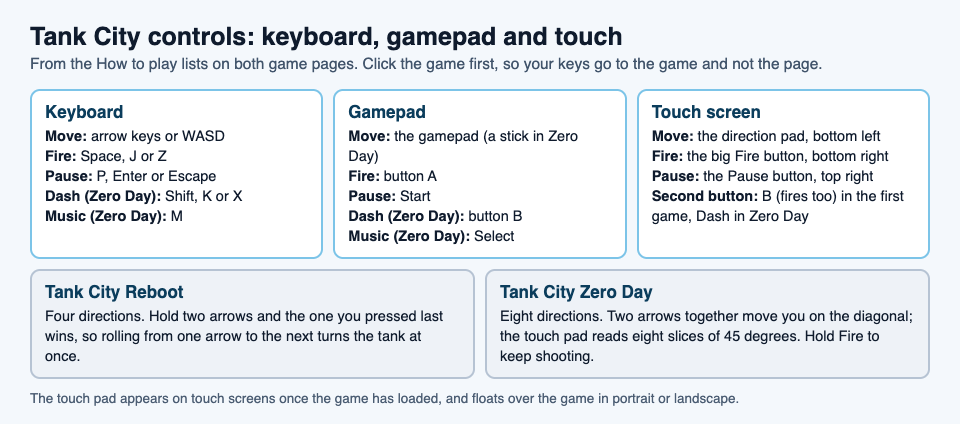
Good tank game controls disappear: you think "turn left, fire" and the tank does it. This guide covers the tank game controls for both games on Tank City Reboot, on a keyboard, a gamepad and a touch screen. It also covers the small things that make them feel right, like where to click first and how the touch pad behaves on a phone.
Everything here comes from the How to play lists on the Tank City Reboot and Tank City Zero Day pages, and from the games' own code. If you are new to the site, our post on the retro tank game in your browser explains what you are playing.
Tank game controls at a glance
The two games share most of their controls. Zero Day adds two of its own.
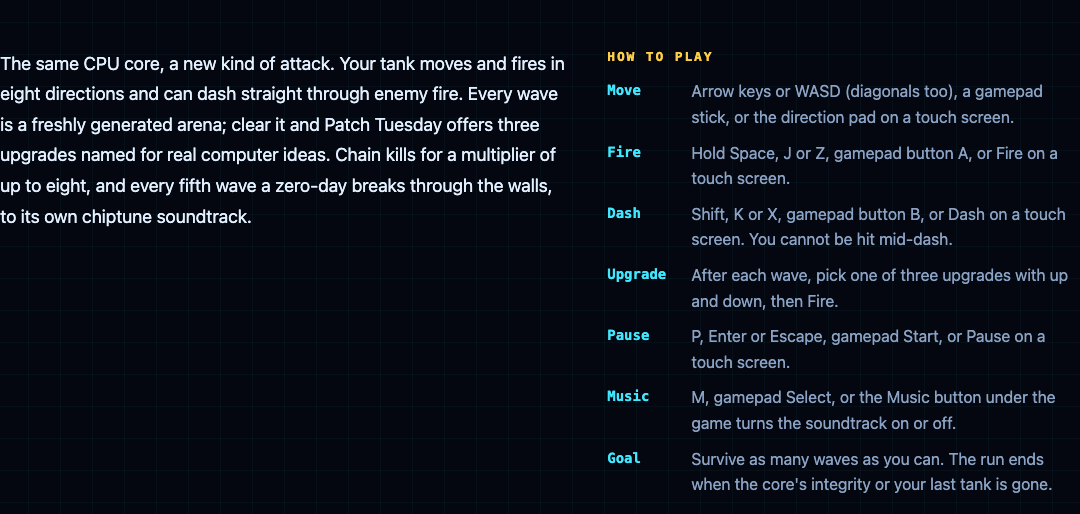
- Move: arrow keys or WASD, a gamepad, or the direction pad on a touch screen.
- Fire: Space, J or Z, gamepad button A, or Fire on a touch screen.
- Pause: P, Enter or Escape, gamepad Start, or Pause on a touch screen.
- Dash (Zero Day only): Shift, K or X, gamepad button B, or Dash on a touch screen. You cannot be hit mid-dash.
- Music (Zero Day only): M, gamepad Select, or the Music button under the game.
Before you play: click the game first
The line under the game says it plainly: click the game, then play. There is a reason. The page loads the game only when you press Play or Full screen, so it stays light until you want it. Once it loads, your keys go to the game only while the game has focus. Clicking or tapping it gives it focus.
While the game has focus, the arrow keys and Space stop scrolling the page. If the page jumps when you press an arrow, click the game again.
Both games need WebGL 2, which current versions of Chrome, Edge, Firefox and Safari offer. If your browser lacks it, the page tells you.
Keyboard controls, and how each game reads them
The keys are the same, but the two games read the arrows differently.
- Tank City Reboot moves in four directions. If you hold two arrows, the one you pressed last wins. That means you can roll from one arrow to the next and the tank turns at once, without lifting your first finger. It makes tight corners much easier.
- Zero Day moves in eight directions. Hold two arrows together, such as up and right, and you move on the diagonal. Opposite arrows cancel each other out.
Zero Day also lets you hold Fire. Keep Space down and your tank shoots again the moment its cannon is ready. After each wave, use up and down to pick one of three upgrades, then press Fire to take it. Our guide to picking upgrades helps you choose.
WASD works for moving in both games, so you can keep your left hand on WASD and your right hand on J for fire, or on K for the dash in Zero Day.
Gamepad controls
Both games read a gamepad. Move with the gamepad (a stick in Zero Day), fire with button A, and pause with Start. In Zero Day, button B dashes and Select turns the music on or off.
As with the keyboard, click the game once so it has focus. The page's line under the game says a gamepad works too.
Touch controls on a phone or tablet
On a touch screen, a touch pad appears once the game has loaded. It floats over the game, in portrait or landscape:
- Bottom left: a round direction pad. Slide your thumb toward the way you want to go.
- Bottom right: a big Fire button, with a smaller second button just to its left, set a little higher.
- Top right: Pause.
The second button changes with the game. In Tank City Reboot it is labelled B, and it fires too, so you can use whichever thumb position feels better. In Zero Day it is Dash.
The direction pad also follows each game's rules. In the first game it picks the nearest of four directions. In Zero Day it reads eight directions, in slices of 45 degrees, so you can aim on the diagonal with one thumb.
Two small details help. The space between the buttons takes no touches, so a swipe there still scrolls the page. And if you switch away from the tab, every touch button is let go, so your tank does not keep driving while you are gone.
Full screen on a computer or phone
Each page has a Full screen button under the game. Full screen keeps the touch pad on screen, and in full screen a swipe on the game no longer scrolls the page. On an iPhone, the browser does not offer full screen for a page. There the game fills the whole window instead, with a button in the top right corner to leave.
A worked example: practise the controls in one minute each
Here is a short routine to get the controls into your fingers before a real run.
- Open Tank City Reboot and press Play. Click the game so it has focus.
- Practise turning. On stage 1, FIREWALL, hold up, then press right without letting go of up. The tank turns right at once, because the last arrow pressed wins. Roll back to up the same way.
- Practise firing. Shoot a firewall block. It breaks a block at a time, so you can see each shot land.
- Pause and resume. Press P and the game shows PAUSED; press P again to carry on. Get used to it before you need it.
- Now open Tank City Zero Day. Hold up and right together and watch the tank move on the diagonal.
- Hold Fire and dash. Keep Space down while you move, then tap Shift. A dash lasts a fifth of a second and recharges in 1.5 seconds, so tap it when an enemy shot is about to reach you.
- Pick an upgrade. When the first wave ends, press down to move through the three cards, then Fire to take one.
On a phone, do the same with your thumbs: the left thumb on the direction pad, the right thumb on Fire, and in Zero Day a quick tap on Dash. When you are ready for more, our plan for surviving the boss waves puts these controls to work.
Frequently asked questions
Why do the arrow keys scroll the page instead of moving my tank?
The game does not have focus yet. Click the game once, and the arrow keys and Space will go to the tank.
Can I play the tank games on a phone?
Yes. Both games play in the browser on a phone, with a touch pad that floats over the game in portrait or landscape.
Can I use a gamepad?
Yes. Move with the gamepad, fire with button A and pause with Start; in Zero Day, button B dashes and Select turns the music on or off.
How do I move diagonally?
Only Tank City Zero Day has diagonal moves. Hold two arrow keys together, push the gamepad stick on the diagonal, or slide your thumb between two directions on the touch pad.
Get started
Play Tank City Reboot: it is free, plays in your browser on a computer or a phone, and needs no account. Each game remembers your best score in that browser, so practise the controls and then go for a new best.
Comments
No comments yet.
Sign in or make an account to comment.