Team retrospective: keep the lessons after the meeting
A team retrospective is the meeting where a team looks back at a stretch of work and agrees what to change. The meeting is usually the easy part. The hard part is that by the next retrospective, half the lessons are forgotten and the same complaints come back. This guide shows how to turn each lesson into something the team can check: a problem written in one line, one fix, one owner, and an outcome recorded at the next meeting.
What a team retrospective is for
A retrospective is a kind of debrief: a planned look back at what happened, so the next stretch of work goes better. Lean teams have a long tradition of this. The Lean Enterprise Institute says that in the Toyota Production System, reflection meetings (hansei) are typically held at key milestones and at the end of a project to identify problems, develop countermeasures and communicate the improvements "so mistakes aren't repeated" (Lean Enterprise Institute, Hansei).
There is research behind the habit too. A 2013 meta-analysis of 46 samples, with 2,136 people in total, found that debriefs, also called after-action reviews, improved effectiveness over a control group by about 25% on average, with similar results for teams and individuals (Tannenbaum and Cerasoli, Human Factors, 2013). The authors also reported that alignment strengthened the effect, and pointed to a possible role for facilitation and structure.
Structure is the part most retrospectives lack after the meeting ends.
Why retrospective lessons get lost
- They are written as feelings, not problems. "Releases keep slipping" is true, but nobody can check whether it got better.
- Every lesson gets several fixes and no owner. Five ideas on a sticky note, and nobody tries any of them.
- Nobody checks. The next retrospective starts fresh, so a fix that failed is never noticed, and one that worked is never made the normal way.
- The notes live where nobody looks. A slide deck from three meetings ago is as good as gone.
Before the meeting: bring last time's outcomes
Open every team retrospective with the record from last time, not with a blank board. For each fix the team agreed, the owner gives one of three outcomes:
- Worked: the problem is gone or clearly smaller. Write down what the fix needs to keep working, and make it the normal way.
- Partly: it helped, but not enough. Agree the next fix.
- Failed: it made no difference. Keep it on the record and ask why.
This is the "act" step of plan, do, check, act, which the Lean Enterprise Institute describes as to "standardize and stabilize the change or begin the cycle again, depending on the results" (Lean Enterprise Institute, PDCA). It takes five minutes, and it changes the mood of the meeting: the team sees its own progress before it starts on new complaints.
During the meeting: one problem, one fix, one owner
Run the discussion however you like. Before anyone leaves, turn each lesson the team wants to act on into three short lines:
- The problem in one line, with a number: what happens, how often, and what should happen.
- One fix to try first. Other ideas can wait in a list; one fix is easier to judge.
- One owner, who tries the fix or makes sure it is tried, and reports the outcome next time.
Two or three lessons per meeting is plenty. A team that acts on three lessons learns more than one that lists twelve.
A worked example: three lessons from one retrospective
Here is a made-up team that holds a retrospective every two weeks. Three things were said in the meeting, and each was written up the same way.
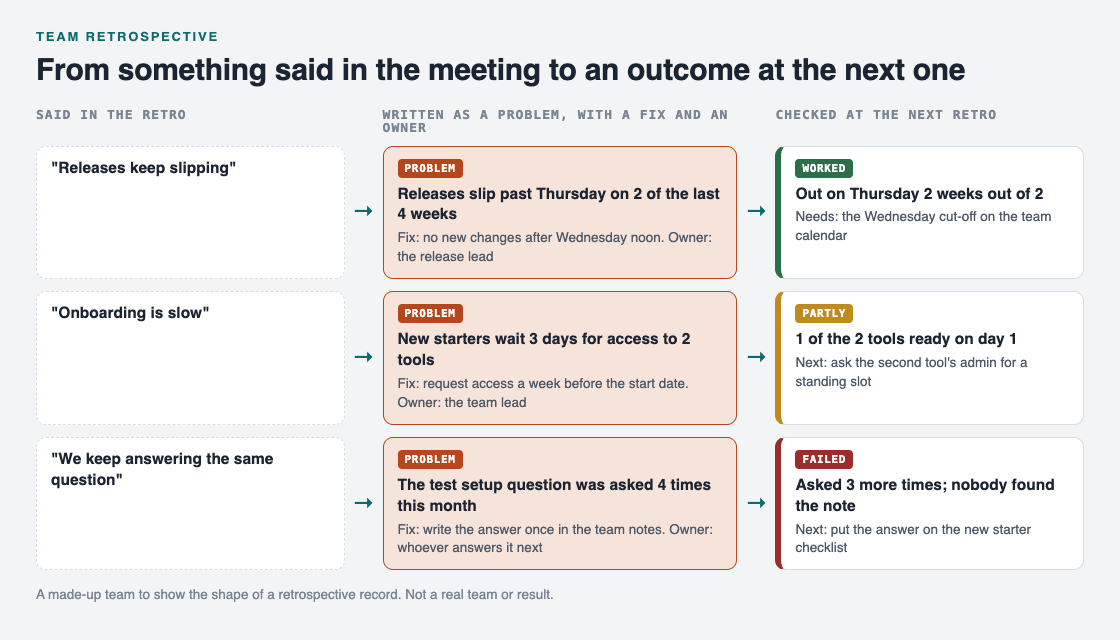
Three lessons, from what was said to what happened by the next meeting.
- "Releases keep slipping." Written as: releases slip past Thursday on 2 of the last 4 weeks. Fix: no new changes after Wednesday noon. Owner: the release lead. At the next retrospective: worked, out on Thursday 2 weeks out of 2. It needs the Wednesday cut-off on the team calendar.
- "Onboarding is slow." Written as: new starters wait 3 days for access to 2 tools. Fix: request access a week before the start date. Owner: the team lead. At the next retrospective: partly, 1 of the 2 tools was ready on day 1. Next fix: ask the second tool's admin for a standing slot.
- "We keep answering the same question." Written as: the test setup question was asked 4 times this month. Fix: write the answer once in the team notes. Owner: whoever answers it next. At the next retrospective: failed, it was asked 3 more times because nobody found the note. Next fix: put the answer on the new starter checklist.
The failed fix is the most useful line on the page. Without it, the team would believe the question was solved. For a longer record of lessons at the end of a project, see our guide to the lessons learned log.
Keep the team retrospective record in Problem Graph
The record needs to be where the team can see it at a glance. The Lean Enterprise Institute describes visual management as putting work and its indicators "in plain view" so status "can be understood at a glance by everyone involved" (Lean Enterprise Institute, Visual Management).
Problem Graph is a problem and solution journal drawn as a map. One keeper, such as the team lead, writes up the record after each retrospective, and everyone else reports outcomes to them and reads it:
- Each lesson becomes a problem written in one line in the work lane.
- Each fix is a solution: added as an idea, marked when someone is trying it, then given an outcome of worked, partly or failed.
- What a working fix needs, such as the Wednesday cut-off, goes on as a requirement.
- Problems that belong together are linked, so a slow onboarding problem can sit next to the repeated question it causes.

The three ways to share, from Problem Graph's home page.
To share it, the keeper creates a private network, gives the team the invite code, marks each problem as a main node and shares it into the network. Its solutions, their outcomes and their requirements go along. Members see it; nobody else does. Anyone with the invite code can join, so give it only to the team. In the app, the Network filter and the List view make a quick agenda for the next retrospective. Our guide on sharing problems and solutions with your team covers sharing in more detail.
Frequently asked questions
How often should a team hold a retrospective?
Often enough that the team still remembers the details, such as every two weeks or at the end of each stretch of work. What matters more is that each one starts by checking the outcomes from the last.
How many action items should come out of a retrospective?
Two or three is plenty. Each needs a one-line problem, one fix to try first and one owner.
What if a fix from the last retrospective failed?
Keep it on the record as failed and ask why before picking the next fix. A failed fix tells the team which guess about the problem was wrong.
Is a retrospective the same as a lessons learned meeting?
They are close. A lessons learned meeting usually happens once at the end of a project, while a retrospective repeats through the work, so each can check the last one's fixes.
Get started
Before your next team retrospective, write the last meeting's lessons as one-line problems, each with its fix and owner. Open the meeting by asking for each outcome.
Try Problem Graph: it is free, and you can look around the public network without an account. Write one problem down in a line and attach the first thing you will try.
Comments
No comments yet.
Sign in or make an account to comment.