Travel problems log: what went wrong on each trip
A travel problems log is a travel document you will actually use again. Photos remind you of the view. A problems log reminds you that the airport train stops running at midnight, that your phone charger failed on day two, and that the hotel "near the center" was a forty minute walk. This post shows you how to keep one, what to write in each entry, and how to turn a messy trip into a better next trip.
Why keep a travel problems log
Trip problems can repeat. You forget the same adapter. You book the same kind of cheap flight with the same tight connection. You get caught by the same currency card fee. Each time it feels new because you only remember the general feeling of "that was annoying," not the cause or the fix.
A log changes that. When each problem sits next to what you tried and whether it worked, you stop solving the same thing from scratch. You also get honest. A fix that failed stays written down as failed, so you do not fall back on it next year out of habit.
A trip has the same shape as a moving house problems list or an event planning problems log: a fixed date, many bookings, and plenty of chances for small things to go wrong.
What to record for each travel problem
Keep each entry small. You want something you can write in a hotel lobby in under a minute. Four parts are enough:
- The problem, in one line. "Missed the connection in Frankfurt" or "Card declined at the rental desk."
- What you tried. Each attempt is its own item. "Asked the gate agent," "Rebooked in the airline app," "Paid the change fee."
- The outcome of each attempt. Did it work, partly work, or fail?
- Links to related problems. The declined card might be linked to "Did not tell the bank about the trip" from a different trip.
Problem Graph is built around this structure. You write the problem in one line, put it in a lane (a trip usually goes in the personal lane), and it lands on your graph when you press Enter. Then you attach solutions, mark the one you are trying, and record the outcome as worked, partly, or failed. As the home page puts it, "the graph remembers so you do not have to."
A worked example
Say you land late and the rental car desk will not accept your debit card. Your entry could look like this:
- Problem: Rental desk refused debit card at 11pm
- Solution 1: Ask for a manager override. Outcome: failed.
- Solution 2: Use partner's credit card and add them as driver. Outcome: partly (worked, but cost an extra driver fee).
- Solution 3, added later as an idea: Bring a credit card in my own name next time.
Three lines, and the next time you book a car you know exactly what to check.
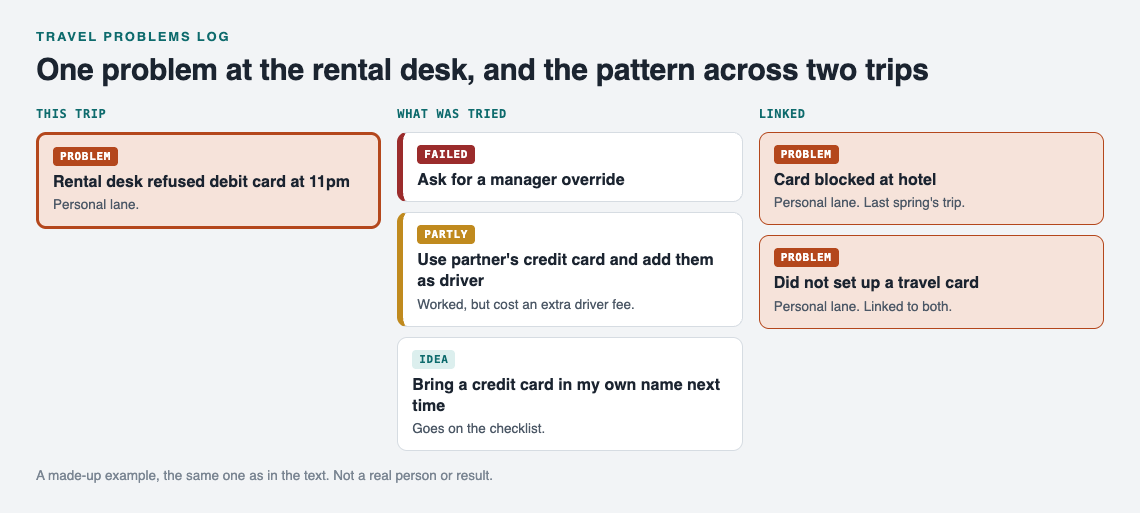
A made-up example: one problem, what was tried, and the pattern it shares with an earlier trip.
Common things that go wrong on a trip
If you are starting a log and do not know what counts, these categories cover most of it:
- Transport: missed connections, delays, strikes, the last train leaving earlier than you thought, rental car surprises.
- Money: declined cards, foreign transaction fees, no cash where cash was needed, tipping confusion.
- Accommodation: wrong location, noise, late check in rules, a missing booking.
- Gear: wrong plug adapter, dead power bank, no rain jacket, shoes that blistered.
- Documents: passport expiry rules, visa forms, printed versus digital tickets.
- Health and comfort: jet lag, food issues, forgetting regular medication. Record what happened and what you did; the log is a record, not medical advice.
- People: mismatched plans with travel companions, someone always late, nobody holding the booking confirmation.
Car trips have their own set. If you drive a lot, a separate car problems log for faults and fixes pairs well with your travel log, and you can link the two when a breakdown ruins a trip.
How to log problems while you are still traveling
The best time to write a problem down is right after it happens, while you still remember the details. Waiting until you get home means you remember the stress and forget the cause.
A few habits help:
- Write the one line immediately. Do not try to explain. "Taxi from airport overcharged" is fine.
- Add solutions as you try them. Mark the one you are trying now. Fill in the outcome when you know it.
- Do not judge the problem's size. Small things like "no hooks in the bathroom" add up over many trips.
- Keep it on your phone. Problem Graph runs in your web browser and works on your phone, so you can open it at the gate or on the bus. Your private problems are saved to your account and follow you to any phone or computer you log in on.
Private is the default. Nobody else sees what you write unless you choose to share it, so you can be blunt about the friend who forgot the tickets.
Reviewing your log after the trip to find patterns
When you get home, spend fifteen minutes with the log. Look at each problem and ask two questions: what caused it, and did it happen before?
This is where a map helps more than a list. In Problem Graph you can link problems that belong together, even across lanes. Link "Card declined at rental desk" on this trip to "Card blocked at hotel" from last spring, and both to a root problem like "Did not set up a travel card." The home page says it well: "Patterns show up on the map that never show up in a list."
Some patterns you might spot:
- Most of your transport problems come from connections under one hour.
- Every gear problem traces back to packing the night before.
- Every trip with a 6am flight starts with a missed breakfast and a bad mood.
The app also lets you filter by lane and by Mine, Network and All shared, and switch to a List view next to the map when you want to scan entries in order. If you like seeing everything at a glance, the approach in visual management at home applies here too.
Getting more ideas
If a problem keeps coming back and you are out of ideas, Problem Graph can show you similar problems other people have shared publicly and which of their solutions worked. You can borrow a solution into your graph with one tap, and it keeps a link back to where it came from. You can also ask for suggestions: the AI proposes new solutions grounded in what worked for others on problems like yours. Treat these as ideas to test, then record the outcome like any other solution.
Turning past problems into a better packing and booking checklist
The point of the log is the next trip. Before you book, open your past problems and turn every solution marked "worked", and every idea you added for next time, into a checklist item.
From the examples above, your checklist might grow to include:
- Bring a credit card in my own name for car rentals.
- Book connections of at least ninety minutes.
- Check the last train time from the airport before booking a late flight.
- Pack the adapter and power bank in the carry on, not the checked bag.
- Tell the bank about travel dates.
Look at the failed solutions too. They belong on a "do not bother" list. If asking for a manager override failed, you skip it next time and go straight to what works.
For group trips, you can share the useful part. In Problem Graph you mark one problem as a main node. Only a main node can be shared, and when you share it, its solutions, their outcomes and the requirements they need go with it. Create a private network, give your travel companions the invite code, and share the main node into it. Members see it; nobody else does. Keep in mind the app says anyone with the invite code can join, so only send it to people you mean to include. You stay the one who writes the log; your companions see it and tell you what changed. The same setup runs a shared band rehearsal list.
Frequently asked questions
Should I log problems during the trip or after I get home?
During the trip, if you can. Write the one line as soon as it happens and fill in outcomes later; the details you lose by waiting can be the ones that would have helped.
Can I share a travel problems log with family or travel companions?
Yes. In Problem Graph you mark a problem as a main node and share it into a private network using an invite code, and its solutions and outcomes go with it. Everything else in your graph stays private.
How detailed should each entry be?
One line for the problem and one line per thing you tried, plus whether it worked, partly worked or failed. Add more only if it would change what you do next time.
What is the difference between a travel journal and a travel problems log?
A travel journal records what you experienced. A travel problems log records what went wrong, what you tried, and what worked, so you can avoid the same trouble on the next trip.
Get started
Before your next trip, open the app at problemgraph.vlvd.net/app and write down the last thing that went wrong when you traveled. Attach what you tried and how it turned out. If you want to see how a graph looks first, the empty app offers a "Load example set" button.
Try Problem Graph: it is free, and you can look around the public network without an account. Write one problem down in a line and attach the first thing you will try.
Comments
No comments yet.
Sign in or make an account to comment.