Use cases post: show what your product is for
A use cases post shows what your product is for by walking through real jobs your reader already has, one at a time. Each one gets the problem, the steps inside your product, the result, and where it stops. A features list says what the product can do. A use case says what a person can get done with it. This guide covers how to pick those jobs, how to write each one, and how to end the post so a reader knows the next step.
If you need a place to publish it, Electrified gives you your own page where your articles live under topics you choose, so your use cases post sits next to everything else you write about your product.
What a use cases post is and why to write one
A use cases post is an article that answers one question: "What would I actually use this for?" The people who read it arrive with a job in mind, not a feature name. They want to know whether your product fits that job before they spend time on it.
A feature means little until the reader sees it attached to a problem they have. "Smart summaries" is vague. "Turn the notes from a call into a short list of action items" is concrete. The reader can picture doing it.
It is also an honest way to promote something. You show the product doing real work and you show its limits. A reader who finishes it knows whether to try it, and that answer is still useful when it is no.
Use cases vs features: how to frame what your product does
A feature is something the product has. A use case is a sentence with a person, a goal and a moment in it.
- Feature: Exports to CSV.
- Use case: A finance lead pulls last month's usage into a spreadsheet before the board meeting.
Here is a quick test. If you cannot say who does it and why, you are still describing a feature. One feature can serve several use cases, and one use case can touch several features. Write the post around the use cases, and name a feature only when a step needs it.
Technical products need this most. Your product may support an API, webhooks or tool calls, but a reader with a job to do thinks in the job, not in those words. The use case is whatever the mechanism gets done for them.
How to find the use cases your readers have
Don't guess. Collect the phrases people already use, then write toward them.
- Support questions. Every "can it do X?" email is a use case written in the customer's own words.
- Your sign-up form. If you ask "what brings you here?", read the answers and group the ones that repeat.
- How people ask. Questions often take the shape "how to [job]" or "[kind of product] for [role]". Write down the exact wording you hear.
- Your own use. Note what you open the product to do each week. You are a user too.
Keep the reader's words, not your marketing words. If people say "clean up meeting notes", don't rename it "knowledge synthesis". Then pick a few use cases that are clearly different from each other. Several that overlap read like one use case said several times.
A simple structure for each use case
Give every use case the same four parts, in the same order. A reader learns the pattern from the first one and can skim straight to the one that fits.
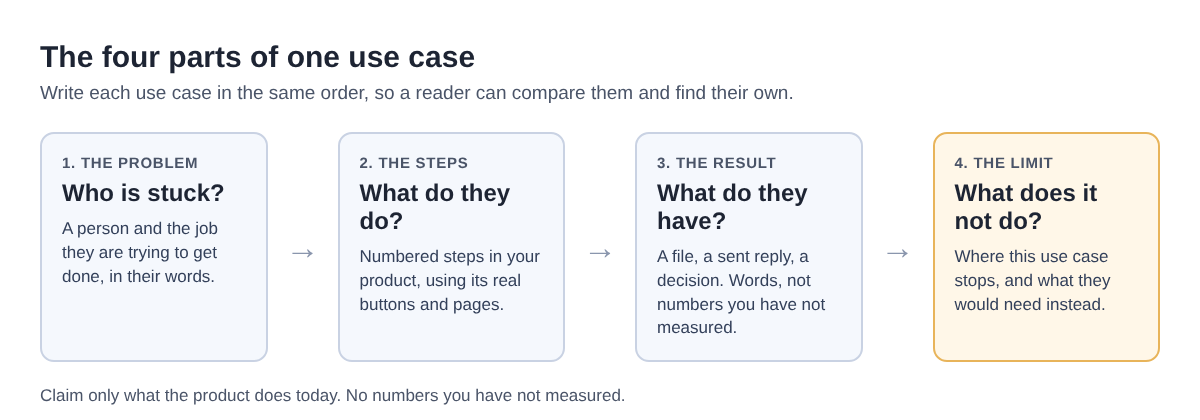
- Problem. Two or three sentences: who has it, and what it costs them in time, errors or stress. Be specific about the situation, not vague about "busy teams".
- Steps. A numbered list of what the person does in your product, using the real names of its screens and buttons. If the list grows long, it may be two use cases, or a tutorial rather than a use case.
- Result. What the person has at the end: a file, a sent reply, a decision. If you state a number, say how you measured it. If you have not measured it, describe the change in words.
- Limit. Where this use case stops, and what a reader would need instead.
On Electrified, an article can have as many sections as it needs, and you start a section with ## and a heading. So each use case becomes its own section, like ## Sort the overnight tickets, with its four parts underneath. The body box has a Preview tab that looks like the published page, so you can check that the parts line up before you publish.
A worked example: three use cases for one product
Here is the structure applied to a made-up product, Ticketwren, an assistant that reads a team's support inbox and drafts replies. Ticketwren is invented for this example, and so are its buttons. These are illustrations, not customer stories.
1. Sort the overnight tickets
Problem: A small support team starts each day with a pile of unsorted tickets and spends the first part of the morning just reading them. Steps: Connect the inbox, choose the categories, run Sort, then open the Urgent group first. Result: The team starts the day with tickets grouped by type and urgency. Limit: A person still checks the groups; a ticket can land in the wrong one.
2. Draft replies in your own tone
Problem: Replies sound different depending on who writes them. Steps: Paste a handful of past replies you like, save them as the tone sample, open a ticket, press Draft, edit and send. Result: Every reply starts from a draft in the team's voice. Limit: A person reads and sends each one; a draft can misread a customer who is joking or upset.
3. Spot repeat bugs for the product team
Problem: The same bug arrives in many tickets, each worded differently. Steps: Run the weekly grouping report, open the largest group and export it. Result: The product team gets one list per issue, with a link to every ticket in it. Limit: It groups what customers report; it does not find the cause.
Notice that every result is something the reader could check for themselves, and none claims a time saved. If you have measured one, say how. Stating the limits up front also tells a reader whose job falls outside them to look elsewhere, which saves both of you time.
If you draft with a writing assistant, Electrified's Settings can make a personal token that lets a tool save and edit drafts in your account. It cannot publish, delete, like, comment or follow, so you read the draft, fix the steps against the real product, check it in Preview and publish it yourself.
Where a use cases post leads the reader
No post can promise sign-ups. You can still make the next step plain for a reader who is ready.
- One next step per use case. After each result, link to the exact place in your product where that job starts, not only to your home page.
- Match the ask to the reader. For an open source tool, the next step may be helping rather than signing up. A call for contributors post handles that.
- Explain once, honestly. Don't post the same pitch again and again. Write the next use case as its own useful article instead.
On Electrified, links in posts open for readers, and some carry a short note such as utm_source=electrified, so your own site can tell which post sent a visitor. Most writers' links carry rel="nofollow ugc", so don't count on them for search credit. Your page has a Follow button and a feed at /@handle/feed.xml, so a reader can keep up as you add new use cases. Other posts on the Promote your work topic page show different ways people present what they make.
Frequently asked questions
How many use cases should one post cover?
Enough to show range, few enough that each gets its full four parts. Each one should be a job a different reader could recognise as theirs.
Should I write one post per use case or a single roundup?
Start with a roundup that gives each use case a short section. Then write a full post for any use case that needs many steps or draws the most questions, and link to it from the roundup.
How do I write use cases before I have customers?
Write from the jobs you built the product to do, and from your own use of it. Describe what the product does step by step, and never invent customers, quotes or results.
Can I update a use cases post when the product changes?
Yes. A published post on Electrified keeps its address and is changed with Save changes, so you can fix a step or a button name when the product moves on.
Get started
- Make an account. You pick a handle, and your page lives at
/@handle. - Open the editor, choose Article, and give it a title of up to 140 characters.
- Write one
##section per use case, each with its problem, steps, result and limit. - Add up to five topics, separated by commas.
- Press Save draft. Only you can see the post until you publish it. Check it in Preview, then press Publish.
For more on structuring posts, browse the Writing guides topic.
Make an account on Electrified: write about your product, topic or idea on your own page, one article at a time, and let readers follow along.
Comments
No comments yet.