Weekly review: close the problems you solved
A weekly review should start with one question: what got solved this week? If you skip it, your open list keeps problems you already fixed, and you stop trusting the list. This guide shows you how to run a weekly review that closes the problems you solved first, writes down what worked, and then deal with what is still open. It takes about 20 minutes. The examples use Problem Graph, a problem and solution journal that draws your problems as a map, but the routine works on paper too.
Why a weekly review should start by closing solved problems
A review that starts with planning looks ahead and adds tasks. The problems you solved on Tuesday can stay on the list, still looking open, and next week you read past them again.
Closing first fixes three things:
- Your list gets shorter before it gets longer. You see the real size of what is left.
- You catch the fix while you still remember it. By next month you may not recall which of four things actually worked.
- You notice wins. A week that felt like nothing moved may show a closed problem or two once you look.
What counts as solved: a clear closing rule
You need one rule you apply the same way every week. Here is a good one:
A problem is solved when the thing you tried worked, and you have seen it work at least once since.
"I sent the email" is not solved. "I sent the email and the invoice got paid" is solved. The test is the outcome, not the effort.
In Problem Graph this maps onto how outcomes are recorded. Every solution you attach to a problem gets an outcome: worked, partly, or failed. So in practice, closing a problem means marking the solution that fixed it as worked. Effort with no result stays as a solution you are still trying.
Three edge cases to decide once and keep:
- Partly worked. Not closed. Mark it partly, and keep the problem open with a note on what is still missing.
- The problem went away by itself. Close it, but write down that nothing you did caused it. That matters if it comes back.
- You decided not to solve it. Be honest about that. Note why and stop carrying it.
The 20-minute weekly review routine, step by step
Pick the same slot each week. Friday afternoon or Sunday evening both work. Set a timer.
Minutes 0 to 5: close what is solved
Open your problems and go through them one at a time. In Problem Graph, the List view beside the map is the fastest way to do this, and the Mine filter keeps it to your own problems. For each one, ask: did something I tried this week work? If yes, mark that solution as worked.
Minutes 5 to 10: record what worked and what failed
For every problem you just closed, make sure the winning solution is written in one plain sentence. Then check the solutions that did not work and mark them failed. More on why below.
Minutes 10 to 15: look at the map
Switch from the list to the map. You can link problems that belong together, even across lanes like personal and work. Look for two problems that keep showing up next to each other, or one solution that keeps working in different places. That pattern can be the most useful thing you get from the whole review.
Minutes 15 to 20: choose next week's tries
For each problem still open, pick one solution to try next and mark it as the one you are trying. One per problem. If you have no idea what to try, that is a sign to look outside your own graph, which the FAQ covers.
Write down what worked before you close a problem
Do not skip this step. When you solve something, the fix feels obvious. Three months later it may be gone.
A worked example. Say your problem was:
Laptop fan runs loud during video calls
During the week you tried three things:
Close browser tabs before calls: failedClean the vents: partlyLower the call video quality: worked
Do not delete the two that did not fully work. Keep them on the map with their outcomes. The Problem Graph home page puts it this way: "The graph is honest. A solution that failed three times stays on the map as a failed solution, and that is exactly what the next person needs to know." The next person may be you, when a new laptop does the same thing.
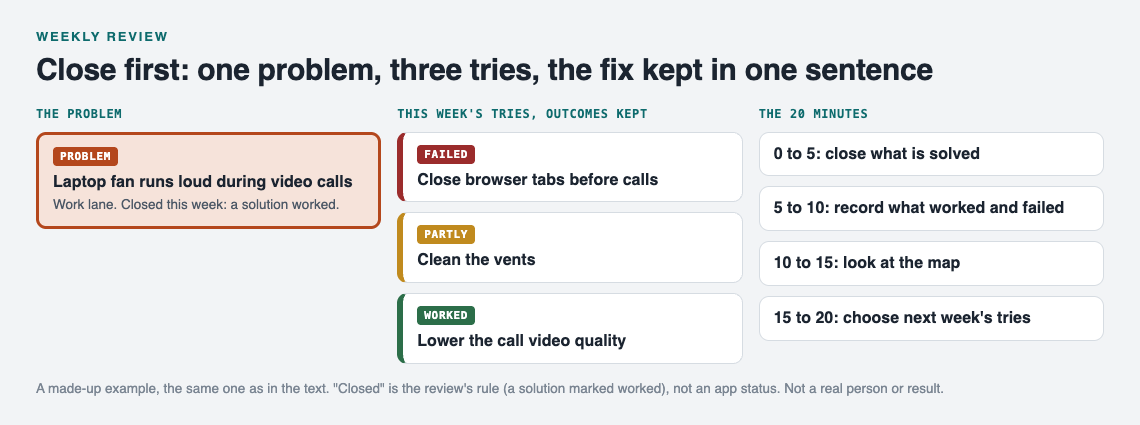
The made-up laptop fan example and the 20-minute routine.
At work, a closed problem with its failed attempts recorded is the core of good handover notes that pass on what was tried.
Prune, merge, and reopen: keep your open list honest
After closing, three smaller jobs keep the list trustworthy.
Prune
Some open problems are not problems anymore. You changed jobs, the deadline passed, or you no longer care. Write one line saying why and stop carrying it. A problem you have not touched in four reviews is a candidate.
Merge
Two entries can be the same problem in different words. "Always tired on Mondays" and "Bad sleep on Sunday nights" might be one thing. In Problem Graph you link problems that belong together, so the connection shows on the map instead of you tracking it in your head.
Reopen
Sometimes a fix stops working. Do not hide that. Add a new solution to try, and if the old one has really stopped working, mark what happened. A problem that keeps coming back may be telling you the first fix was a patch.
If you share problems with others, honesty matters even more. A household list goes stale when nobody closes things; see roommate problems on a shared list and one list for a volunteer group. In Problem Graph, you can mark one problem as a main node and share it into a private network with an invite code. Its solutions and their outcomes go along with it, so your weekly closing shows up for the people in that network.
Weekly review template you can copy
Copy this into a note or keep it next to your graph. Run it in order.
- Close. For each open problem: did a solution work this week? If yes, mark it worked.
- Record. For each closed problem, write the fix in one sentence. Mark any solutions that failed as failed. Mark half fixes as partly.
- Count. How many problems did I close? Write the number down.
- Prune. Which open problems no longer matter? Note why and let them go.
- Merge. Which problems are really the same, or keep appearing together? Link them.
- Reopen. Did any closed problem come back? Add a new solution to try.
- Look. On the map, what pattern do I see that I did not see in the list?
- Choose. For each open problem, pick one solution to try next week.
Frequently asked questions
How long should a weekly review take?
Aim for about 20 minutes. If it takes much longer, your open list is too long and the prune step needs more attention. If it takes five minutes, check that you are actually recording what worked.
What if a problem is only partly solved?
Keep it open. Mark the solution as partly, and write what is still missing in one line. Next week, pick a second solution to try alongside the partial one.
Should I delete closed problems or archive them?
Keep them. A closed problem with its working fix and its failed attempts is the most useful thing in your journal, because it answers "what did I do last time?" In Problem Graph, closed problems stay on the map with their outcomes, which is what makes patterns visible later.
Can I plan next week in the same review?
Yes. Close problems first, then plan tasks. Planning goes faster once the list shows only what is really open.
Get started
Your first review is easier if you start with a few problems already written down. Open the app, write one problem in a line, and press Enter. It lands on the graph right away. Put it in a lane: personal, work, expert, or scientific. Add the solutions you tried this week and mark each one worked, partly, or failed.
If an open problem has you stuck, two things can help during the "choose" step. Problem Graph can show similar problems other people have shared publicly and which of their solutions worked, and you can borrow one into your own graph with one tap. It keeps a link back to where it came from. You can also ask for suggestions: the AI proposes new solutions grounded in what worked for others on problems like yours. Treat those as ideas to test, then record the outcome like any other try.
Your problems are private by default. Only you see them, and they follow you to any phone or computer you log in on. It runs in your browser, so you can do the review wherever you are.
Try Problem Graph: it is free, and you can look around the public network without an account. Write one problem down in a line and attach the first thing you will try.
Comments
No comments yet.
Sign in or make an account to comment.