What does a kernel do in an operating system?
You see the word in update notes, in error messages and in talk about phones and servers: the kernel. So what does a kernel do? In short, it is the part of the operating system that runs the computer itself. It decides which program gets the processor and when, keeps programs out of each other's way, and is the only part allowed to talk to the hardware directly.
This guide explains each of those jobs in plain words, using the operating system entry in the glossary of the US National Institute of Standards and Technology (NIST) and Microsoft's documentation on how Windows runs code. It ends with the free browser game Tank City Reboot, whose last stage is named after the kernel.
The operating system and its core
NIST's glossary describes an operating system as a collection of software that manages a computer's hardware and provides common services for programs. It is the first program loaded when the computer is turned on. NIST adds the detail that matters here: its principal component, the kernel, stays in memory at all times.
That last point tells you how central the kernel is. Other parts of the operating system, like the settings app or the file browser, start and stop like any program. The kernel never leaves. Everything else depends on it being there.
What does a kernel do? Three main jobs
NIST lists the work an operating system may do as input and output control, resource scheduling and data management. The kernel is where most of that happens. It helps to think of three jobs.
- Sharing the processor. Many programs want to run at once, but a processor core runs one thing at a time. The kernel decides who goes next.
- Keeping programs apart. Each program gets its own space in memory, and the kernel stops one program from reading or changing another's.
- Talking to the hardware. Programs do not drive the disk, the screen or the network themselves. NIST notes that applications go through the operating system for most screen and file work, and the kernel, with its drivers, does the hardware side.
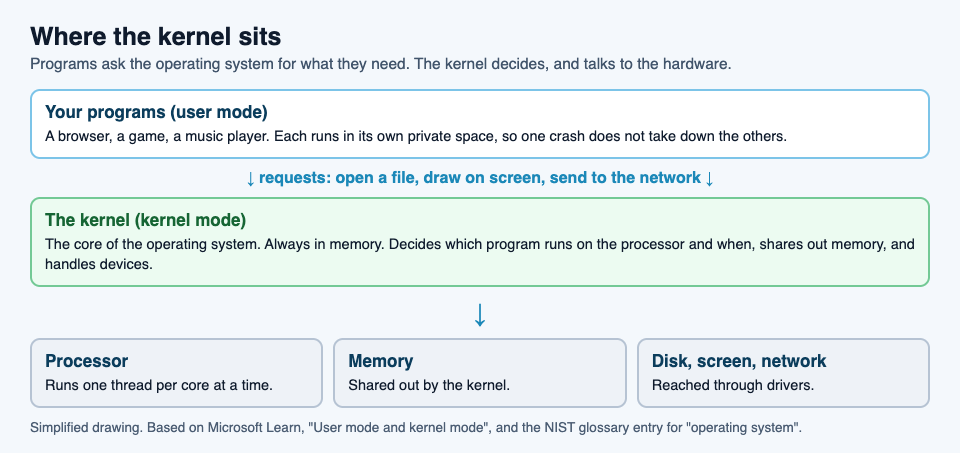
User mode and kernel mode
How does the kernel enforce those rules? The processor itself helps. Microsoft's guide to user mode and kernel mode explains that a processor running Windows works in two modes and switches between them depending on the code it is running.
- User mode is where applications run. When you start a program, Windows creates a process for it with a private virtual address space, its own view of memory. A program in user mode cannot reach addresses reserved for the operating system.
- Kernel mode is where the core of the operating system runs, along with many drivers. Code here can reach everything.
The point of the split is simple: ordinary programs get a fenced-off area, and only trusted core code gets the keys to the whole machine.
Why one crash does not take everything down
The split has a very visible effect. Microsoft notes that because each application's memory is private, one application cannot change another's data, and if an application crashes, it does not affect other applications or the operating system. That is why a browser tab or a game can freeze and close while the rest of your computer carries on.
Kernel mode has no such fence. Microsoft points out that a driver running in kernel mode is not isolated from other drivers or the operating system, and if it crashes, the entire operating system crashes. This is why a faulty driver can take the whole computer down, while a faulty app usually takes down only itself. It is also why updates to the kernel and drivers are treated with extra care.
A worked example: music and a browser on one core
Say you are listening to music while reading a web page, and, to keep it simple, your computer has a single processor core. Here is what the kernel does.
- Both programs are ready. The music player and the browser each have work to do, but the core can run only one at a time.
- The kernel picks one. It lets the music player run for a short time slice. Microsoft's page on multitasking gives about 20 milliseconds as a typical length, though it depends on the system and processor.
- Time is up. When the slice ends, the kernel pauses the music player and saves its context, the exact state it was in.
- The next one runs. The kernel restores the browser's saved context and lets it run for its own slice.
- Repeat. Back and forth, many times a second. Because each slice is so short, both programs appear to run at the same time, and the music never stutters.
- The browser asks for something. To load an image from disk, the browser does not touch the disk. It asks the operating system, and the kernel, through the disk's driver, fetches the data and hands it back.
If the browser crashes at step 6, the music keeps playing: the two lived in separate memory, and only the kernel ever had the keys to both.
Learn the idea by playing: Tank City Reboot
In Tank City Reboot, your antivirus tank guards a CPU core at the bottom of a circuit board, and every stage is named for a real computing idea. Stage 6, the last before the stages loop with faster enemies, is called KERNEL. It opens with this fact: "The kernel is the core of an operating system. It decides which program runs on the processor, and when."

The other five stages follow the same pattern, from FIREWALL and CACHE to COOLANT, ENCRYPTION and DATA BUS, so a full run walks you through the parts of a computer one sentence at a time. The second game, Tank City Zero Day, adds upgrades named for ideas like multithreading and sandboxes.
A game gives you the word and one true line about it. It is not a course in operating systems. If you want more of the security side, our guides to the types of malware and zero-day flaws pick up where the game leaves off.
Frequently asked questions
What does a kernel do in simple terms?
It is the core of the operating system. It decides which program runs on the processor and when, keeps programs in separate memory, and handles the hardware on their behalf.
Is the kernel the same as the operating system?
No. The kernel is the principal part of the operating system, and the one that stays in memory at all times. The operating system also includes other programs and services built on top of it.
What is the difference between user mode and kernel mode?
Applications run in user mode, each in its own private memory, and cannot reach the operating system's memory. Core operating system code runs in kernel mode and can reach everything.
Why can a bad driver crash the whole computer?
Many drivers run in kernel mode, where code is not isolated. If one of them crashes, the whole operating system crashes with it.
Get started
Play Tank City Reboot: it is free, plays in your browser on a computer or a phone, and needs no account. Clear the first five stages and read the KERNEL fact when stage 6 begins.
Comments
No comments yet.
Sign in or make an account to comment.