What is a backup? The 3-2-1 rule and how to restore
What is a backup? It is a second copy of your files, kept somewhere other than the original, so you can get them back after a loss. A dead drive, a stolen laptop, a deleted folder or a ransomware attack can each wipe out the original. A good backup turns that from a disaster into an afternoon of copying files back. This post explains the kinds of backup, the 3-2-1 rule, and a plan you can set up for one computer.
What is a backup? The plain definition
NIST's glossary defines a backup as "a copy of files and programs made to facilitate recovery if necessary." Wikipedia's Backup article adds the part people forget: the copy is "taken and stored elsewhere so that it may be used to restore the original after a data loss event."
Two words carry the meaning: elsewhere and restore. A copy in the same folder is not a backup, because whatever deletes the original can delete the copy. And a copy you cannot restore from is not a backup either, just a file you hope is fine.
Wikipedia also notes the small grammar point that trips people up: "back up" is the verb, and "backup" is the noun. You back up your files, and the result is a backup.
Full, incremental and differential backups
Copying everything every day is slow and fills drives fast. So backup tools usually mix three kinds of copy, all described in Wikipedia's article.
- Full backup. A complete copy of everything. It is the reference point the others build on.
- Incremental backup. Only the data changed since the last backup of any kind. Each one is small. To restore, you start from the last full backup and then apply every incremental in order.
- Differential backup. Only the data changed since the last full backup. Each one grows over time, but a restore needs at most two pieces: the full backup and the latest differential.
The trade is simple. Incrementals are quick to make and slower to restore. Differentials are slower to make and quicker to restore. Most home tools pick for you, and that is fine. What matters more is where the copies live.
The 3-2-1 rule
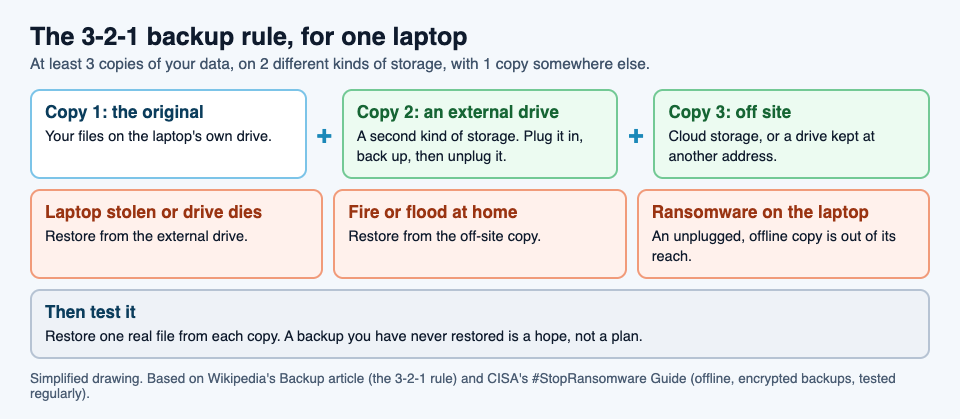
The best-known rule of thumb is short. Wikipedia states it as: keep "at least 3 copies of the data, stored on 2 different types of storage media, and one copy should be kept offsite, in a remote location (this can include cloud storage)."
- 3 copies means the original plus two backups.
- 2 kinds of storage means the copies do not all share the same weakness. Wikipedia's reason: different media help "eliminate data loss due to similar reasons."
- 1 off site means a fire, flood or burglary at home cannot take every copy at once.
Why a backup has to be offline
A backup that is always plugged in has a weakness. CISA, the US cybersecurity agency, explains it in its #StopRansomware Guide: "many ransomware variants attempt to find and subsequently delete or encrypt accessible backups to make restoration impossible unless the ransom is paid."
So CISA's advice is to "maintain offline, encrypted backups of critical data, and regularly test the availability and integrity of backups." Each word answers a risk.
- Offline, so ransomware on your computer cannot reach it.
- Encrypted, so a lost or stolen backup drive does not leak your files.
- Tested, so you find out the backup is broken before the day you need it.
A worked example: a backup plan for one laptop
Here is a plan you can set up in an afternoon. It follows the 3-2-1 rule and CISA's three words.
- List what you cannot replace. Photos, schoolwork, documents, saved game folders. Programs can be reinstalled; your own files cannot.
- Copy 1 is the original. It stays on the laptop.
- Copy 2: an external drive. Use your system's own backup tool to make a full backup to it. Choose the option to encrypt the backup if the tool offers one. When it finishes, unplug the drive. That makes it offline.
- Copy 3: off site. Use a cloud storage service, or a second drive you keep at a relative's home or at work and swap every month or so.
- Set a rhythm. Plug in the external drive once a week and let the tool add what changed. That is an incremental or differential backup, depending on the tool.
- Test a restore. Pick one real file, rename the original, and restore it from each copy. Open it. If it opens, your backup works. Wikipedia mentions checksum checks for confirming that data was copied accurately; opening a restored file is the home version of that check.
- Write it down. Note where each copy is and how to restore. In a bad week, you will not want to work it out from scratch.
That is three copies, two kinds of storage (the laptop's drive and the external drive, plus the cloud), one copy off site, an offline copy, and a tested restore.
What a backup is not
A few things feel like backups but do not do the job on their own.
- RAID is not a backup. RAID keeps a computer running when one disk fails. But Wikipedia's RAID article notes that the whole array "is at risk of physical damage by fire, natural disaster, and human forces," while backups can be stored off site.
- A copy that is always connected can be found and encrypted by ransomware, as CISA warns.
- A copy you have never restored is unproven until you test it, which is why CISA advises testing backups regularly.
Learn the idea by playing: the Backup power-up
Tank City Reboot is a free tank game set inside a computer, where every power-up and enemy is named for a real idea. In the first game, the Backup power-up gives you one extra life. The card under the game gives the real idea: "A backup is a copy of your data kept somewhere else, so you can restore it after a loss."
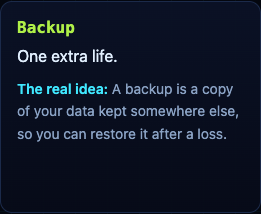
It is a neat match: a backup is a second chance, and so is an extra life. In Tank City Zero Day, the second game, the same thinking appears as upgrades. RAID adds one point of core integrity and repairs the core fully, and Two-factor gives one extra life.
The game teaches one sentence per name. It is not a security course and it does not back up your files. It is a quick way to meet the idea before you set up the real thing.
Frequently asked questions
What is a backup in simple words?
A backup is a copy of your files kept somewhere else, so you can get them back if the originals are lost, deleted or locked by ransomware.
What is the 3-2-1 backup rule?
Keep at least 3 copies of your data, on 2 different kinds of storage, with 1 copy off site. Cloud storage can count as the off-site copy.
How often should I test my backup?
CISA advises testing backups regularly. A simple habit is to restore one real file from each copy every time you change your setup, and now and then in between.
Is RAID the same as a backup?
No. RAID keeps a computer running through a disk failure, but fire or theft can take the whole array at once. A backup is a separate copy kept elsewhere.
Get started
Play Tank City Reboot: it is free, plays in your browser on a computer or a phone, and needs no account. Grab the Backup power-up for an extra life, then go make a real backup of your own files.
Comments
No comments yet.
Sign in or make an account to comment.