What is ransomware and how does it work?
One morning the files on a computer will not open, and a note on the screen demands payment to get them back. That is ransomware at work. So what is ransomware, exactly? It is malicious software that scrambles the files on a device so they cannot be used, then demands a ransom for the key that unscrambles them. Increasingly, the attackers also threaten to leak what they stole.
This guide explains how ransomware works, why paying is a gamble, and what actually protects you, using the #StopRansomware pages of the US Cybersecurity and Infrastructure Security Agency (CISA). It ends with the free browser game Tank City Reboot, where ransomware is an enemy and a backup is a power-up.
What is ransomware? CISA's definition
CISA's Ransomware 101 page describes ransomware as an ever-evolving form of malware designed to encrypt files on a device, making those files, and the systems that rely on them, unusable. The attackers then demand a ransom in exchange for decryption.
Encryption is the heart of it. Encrypted data looks like random noise to anyone who does not hold the key. Your files are still on the disk, but without the key they are useless, and the attackers hold the only copy of it.
Ransomware is one member of a larger family. If you want the bigger picture first, our guide to the types of malware explains how it differs from worms, trojans, spyware and rootkits.
How ransomware works, step by step
CISA's Ransomware FAQs describe the tactics. Put in order, an attack usually looks like this:
- Getting in. CISA's advice to never click links or open attachments in unexpected emails, and to keep software patched, points to the usual doors: tricking a person, or using a hole that was never fixed.
- Spreading. Once inside an organization, attackers move from machine to machine to reach important data and spread the ransomware across whole networks.
- Removing the way back. CISA notes that attackers increasingly delete system backups, to make recovery harder or impossible.
- Encrypting and demanding. The files are locked and a ransom note appears.
- Adding pressure. Attackers threaten to release stolen data, and sometimes name and shame victims publicly.
Who is at risk
News stories focus on hospitals, cities and big companies, and CISA notes that attacks on governments and critical services have become more common. But its answer to "who is at risk?" is broader: anyone with a computer connected to the internet. A family laptop, a school's shared drive and a small shop's till are all targets of the same software.
Why paying is a gamble
When the files you need are locked, paying can look like the fast way out. CISA is blunt about it: some victims pay to recover their files, but there is no guarantee that they will get them back if they do.
Paying also does nothing about the other half of the threat. If the attackers copied your data before encrypting it, they still have that copy. That is why prevention, and above all a backup the attackers cannot reach, matters more than any decision made after the note appears.
A worked example: one laptop, two endings
Here is how the same attack plays out for one household, depending on a single choice made months earlier.
- The email. A message arrives that looks like a delivery notice, with an attachment. Someone opens it.
- The infection. The attachment carries ransomware, which starts encrypting photos, schoolwork and documents.
- The note. The next time anyone sits down, the files will not open, and a note demands payment.
- Ending A: the backup drive was plugged in. It was connected all the time for convenience, so the ransomware reached it too. Now the only copies are locked, and the family faces the gamble of paying.
- Ending B: the backup was offline. The family followed CISA's advice to back up regularly on a separate device and store it offline. The drive sat in a drawer, untouched. Once the laptop has been cleaned or reset, they copy their files back from it.
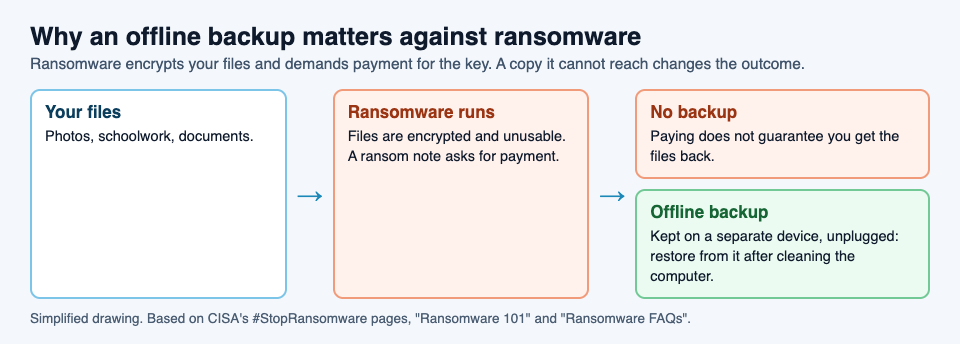
Ending B still costs a bad day, and anything saved since the last backup is lost. But the attackers' main lever is gone. That is the whole case for keeping a backup offline.
How to protect yourself
CISA's precautions for everyone come down to three habits:
- Update software and operating systems with the latest patches, which close holes attackers use to get in. Our guide to zero-day flaws and patches explains why updates matter.
- Never click links or open attachments in unsolicited emails.
- Back up regularly, keep the copy on a separate device, and store it offline.
For organizations, CISA adds more: give each user only the permissions they need, allow only approved programs to run, use strong spam filters, and set firewalls to block known malicious addresses. None of these makes anyone untouchable, but together they make an attack harder to start and easier to recover from.
Learn the idea by playing: Tank City Reboot
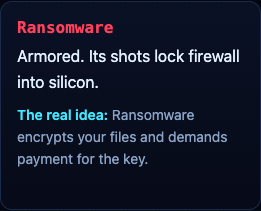
Tank City Reboot has two original tank games set inside a computer, with every enemy, power-up and wall named for a real computing or security idea. In the second game, Tank City Zero Day, Ransomware is an armored tank whose shots lock firewall into silicon, much as the real thing locks your files. Its card says, "Ransomware encrypts your files and demands payment for the key."
The first game has the other half of the lesson: a Backup power-up that gives you one extra life. Its card puts the idea simply: "A backup is a copy of your data kept somewhere else, so you can restore it after a loss."
A game teaches the words and one idea each. It is not a security course, and it does not protect a computer. Your real backup does that.
Frequently asked questions
What is ransomware in simple words?
Malicious software that encrypts the files on a device so they cannot be used, then demands payment for the key. Attackers often also threaten to leak data they stole.
Should I pay a ransomware demand?
CISA warns that paying gives no guarantee you will get your files back, and it does not undo any theft of your data. An offline backup is the reliable way to recover.
Can ransomware encrypt my backup?
Yes, if the ransomware can reach it. CISA notes that attackers increasingly delete backups, which is why it advises keeping one on a separate device, stored offline.
Who gets hit by ransomware?
Anyone with a computer connected to the internet, according to CISA, from families to hospitals and governments.
Get started
Play Tank City Reboot: it is free, plays in your browser on a computer or a phone, and needs no account. Grab the Backup power-up when it appears, then make a real backup of your own files.
Comments
No comments yet.
Sign in or make an account to comment.