What is a CPU core? Cores and threads made plain
Spec sheets for laptops and phones list "cores" and "threads" as if everyone knows what they mean. So what is a CPU core? It is one complete processing unit inside the processor chip: a small engine that reads a program's instructions one after another and carries them out. A chip with four cores holds four of these engines, and they can work at the same moment.
This guide explains the hardware side: what one core does, what "threads" means on a spec sheet, and why more cores do not always mean faster. For the software side, read our simple explanation of multithreading.
What is a CPU core?
Start with the CPU, the central processing unit. Wikipedia's Central processing unit article describes it as the circuitry that executes the instructions of a computer program. Its main parts are an arithmetic-logic unit (ALU), which does the sums and comparisons, a set of registers, which are tiny storage spots for the numbers being worked on, and a control unit that directs the rest.
Today most chips hold several of these units. The same article says that chips with more than one CPU on them are called multi-core processors, and each of the individual CPUs is called a core.
So each core is a full CPU in its own right, and the chip is the package that holds them all.
What one core does: fetch, decode, execute
Every core repeats the same three steps from the moment the computer starts until it shuts down. Wikipedia calls this the instruction cycle, or the fetch-decode-execute cycle.
- Fetch. A register called the program counter holds the memory address of the next instruction. The core reads that instruction from memory, and the counter moves on to the one after it.
- Decode. The instruction decoder turns the instruction into signals that switch on the parts of the core that are needed.
- Execute. Those parts do the work. For an addition, the two numbers flow from registers into the ALU, the sum appears at its output, and it is usually written back to a register for the next instruction to use.
Two details make real cores faster than this simple loop. First, fetching from main memory is slow and can leave the core waiting, which is why chips keep a cache close to each core. Our guide on how a CPU cache works covers that. Second, most modern cores use a pipeline: the next instruction starts before the last one has finished, because the cycle is broken into separate steps.
A core's clock sets its pace: the faster the clock, the more instructions per second. That is why a hot chip that lowers its clock slows down, as our post on thermal throttling explains.
Many cores on one chip
Wikipedia's Multi-core processor article defines it as a single chip with two or more separate CPUs, called cores. Each core reads and executes its own instructions. Because there are several, the chip can run instructions on separate cores at the same time. That is real parallel work, not taking turns.
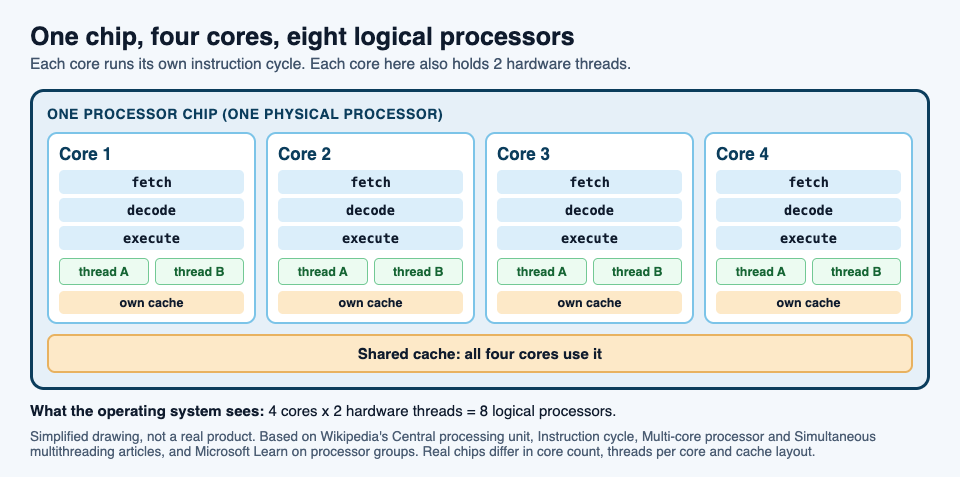
The cores are not fully separate, though. The Central processing unit article explains that each core usually has its own cache, while a larger cache further out is shared between all the cores. The cores also have to talk to each other, and that takes some of their time.
Hardware threads and logical processors
Now the second number on the spec sheet. A chip may list more threads than cores, often twice as many. These are hardware threads, and the most common way to build them is called simultaneous multithreading.
The idea is that one core keeps track of two (or more) streams of instructions at once. Wikipedia explains that the core needs only a few additions for this: the ability to fetch instructions from more than one thread in a cycle, and extra registers to hold each thread's numbers. Two threads per core are common.
Why bother? A core often sits idle while it waits for data from memory. With a second thread loaded, it can work on that thread during the wait. Wikipedia sums it up: in most cases it is about hiding stalls during slow activities such as memory access.
The catch is that both threads share one core's parts, so two hardware threads are not two cores. When both want the same part, one waits.
Your operating system counts each hardware thread as a separate processor. Microsoft's page on processor groups gives the plain definitions:
- A physical processor is the chip in its socket, and it can hold one or more cores.
- A core is one processor unit, which can consist of one or more logical processors.
- A logical processor is one computing engine as the operating system and programs see it.
So a chip with 4 cores and 2 hardware threads per core shows up as 8 logical processors.
Why more cores do not always mean faster
Extra cores only help if a program has work it can split. The Multi-core processor article is direct about this: the gain depends on the software, and it is limited by the share of the work that can run in parallel. That limit has a name, Amdahl's law.
Amdahl's law says the improvement from speeding up one part of a job is limited by how much of the time that part is used. For cores, the formula becomes: speedup = 1 / ((1 - p) + p / N), where p is the share of the job that can be split, and N is the number of cores.
A worked example: one job on 1, 2, 4 and 8 cores
Wikipedia gives a program that first scans a folder to build a list of files, which cannot be split, then hands each file to a separate thread, which can. Let us put numbers on it.
Say the whole job takes 100 seconds on one core. The scan takes 10 seconds and the file work takes 90. So p is 0.9.
- 1 core: 10 + 90 = 100 seconds. Speedup 1.
- 2 cores: 10 + 90 / 2 = 55 seconds. Speedup 1 / (0.1 + 0.45) = about 1.8.
- 4 cores: 10 + 90 / 4 = 32.5 seconds. Speedup 1 / (0.1 + 0.225) = about 3.1.
- 8 cores: 10 + 90 / 8 = 21.25 seconds. Speedup about 4.7.
- Any number of cores: the file work shrinks toward zero, but the 10-second scan stays. The job can never take less than 10 seconds, so the speedup can never pass 10.
Look at what each doubling buys. Going from 1 to 2 cores saves 45 seconds. Going from 4 to 8 saves only about 11. Wikipedia calls this diminishing returns: for a job of fixed size, each added processor adds less than the one before.
Real programs do a little worse than the formula, because cores spend time talking to each other.
How to see your own cores
- On Windows, open Task Manager. Microsoft names it as a program that displays the workload of each processor in the system.
- On Linux, the kernel's page on CPU topology explains that the details live in files under
/sys/devices/system/cpu/. The file/sys/devices/system/cpu/onlinelists the CPUs that are online and being scheduled, in a short form such as0-1,3. Each foldercpu0,cpu1and so on has atopologyfolder with details on how that logical processor fits into its core and its chip.
Twice as many logical processors as cores means hardware threads are at work.
The CPU core in Tank City Reboot
In Tank City Reboot, a free browser game, the CPU core is the thing you defend. Your antivirus tank guards the CPU core at the bottom of a circuit board. Twenty malware tanks come at it each stage, four at a time, and your goal is to destroy all 20 before any of them hits the core.
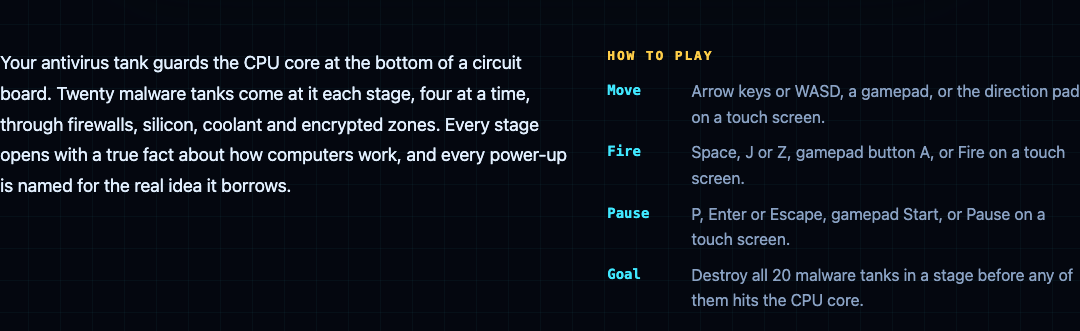
In Tank City Zero Day, the second game, you guard the same core. It has an integrity that starts at 3 and can rise to 5, and the run ends when that integrity or your last tank is gone. The RAID upgrade gives the core +1 integrity and repairs it fully, and Hot patch makes the core's wall silicon every wave. The Multithreading upgrade gives you more shots per volley, in a spread, and its card says: "Several threads let one program do several things at once."
The game teaches each idea in one sentence. It is a game, not a computer course.
Frequently asked questions
Is a core the same as a CPU?
Each core is a complete CPU. The chip that holds several cores is also called the CPU or processor, which is why the words get mixed up.
What is the difference between cores and threads?
A core is a physical processing unit. A hardware thread is one stream of instructions that a core keeps track of, and a core with two of them shows up as two logical processors while still sharing one set of parts.
Do more cores make games and apps faster?
Only for work the program can split. By Amdahl's law, the part that cannot be split sets a limit no number of cores can beat.
Does a single-core computer run only one program?
No. One core runs one stream of instructions at a time, but Microsoft explains that the operating system gives each thread a short time slice, about 20 milliseconds, so they appear to run at the same time.
Get started
Play Tank City Reboot: it is free, plays in your browser on a computer or a phone, and needs no account.
Comments
No comments yet.
Sign in or make an account to comment.