What is a data bus in a computer?
Computing lessons and spec sheets talk about buses, 32-bit and 64-bit systems, and data moving "over the bus" as if everyone knew what that meant. So what is a data bus? A bus is the set of shared lines that carries data between the parts of a computer: the processor, the memory and the devices. The data bus is the part of it that carries the values themselves.
This guide explains buses in plain words, following the Wikipedia article on the bus in computing), with one worked example of a memory read. It ends with the free browser game Tank City Reboot, where DATA BUS is both a stage and a kind of ground your tank drives on.
What a bus is
Wikipedia describes a bus, once also called a data highway or databus, as a communication system that transfers data between components inside a computer. At its core it is a shared physical pathway, usually wires or copper traces on a circuit board, that lets several devices talk to each other.
The key word is shared. Many parts use the same lines, so they cannot all send at once. Wikipedia explains that buses use arbitration, a set of rules that decides which device may transmit at any moment. This is different from a network, which sends addressed packets through switches.
Buses come in kinds, by role. The system bus, also called the memory bus or internal data bus, connects the processor and memory. Other buses connect devices: Wikipedia names PCI Express for fast connections inside the computer and USB for connecting things from outside.
What is a data bus? Address, data and control
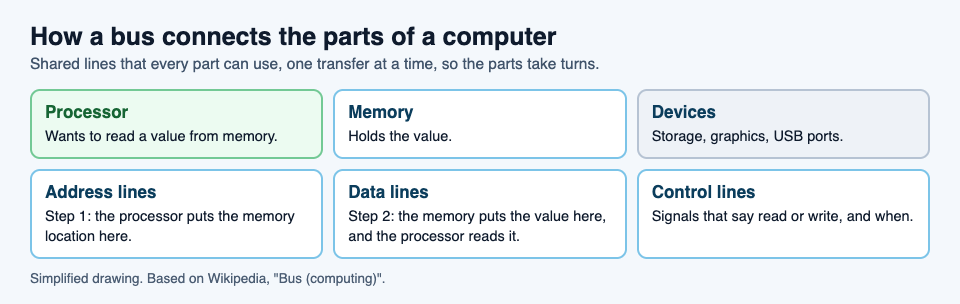
A bus between the processor and memory does three jobs, and it helps to think of each as its own set of lines.
- The address bus says where. Wikipedia explains that when a processor needs to read or write a memory location, it puts that location on the address bus.
- The data bus carries what. The value being read or written travels on the data bus.
- The control bus says how and when. It carries signals such as whether this is a read or a write. Wikipedia gives two examples used with main memory, RAS and CAS, which tell the memory chips which half of an address is being sent.
Bus width, and what 32-bit really limited
The width of a bus is the number of bits it can move in one clock cycle. On early processors this was literally the number of wires: Wikipedia notes that a 16-bit address bus had 16 physical wires.
Width matters most on the address bus, because it decides how much memory the processor can reach. Each extra address line doubles the number of locations. Wikipedia works through the famous case: a 32-bit address bus can name 4,294,967,296 memory locations, which, if each location holds one byte, is about 4 GB. That is the arithmetic behind the often-quoted 4 GB limit of 32-bit addressing: a 32-bit address simply has no way to name a location beyond the last one.
The data bus has a width too. A wider data bus moves more bits in each transfer, so the processor can fetch a whole word, several bytes, at once instead of one byte at a time.
Parallel and serial buses
Older buses were mostly parallel: many wires side by side, each carrying one bit of a word at the same time. Wikipedia explains that as speeds rose, parallel buses ran into trouble. Signals on neighboring wires arrive at slightly different times, called timing skew, and interfere with each other, called crosstalk.
Serial buses send bits one after another on fewer lines. That sounds slower, but because a serial bus avoids skew and crosstalk, it can often run at higher overall data rates than a parallel one. USB and Serial ATA, used for storage drives, are examples. Modern computers use both kinds, each where it fits.
One more idea worth knowing is direct memory access, or DMA. Wikipedia explains that it lets devices move data straight to and from memory over the bus without the processor handling each transfer, which leaves the processor free for other work.
A worked example: one memory read, step by step
Say a program needs a number stored in memory. Here is what happens on the bus, in the order Wikipedia describes.
- Take a turn. The processor gets the right to use the shared lines. Other devices wait their turn, which is what arbitration is for.
- Say where. The processor puts the memory location of the number on the address bus.
- Say what kind. The control lines signal that this is a read, not a write.
- Answer. The memory finds that location and puts its value on the data bus.
- Collect. The processor reads the value off the data bus, and the bus is free for the next transfer.
A write is the same dance with the data flowing the other way: the processor puts both the address and the value on the bus, and the memory stores it. And if a device such as a storage drive uses DMA, it can run this sequence with memory itself while the processor does something else.
Learn the idea by playing: Tank City Reboot
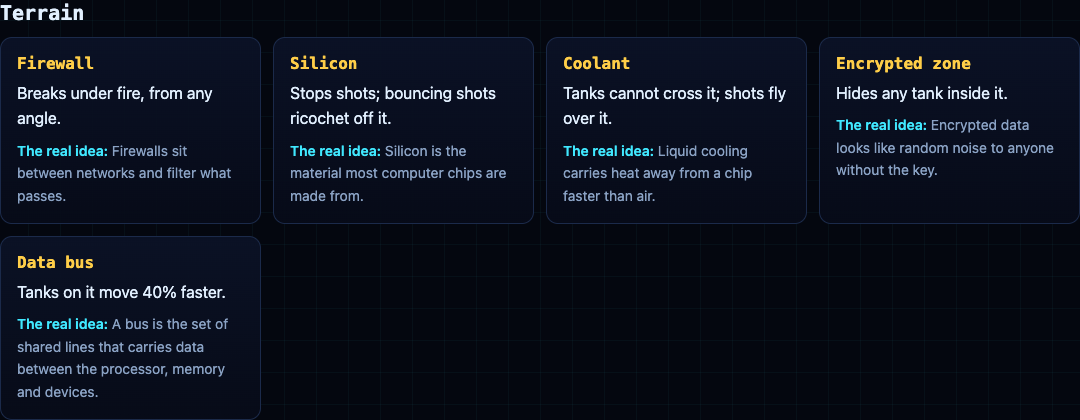
Tank City Reboot is a tank game set inside a computer: your antivirus tank guards the CPU core on a circuit board, and every stage, enemy and wall is named for a real computing idea. The fifth stage is DATA BUS, and it opens with this fact: "A bus is the set of shared lines that carries data between the processor, memory and devices."
Data bus is also a kind of ground on the map. In the first game it is slippery, so tanks slide before they stop. In the second game, Tank City Zero Day, tanks on it move 40% faster, a fair picture of a fast lane for data.
A game gives one true sentence per idea. It is not a computer science course. For more ideas from the same stages, read our guides on the retro tank game and the types of malware.
Frequently asked questions
What is a data bus in simple terms?
The set of shared lines that carries data between the processor, memory and devices. The address lines say where, the data lines carry the value, and the control lines say read or write.
What is the difference between the address bus and the data bus?
The address bus carries the memory location. The data bus carries the value stored there, or the value being written.
Why does 32-bit addressing stop at about 4 GB?
A 32-bit address bus can name 4,294,967,296 locations. If each holds one byte, that is about 4 GB, and a 32-bit address cannot name anything beyond that.
Is USB a bus?
Yes. Its name stands for Universal Serial Bus, and Wikipedia gives it as a widely used example of a bus for connecting external devices.
Get started
Play Tank City Reboot: it is free, plays in your browser on a computer or a phone, and needs no account. Reach the DATA BUS stage and learn to steer on the slippery ground.
Comments
No comments yet.
Sign in or make an account to comment.