What is a hot patch? Fixing software without a restart
Most updates end the same way: save your work, close everything, restart. For one laptop that costs a few minutes. For a server that many people depend on, a restart means downtime, so updates get put off, and a known security hole stays open longer. So what is a hot patch? It is a fix applied to software while it is still running, with no restart. The code in memory is changed in place, and every task carries on.
This guide explains how hot patching works, using Microsoft's documentation for Windows Server and the Linux kernel's own documentation. It ends with the free browser game Tank City Zero Day, where Hot patch is an upgrade that rebuilds your defences every wave.
What is a hot patch? The plain answer
A patch is a fix for a problem in software, such as a security hole; our guide to what a software patch is covers the basics. A normal patch replaces program files on disk. The new code only takes effect once the program, or the whole machine, restarts and loads those files again.
A hot patch skips the restart. Microsoft's page on Hotpatch for Windows Server says it plainly: hotpatching patches the in-memory code of running processes without the need to restart the process. The fix lands in the copy of the program that is already running.
You may also see the word hotfix. Wikipedia's entry on the hotfix describes an update released outside the normal update cycle, or meant for a live system, often to fix a bug. The two words overlap, but a hotfix is about timing, and a hot patch is about installing without a restart.
Why a restart is the problem
The Linux kernel's documentation on livepatching opens with the reason it exists. There are many situations where people are reluctant to reboot a system: it may be running complex scientific computations, or be under heavy load at peak hours. Yet those same people want a stable and secure system.
A restart forces a choice between the two. Patch now and interrupt the work, or keep the work running and leave the hole open. Microsoft lists the gains of hotpatching in the same terms: less need to restart, updates that install faster and use less disk and processor time, and less time exposed to security risks.
How hot patching works inside the computer
A running program is a set of functions, small pieces of code that call each other. The Linux approach fixes a broken function by redirecting calls. The fixed version is loaded next to the old one, and the start of the old function is changed so that every call is sent on to the new one. Nothing has to stop.
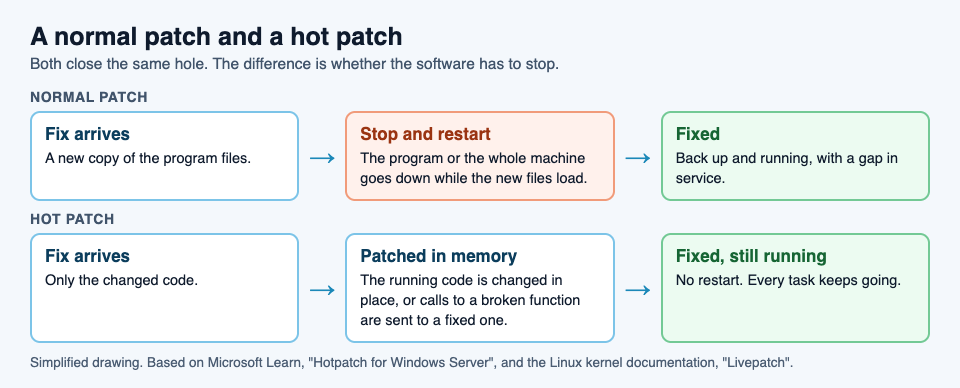
The hard part is timing. The kernel documentation explains that many fixes are small and self-contained, such as adding a missing check, and functions like that can be swapped one by one. Bigger fixes change several functions that must agree with each other, and those must all switch at the same moment, only when it is safe. Linux handles this task by task: each running task moves to the patched code once it is safe to do so, and the switch usually completes in a few seconds.
There are limits. The kernel documentation lists several, starting with this one: only functions that can be traced can be patched. Not every fix can be applied live.
Hotpatch on Windows Server: baselines and hotpatch months
Microsoft's Hotpatch runs on a regular rhythm. It starts from a baseline, the full monthly cumulative update. Every three months the baseline is refreshed with the latest cumulative update, and the two months in between get hotpatch releases.
- Baseline months include every update in that month's full cumulative update, and they need a restart.
- Hotpatch months carry security fixes that install without a restart.
- Unplanned baselines happen when an urgent update, such as a zero-day fix, cannot wait. It replaces that month's hotpatch, and it needs a restart.
Microsoft's page names Windows Server 2025 and Windows Server 2022 as the versions it applies to.
A worked example: plan a year of server restarts
Say you look after one server and want to know how often it will need to restart for updates. Using Microsoft's description, here is how to plan it.
- Mark the baseline months. If January is a baseline, so are April, July and October. That is four planned restarts in a year.
- Mark the hotpatch months. February and March, May and June, August and September, November and December. That is eight months of security fixes with no restart. Microsoft gives the same example: four planned baselines and eight hotpatch releases in a year.
- Leave room for surprises. If a zero-day fix arrives in a hotpatch month, it may come as an unplanned baseline, which needs a restart. Keep a restart window available every month, even if you rarely use it. Our guide to zero-day flaws explains why those fixes cannot wait.
- Compare. If every monthly security update needed a restart, that would be twelve a year. With hotpatching, it is four planned, plus any unplanned ones.
The fix still arrives every month. What changes is how many of those months interrupt your work.
Learn the idea by playing: the Hot patch upgrade
Tank City Zero Day is the second game on the Tank City Reboot site, set inside a computer like the first. After each wave, a screen called Patch Tuesday offers three upgrades named for real computer ideas, and you pick one. Hot patch is one of them.
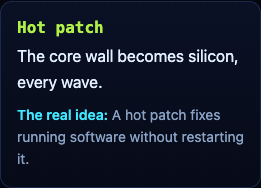
You can take it once. From then on, every new wave starts with the wall around the core built as silicon, which stops shots. Like a real hot patch, the fix is applied while the run keeps going: no restart, no lost progress. And like a real patch, it is not the end of the story. The zero-day boss of every fifth wave breaks through any wall, silicon included. The game teaches the word and one idea; it is not a security course and does not patch or protect your devices.
Frequently asked questions
What is a hot patch in simple words?
A fix applied to software while it is still running, so the program or computer does not need to restart.
What is the difference between a hot patch and a hotfix?
A hot patch is about installing without a restart. A hotfix, as Wikipedia describes it, is an update released outside the normal update cycle, often to fix a bug, and it may or may not need a restart.
Does hot patching mean I never restart?
No. On Windows Server Hotpatch, baseline months every three months still need a restart, and so does an unplanned baseline for an urgent fix.
What is livepatching in Linux?
The Linux kernel's way of hot patching: calls to a broken function are redirected to a fixed one, so critical functions are fixed without a system reboot.
Get started
Play Tank City Reboot: it is free, plays in your browser on a computer or a phone, and needs no account. Then open Tank City Zero Day, and when Patch Tuesday offers Hot patch, take it and watch the core wall come back as silicon every wave.
Comments
No comments yet.
Sign in or make an account to comment.