What is a software patch and why does it matter?
Your phone wants to restart for an update. Your laptop has a list of them waiting. It is tempting to click "later" every time. So what is a software patch, and does it matter if you wait? A patch is a fix the maker sends out for a problem in their software, such as a security hole. Waiting leaves that hole open, and attackers may go after it even after the fix is out.
This guide explains what patches are, what they fix, how they should reach you and what Patch Tuesday means, using the glossary of the US National Institute of Standards and Technology (NIST), the Cybersecurity and Infrastructure Security Agency (CISA) and Microsoft's own documentation. It ends with the free browser game Tank City Reboot, where a Patch is a power-up.
What is a software patch? The definition
NIST's glossary calls a patch a "repair job" for a piece of programming, also known as a fix. It is the immediate solution to a known problem, provided to the people who use the software.
The same entry adds two useful details. A patch is not always the best possible solution: the makers often find a better one for the next full release. And many operating systems include a special program to install patches and keep track of which ones are in place. That program is the update screen you already know.
So the words "patch" and "update" overlap. CISA's guide, Understanding Patches and Software Updates, uses them together: patches are software and operating system updates that address security weaknesses.
What patches fix: security holes, bugs and features
CISA describes three things an update can carry:
- Security fixes. These close a weakness that an attacker could use to get into a program or a device. This is the main reason to install updates quickly.
- Bug fixes. These repair things that work badly, such as performance problems.
- Better security features. Sometimes an update adds new protection, not only repairs.
Here is the part that makes waiting risky. CISA warns that attackers may target weaknesses for months or even years after updates are available. Every device that has not installed the fix is still open to them. A flaw nobody has fixed yet is a different thing, called a zero-day; our guide to zero-day flaws follows one from discovery to fix.
How patches reach you: automatic, manual and the trap
A patch only helps once it is installed on your device. CISA describes two safe ways for that to happen.
- Automatic updates. You agree once, and updates are pushed to your device as they come out. CISA recommends turning this on wherever it is offered.
- Manual updates. You go to the maker's website, or the update screen in your settings, and install the files yourself. If a program has no automatic option, CISA says to check the maker's site from time to time.
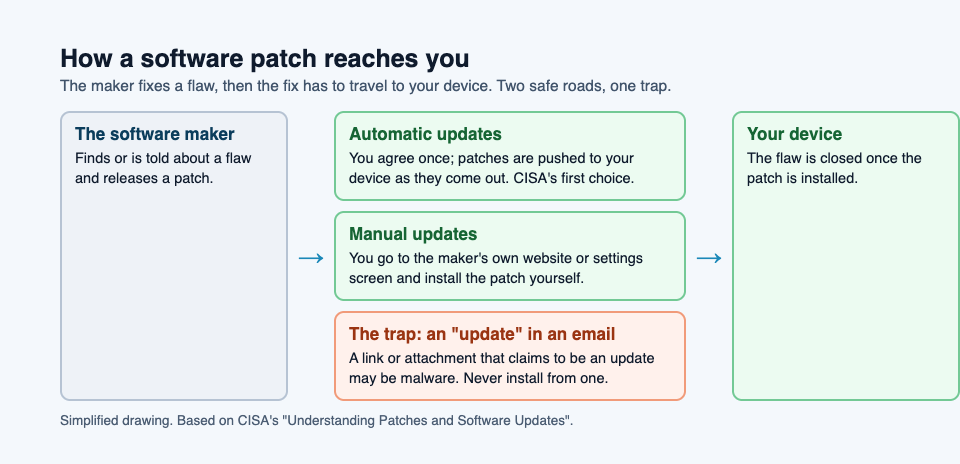
There is also a trap. CISA warns that attackers have used emails to send people to harmful files dressed up as updates, and that an email attachment claiming to be an update may be malware. A harmful program dressed up as something useful is how a trojan works; our guide to the types of malware explains it. A real update comes from the program's own update screen or the maker's own website, never from a link in a message. CISA also suggests avoiding updates on untrusted networks, such as an airport, hotel or coffee shop, unless you connect through a VPN to a network you trust.
Patch Tuesday and other release rhythms
Some makers release patches on a schedule. Microsoft's documentation on the Windows update release cycle says its monthly security update comes out on the second Tuesday of each month, typically at 10:00 AM Pacific Time. That day is commonly called Patch Tuesday, or Update Tuesday.
The same page explains a few more terms worth knowing:
- Cumulative. Each monthly update includes all the earlier fixes too, so a device that missed a month catches up in one install.
- Out-of-band. When a problem cannot wait for the next Patch Tuesday, Microsoft can release a fix outside the schedule.
- Hotpatch. Devices that an IT team enrolls in hotpatch updates can install some monthly security fixes without a restart.
For you, a schedule means a predictable day each month when updates are likely to be waiting.
A worked example: a ten-minute monthly update check
Here is a short routine you can follow once a month, a day or two after the second Tuesday. It uses only CISA's advice.
- Check that automatic updates are on for the operating system, the browser and your phone. If they are, most patches arrive without you doing anything.
- Open each update screen anyway. On Windows, that is Windows Update in Settings; select Check for updates. Install anything waiting, and do the restart instead of postponing it.
- Do it on a trusted network. If you are travelling, wait until you are home or at work, as CISA suggests.
- List any program that no longer gets updates. CISA calls this end-of-life software: the maker has stopped supporting it, so new holes will never be patched. CISA recommends retiring all of it, so plan a replacement.
- Delete any "update" email. If a message urges you to install an update from a link or an attachment, do not. Open the program's own update screen instead.
Steps 1 and 2 close the holes that have fixes. Step 4 finds the holes that never will. CISA's own summary is simple: keeping your software up to date is the most effective measure you can take.
Learn the idea by playing: Patch, Patch Tuesday and Hot patch
Tank City Reboot is a tank game set inside a computer: your antivirus tank guards the CPU core, and every enemy, power-up and wall is named for a real computing or security idea. Patch is one of the power-ups. Pick it up and you get a shield for ten seconds.
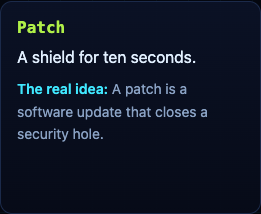
Its card gives the real idea: "A patch is a software update that closes a security hole." In the second game, Tank City Zero Day, each cleared wave ends with Patch Tuesday, which offers three upgrades named for real computer ideas. One of them is Hot patch, whose card reads, "A hot patch fixes running software without restarting it." A game teaches the word and one idea; it is not a security course and does not patch or protect your devices.
Frequently asked questions
What is a software patch in simple words?
A fix the maker sends out for a problem in their software, such as a security hole. NIST calls it a repair job for a piece of programming.
Is a patch the same as an update?
Mostly. CISA describes patches as software and operating system updates that fix security weaknesses; an update can also fix bugs or add features.
Why should I install patches right away?
CISA warns that attackers may target a weakness for months or years after a fix is available, so every day a patch waits is a day the hole stays open.
What is Patch Tuesday?
The second Tuesday of each month, when Microsoft publishes its monthly security update for Windows, typically at 10:00 AM Pacific Time.
Get started
Play Tank City Reboot: it is free, plays in your browser on a computer or a phone, and needs no account. Pick up a Patch when you find one, and see how much ten seconds of shield is worth.
Comments
No comments yet.
Sign in or make an account to comment.