What is a sandbox in cybersecurity?
"Open it in a sandbox" is common advice for a file you do not trust. But what is a sandbox in cybersecurity? It is a closed-off space where a program can run without being able to reach the rest of your computer. If the program turns out to be harmful, the harm stays inside the box.
This guide explains what a sandbox is, what it blocks and what it does not, using the definitions in the glossary of the US National Institute of Standards and Technology (NIST). It walks through a real example, Microsoft's Windows Sandbox, and ends with the free browser game Tank City Reboot, where Sandbox is an upgrade you can pick.
What is a sandbox in cybersecurity? The definitions
NIST's glossary gives several definitions of a sandbox, from different source documents. Together they paint a clear picture.
- A restricted, controlled place to run code. It stops possibly harmful software from reaching any part of the system except the parts it is allowed to use.
- A short list of permissions. An untrusted program runs with its permissions cut down to an essential set. In particular, NIST notes, a program in a sandbox is usually kept away from the file system and the network.
- Separate systems on one machine. In the world of virtual machines, sandboxing means keeping each guest operating system apart from the others and limiting what each can reach.
The common thread is the word "untrusted". A sandbox is for code you are not sure about. It lets that code run, so you can use it or watch what it does, without giving it the run of the house.
What a sandbox blocks
Think about what harmful code usually wants. It wants to read or change your files, send data out over the network, or interfere with other programs and the system itself. A sandbox closes those doors by default and opens only the ones the program truly needs.
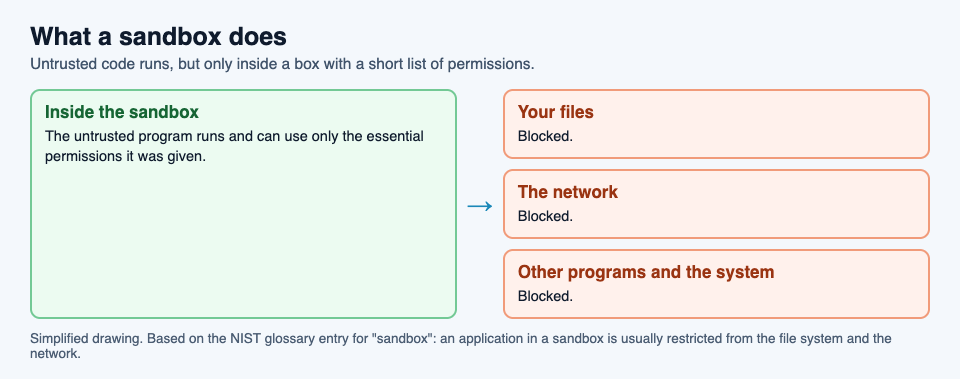
NIST's examples come from the web. One definition names "mobile code" as the kind of software a sandbox is meant to contain. NIST's entry for mobile code describes it as programs fetched from another system over a network and run on yours without you installing or starting them yourself, and lists Java and JavaScript among the technologies behind it. Another definition gives the Java applet, an older kind of program that ran inside web pages, as a widely used example of an application kept in a sandbox.
What a sandbox does not do
A sandbox is a wall, not a judge. It does not decide whether a program is harmful. It only limits what the program can reach while it runs. That has three consequences worth knowing.
- Anything you let through, the program can use. If you give a sandboxed program access to a folder or the network, it can use that access, for good or ill.
- A sandbox is only as good as its settings. A box with the network switched on is not the same box as one with the network off, as the example below shows.
- It does not clean anything. If you copy a harmful file out of the sandbox and open it on your computer, the sandbox has done nothing for you.
A worked example: opening an attachment in Windows Sandbox
Microsoft's Windows Sandbox is a sandbox built into some editions of Windows 11 and Windows 10 (not the Home edition). Microsoft describes it as a lightweight, isolated desktop for running programs safely, kept apart from your main system by a separate kernel running on a hypervisor, the software layer that runs virtual machines. Here is how its guidance applies to a suspicious email attachment.
- The doubt. An attachment arrives that you did not expect, from a sender you half recognize. You want to see what it is without risking your computer.
- Turn the network off. Microsoft notes that Windows Sandbox connects to the network by default, and that this can expose untrusted programs to your internal network. Its advice for untrusted files is to start a sandbox with networking disabled.
- Share the file read-only. The same advice is to make the folder holding the file available to the sandbox in read-only mode, so nothing inside can change the original.
- Open it inside. The file opens in the sandbox's own copy of Windows. If it tries to change files or install something, it changes only the sandbox.
- Close the box. Microsoft says the sandbox is temporary: closing it deletes all software, files and state. The next one starts as clean as a new installation.
Step 2 is the one people miss. With the network on, a harmful file inside the box could still reach other devices on your home or office network. The sandbox's protection depends on the doors you leave shut.
Learn the idea by playing: Tank City Zero Day
Tank City Reboot is a site of two original tank games set inside a computer, with every enemy, power-up and wall named for a real computing or security idea. In the second game, Tank City Zero Day, you choose one of three upgrades after each wave, and one of them is Sandbox: a shield that stops one hit and then recharges.
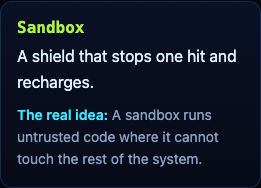
Its card gives the real idea in one sentence: "A sandbox runs untrusted code where it cannot touch the rest of the system." The shield is a good picture of it: the hit lands, but it does not reach you.
The game teaches the word and one idea, not how to set up a sandbox. It is not a security course, and it does not protect your computer. For more of the background, read our guides to the types of malware and zero-day flaws.
Frequently asked questions
What is a sandbox in simple terms?
A closed-off space on a computer where an untrusted program can run, with its access to your files, the network and the rest of the system cut down to the minimum.
Does a sandbox stop malware?
It limits what malware can reach while it runs inside the box. It does not decide whether a file is harmful, and anything you let through, such as network access, the program can use.
Is a sandbox the same as a virtual machine?
Not always, but they overlap. Windows Sandbox is a disposable virtual machine, and NIST uses "sandboxing" for keeping virtual machines apart. Other sandboxes simply restrict one program's permissions.
What happens to a file when I close Windows Sandbox?
Everything inside is deleted: software, files and state. The next sandbox starts clean.
Get started
Play Tank City Reboot: it is free, plays in your browser on a computer or a phone, and needs no account. Then try Zero Day and pick the Sandbox upgrade when it is offered.
Comments
No comments yet.
Sign in or make an account to comment.