What is cryptojacking? Cryptominer malware explained
Your laptop is hot, the fan will not stop, and everything feels slow, even with only a browser open. One possible cause has a strange name. So what is cryptojacking? It is when someone secretly uses your device's processor to mine cryptocurrency for themselves. You pay for the electricity and the wear; they keep the coins.
This guide explains how cryptojacking works, the two kinds, the signs to look for and what to do, using the guide the US Cybersecurity and Infrastructure Security Agency (CISA) wrote on it. It ends with the free browser game Tank City Zero Day, where a cryptominer is one of the threats you fight.
What is cryptojacking? The short answer
CISA's guide, Defending Against Illicit Cryptocurrency Mining Activity, defines it like this: cryptojacking occurs when malicious actors hijack the processing power of victims' devices and systems to mine cryptocurrency. They get the mining software in by exploiting weaknesses in web pages, software and operating systems.
The page now sits in CISA's archive, which CISA says may contain outdated information. The definition still matches the plain meaning of the word: what is taken is your processor's time.
How cryptomining works, and why attackers want your processor
Cryptocurrency is digital money that runs without a central bank. CISA explains that mining is how new cryptocurrency is earned. Mining software solves hard math problems involved in checking transactions, and each solved problem verifies a transaction and earns a reward paid in the currency.
Those calculations need a massive amount of processing power, and processing power costs money: the hardware, and the electricity to run it. Cryptojacking moves that cost onto someone else. Every device the attacker controls is one more processor working for them, on someone else's power bill.
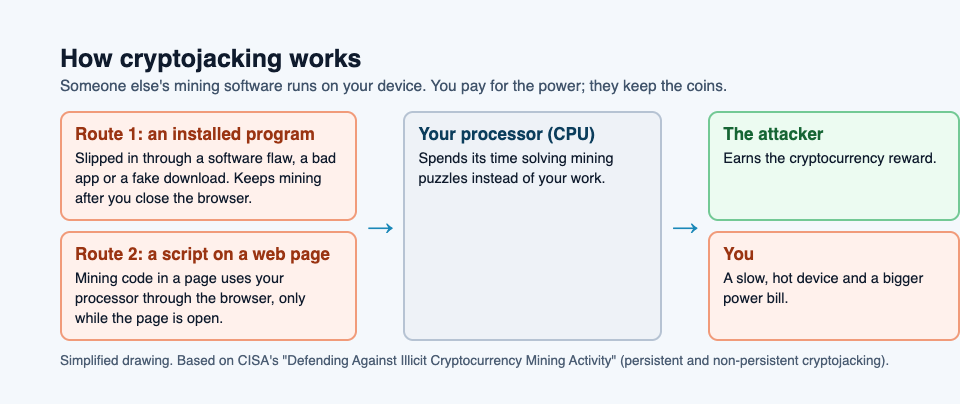
Two kinds: in the browser and installed on the device
CISA describes two kinds, and the difference tells you where to look.
- Non-persistent, in the browser. A web page carries hidden mining code written in JavaScript, the language browsers run. While the page is open, it uses your processor through the browser. Close the page or the browser, and the mining usually stops.
- Persistent, installed on the device. Mining software has been installed on the device itself, often through a security flaw. It keeps running after you leave the page that brought it in.
CISA lists how the installed kind spreads: harmful mobile apps, botnets, social media, flaws in apps and servers, and hijacked Wi-Fi hotspots. A botnet is a group of hijacked computers taking orders from one controller, so a mining botnet is many stolen processors working at once.
It is not only laptops. CISA says any internet-connected device with a processor can be cryptojacked: computers, network devices, phones, and Internet of Things devices such as printers, video cameras and smart TVs.
The signs of cryptojacking
Cryptojacking runs in the background, so you rarely see it directly. The signs come from what CISA lists as its effects:
- Slowness. The processor and the network connection are busy mining, so your own work gets less of them.
- Heat and noise. A processor running flat out gets hot, and the fan runs hard. CISA warns that extreme temperatures can cause crashes and even physical damage. Our guide to thermal throttling explains why a hot chip also slows itself down.
- Power use. More work means more electricity, and on a phone or laptop that can mean a battery that drains faster.
None of these signs proves cryptojacking on its own. A big download, an update or a heavy game can cause the same effects for a while. What stands out is high processor use that stays high when you are doing nothing, which is exactly what CISA tells administrators to watch for.
A worked example: tracking down a hot, slow laptop
Here is a calm way to check, built on CISA's advice. Picture a laptop that has run hot all week.
- Look at what is using the processor. Open the list of running programs: Task Manager on Windows, Activity Monitor on a Mac. Sort it by processor use. A normal idle laptop shows most programs using very little.
- Check the browser first. If the browser is at the top, close tabs one at a time and watch the number. If it drops when one page closes, that page was the cause. Do not go back to it.
- Look for a program you do not recognize. If the processor stays busy with the browser closed, look for a program you did not install, or one that should not need much power. That points to the persistent kind.
- Run your antivirus. CISA's first defense is antivirus software, kept up to date, which can find and remove unwanted programs.
- Update everything. Install waiting updates for the operating system, the browser and your apps, since CISA says the installed kind gets in by exploiting flaws, the kind a software update closes.
Step 2 handles the browser kind. Steps 3 to 5 handle the installed kind. If the heat has a normal cause, like a backup running, you have lost ten minutes and learned what your laptop looks like when it is healthy.
How to protect your devices
CISA's list of defenses is mostly ordinary good habits, which is good news:
- Use antivirus software and keep it up to date.
- Keep the operating system and your software updated, so known flaws are closed.
- Use strong passwords, CISA suggests at least 16 characters, and change the default passwords on routers, cameras and other devices.
- Be wary of downloads from websites you do not trust.
- Uninstall software you no longer use, and turn off services you do not need.
- Use a firewall, which can block some harmful traffic and some unneeded outgoing connections.
- Know what normal processor use looks like on your devices, so a change stands out.
Our guide to the types of malware shows how the same habits help against worms, trojans and other threats.
Learn the idea by playing: the Cryptominer turret
Tank City Zero Day is a tank game set inside a computer. You guard the CPU core, and every threat, upgrade and wall is named for a real computing or security idea. One of the threats is the Cryptominer: a turret that fires rings of shots. Its card on the game page gives the real idea in one line.
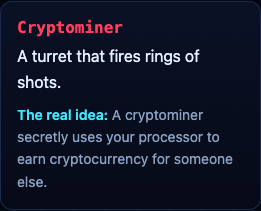
"A cryptominer secretly uses your processor to earn cryptocurrency for someone else." It shares the field with the Botnet drone, the Worm, Ransomware and the Zero-day boss. A game teaches the word and one idea; it is not a security course and does not protect your devices. For the first game in the series, start at Tank City Reboot.
Frequently asked questions
What is cryptojacking in simple words?
Someone secretly uses your device's processor to mine cryptocurrency for themselves. You pay for the power and the slowdown; they keep the reward.
Is cryptojacking dangerous?
CISA lists slower devices, higher power use, crashes and even hardware damage from extreme heat. It also means someone got code onto your device or into a page you visited.
Can a website mine cryptocurrency through my browser?
Yes. CISA describes mining code hidden in web pages that uses a visitor's processor through the browser, usually only while the page is open.
Can phones and smart TVs be cryptojacked?
CISA says any internet-connected device with a processor can be, including phones, printers, video cameras and smart TVs.
Get started
Play Tank City Reboot: it is free, plays in your browser on a computer or a phone, and needs no account. Then try Tank City Zero Day and see how long your core lasts against the Cryptominer's rings.
Comments
No comments yet.
Sign in or make an account to comment.