What is overclocking and is it safe?
What is overclocking? It is running a computer chip faster than the clock speed its maker rated it for. People do it to get more speed from the same hardware, often for games. It has real costs in heat, power and risk, and people disagree about how safe it is. This post explains how it works, both sides of the safety question, and how the two Tank City Reboot games turn the idea into an upgrade.
What is overclocking, in plain words?
Every processor has a clock. It sends out steady pulses, and every part of the chip takes one step on each pulse. The number of pulses per second is the clock speed, measured in hertz. A chip rated at 3.5 GHz is built to run at 3.5 billion pulses a second.
Overclocking raises that number above the rating. If the chip keeps up, it does more work each second. If it cannot keep up, it makes mistakes.
The opposite also exists. Underclocking lowers the clock below its default, trading speed for less power use, less heat and quieter fans. Some phones and laptops do this on their own when they run on battery.
Why a chip can often run faster than its rating
Chips of one design come off the same production line, but they are not all equal. Makers test each chip after it is made and label it with a speed it passes. This is called binning: a chip that passes the higher test is sold as the faster model, and one that only passes a lower test is sold as the slower one.
The tests are strict. A maker checks the chip with the instructions and data that take longest to settle, at the temperature and voltage where it performs worst. And if a batch turns out better than needed, some good chips can be sold with a lower rating, simply because that is what the market wants. That gap between the label and what a chip can really do is the room overclockers look for.
What overclocking costs: voltage, heat and power
A clock pulse is a deadline. After each pulse, every signal line inside the chip must finish switching from 0 to 1, or from 1 to 0. If the next pulse arrives first, the result is wrong. That settling time puts a hard limit on how far any chip can be pushed.
To make the signals settle faster, overclockers often raise the chip's voltage. Here is the catch. The heat a chip makes grows about in step with its clock speed, but about with the square of its voltage. A small voltage bump can add a lot of heat.
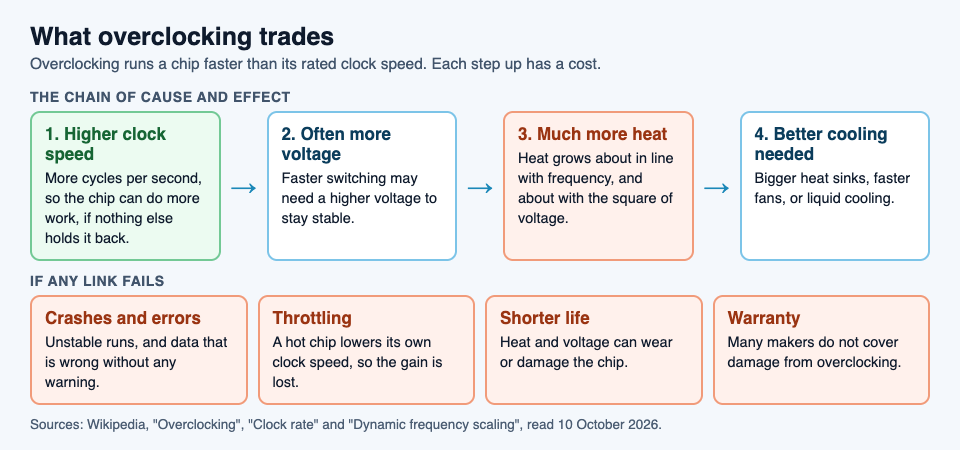
That heat has to go somewhere. A stock cooler is designed for the chip at its rated speed, so overclocked systems often need bigger heat sinks, faster fans or liquid cooling. If the heat is not removed, the chip protects itself by lowering its own clock speed, which is called thermal throttling. Then the extra speed is gone.
Is overclocking safe? Both sides
This is a real debate, and both sides have a point.
The case for: overclockers say careful testing can show that a system is stable. Many motherboards are sold with overclocking settings built in, and some graphics cards are sold already overclocked by the factory, with a warranty. For a gamer, a cheaper chip run faster can match a dearer one, and an older chip can stay useful longer.
The case against: an overclocked chip runs outside the conditions its maker tested. It can crash, or worse, give wrong answers with no warning, which is called silent data corruption. Such errors can be blamed on software bugs when the real cause is the chip. A large 2011 field study of consumer PCs and laptops, cited in Wikipedia's entry on overclocking, found four to twenty times more crashes from processor failure in overclocked machines over eight months. And while test programs exist, it is generally impossible for one person to test every part of a processor.
Two points are not in dispute. Heat and voltage can wear out or damage a chip. And many makers do not cover damage from overclocking under warranty, though some allow it within a set margin. Whether the gain is worth the risk depends on the machine and what it is used for.
Overclocking in the two Tank City games
Both games have an Overclock. The first game's card explains the real idea: "Overclocking runs a chip faster than its rated clock speed." The Zero Day card says the same in fewer words.
In Tank City Reboot, Overclock is a power-up that upgrades your cannon in three levels. Level 1 makes your shots fly at 240 instead of 150. Level 2 lets you have two shots on the field at once. Level 3 makes shots that break silicon, which stops every shot until your cannon is fully overclocked. The side panel shows an OC meter with three marks, one per level. In the game it is fragile: lose a life and it goes back to zero. You can read about every power-up in our tank game power-ups guide.
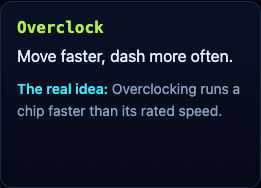
In Tank City Zero Day, Overclock is an upgrade you can pick twice. From the code, each level adds 15% to your tank's starting speed and cuts the time your dash needs to recharge: from 1.5 seconds, to 1.05, to 0.6.
The games also show the other half of the idea. Stage 3 of the first game opens with a fact about heat: "When a chip gets too hot, it lowers its own clock speed to cool down." And the first game's Coolant terrain card says liquid cooling carries heat away from a chip faster than air.
A worked example: thinking through an overclock
This post is not a how-to for any particular computer, and the settings differ from machine to machine. But the questions to ask before you change anything are the same. Here is a careful order.
- Find the rating. Note the clock speed your chip is sold at. That is the speed its maker promises.
- Read the warranty. Check whether your chip's maker covers overclocking. If it does not, you carry the cost of any damage.
- Back up first. Silent data corruption is a known risk, so keep a backup of anything you care about before you start.
- Check the cooling. A cooler built for the stock speed may not handle more heat.
- Change one small step at a time. Raise the clock a little, test, and only then go further. Leave voltage alone unless you understand the heat it adds.
- Watch for throttling. If the chip gets hot and slows itself down, the overclock is giving you nothing.
- Know when to stop. Any crash or odd error means step back to the last stable setting.
In the game, the same thinking applies on a smaller scale. A level 3 cannon is worth protecting, so grab a Patch shield before you push forward.
Frequently asked questions
Does overclocking damage your computer?
It can. Running a chip faster, often with more voltage, makes more heat, which can shorten its life or damage it, and many warranties do not cover it.
Is overclocking worth it for gaming?
Higher frame rates in games are the most common reason people overclock. Whether it is worth it depends on the gain you get, your cooling, and how much risk you accept.
What is the difference between overclocking and thermal throttling?
Overclocking raises the clock speed on purpose. Thermal throttling lowers it automatically when the chip gets too hot, which can cancel out an overclock.
What does Overclock do in Tank City Reboot?
It upgrades your cannon: faster shots, then two shots at once, then shots that break silicon. You lose the levels when you lose a life.
Get started
Play Tank City Reboot: it is free, plays in your browser on a computer or a phone, and needs no account. Then try Tank City Zero Day and see how a faster dash changes the way you play.
Comments
No comments yet.
Sign in or make an account to comment.