What is two-factor authentication and why use it?
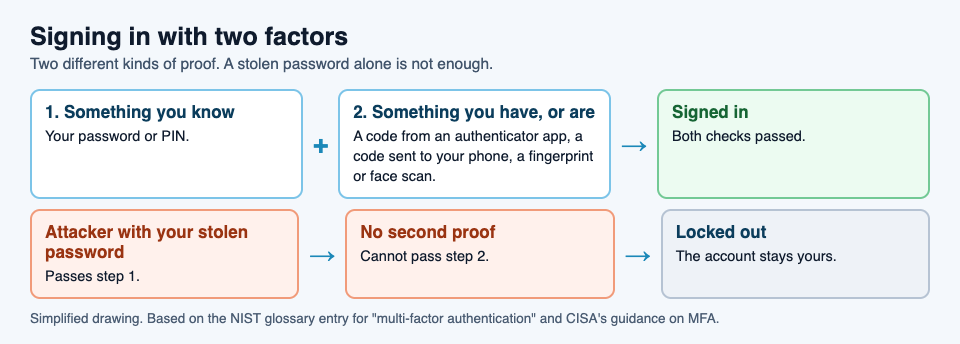
Your email, bank and games all ask you to "turn on 2FA" or "two-step verification" at some point. What is two-factor authentication? It is a sign-in that asks for two different kinds of proof that you are you, usually your password plus a code from your phone. The point is simple: a stolen password on its own is no longer enough to get into your account.
This guide explains how it works in plain words, which kinds are stronger, and how to turn it on, using the glossary of the US National Institute of Standards and Technology (NIST) and guidance from the Cybersecurity and Infrastructure Security Agency (CISA). It ends with the free browser game Tank City Reboot, where Two-factor is an upgrade that gives you an extra life.
What is two-factor authentication? The three kinds of proof
NIST's glossary files two-factor authentication, or 2FA, under multi-factor authentication: proving who you are with two or more different factors. It names three kinds.
- Something you know: a password or a PIN.
- Something you have: a token, such as a phone with an authenticator app or a small hardware device.
- Something you are: a fingerprint or a face scan.
The key word is different. Two passwords are still one factor, because both are things you know, and both can be stolen the same way. Two-factor means combining kinds, such as a password you know with a phone you have.
You will see it under many names. CISA's guide to multifactor authentication lists two-step authentication, 2-Step Verification, two-factor authentication and 2FA as different ways of saying the same thing.
Why a second factor stops a stolen password
Passwords have weak points. CISA notes that a password can be reused, cracked or stolen. People use the same one on many sites, so a leak from one site opens the others. Fake login pages trick people into typing them in.
A second factor changes the math. CISA's page on turning on MFA puts it directly: even if someone steals your password, they will not be able to meet the second step. They would also need your phone or your face, which is a much harder thing to steal from the other side of the world.
The common kinds, from weaker to stronger
Not every second factor is equal. CISA lists the popular forms, and says plainly that some are better than others, though any of them is better than none.
- A code by text message, voice call or email. Easy to set up, and far better than a password alone. CISA's advice mentions SMS-based attacks, so it is not the strongest choice.
- An authenticator app. An app on your phone that, as CISA describes, makes a new code every 30 seconds. You type the current code after your password.
- A fingerprint or face scan, often used to unlock the phone or app that holds your second factor.
- Phishing-resistant sign-in. CISA calls this the standard to aim for. The only widely available kind is FIDO, also known as WebAuthn. It blocks the login if you are tricked into signing in on a fake website.
A worked example: a leaked password meets a second step
Say you used the same password for a shopping site and your email, and the shopping site is breached. Here is how the story goes with and without a second factor.
- The leak. Your email address and password end up on a list that criminals trade.
- The attempt. Someone tries that pair on your email account. The password is right.
- Without two-factor. They are in. From your email they can reset the passwords of your other accounts, one by one.
- With two-factor. The site asks for the code from your authenticator app. They do not have your phone, so the login stops here.
- What you do next. Once you hear about the leak, change the password, everywhere you used it. The second factor bought you that time.
Two-factor did not stop the leak, and it does not fix the reused password. It stopped the leak from turning into a lost account, which is the part that hurts.
How to turn it on
CISA's steps work for most accounts:
- Open the account's settings, sometimes called Account Settings, Profile or Preferences.
- Find the security section, sometimes called Security or Password and Security.
- Look for two-factor authentication, two-step authentication or something similar, and turn it on.
- Pick a method. CISA's examples are a code by text or email, an authenticator app, or a fingerprint or face scan; where a phishing-resistant option is offered, it is the strongest.
CISA suggests starting with email, banking, social media, online shopping, and gaming and streaming accounts. Email comes first, because it can reset everything else. One note: the two CISA pages quoted here are marked as archived on CISA's site, and the factors they describe match NIST's definition above.
Learn the idea by playing: Tank City Zero Day
Tank City Reboot has two original tank games set inside a computer, where every enemy, power-up and wall is named for a real computing or security idea. In the second game, Tank City Zero Day, you pick one of three upgrades after each wave, and Two-factor gives you one extra life.
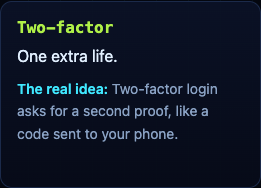
Its card says, "Two-factor login asks for a second proof, like a code sent to your phone." An extra life is a fair picture: one hit is no longer the end, just as one stolen password is no longer the end of an account.
A game teaches the word and one idea. It is not a security course, and playing it does not secure an account. For more on the threats that second factors guard against, read our guides to the types of malware and zero-day flaws.
Frequently asked questions
What is two-factor authentication in simple words?
Signing in with two different kinds of proof, usually a password you know and a code from a phone you have, so a stolen password alone cannot open your account.
Is 2FA the same as two-step verification?
For most people, yes. CISA lists two-step authentication, 2-Step Verification, two-factor authentication and 2FA as names for the same idea.
Which kind of two-factor authentication is best?
CISA calls phishing-resistant sign-in, such as FIDO, the standard to aim for. An authenticator app is a strong step up from text codes, and any second factor beats none.
Which accounts should I protect with two-factor authentication first?
CISA's list starts with email accounts, then financial services, social media, online stores, and gaming and streaming services. Email matters most, because it is used to reset the passwords of everything else. If an account offers no second factor, CISA suggests asking the company to add one.
Get started
Play Tank City Reboot: it is free, plays in your browser on a computer or a phone, and needs no account. Then turn on two-factor authentication for your email, and try Zero Day's Two-factor upgrade for an extra life.
Comments
No comments yet.
Sign in or make an account to comment.