2048 strategy for beginners: how to get the 2048 tile
A good 2048 strategy for beginners comes down to one idea: pick a corner and build everything around it. 2048 looks like a game of quick reactions, but it rewards a plan, and the plan Wikipedia describes is simple enough to use from your very first game. This guide explains the corner strategy, why it works, a first game you can follow, and the mistakes that end most early games.
2048 strategy for beginners: the short version
The Strategy section of Wikipedia's article on 2048) sums up the classic approach in a few lines. Here it is in plain steps:
- Keep your largest tile in one corner. Choose it at the start and do not move it out.
- Fill the row along that corner with your other large tiles. Biggest in the corner, then the next biggest beside it, and so on.
- Keep that row full, so you can use three directions. With the row full, three of the four slides leave your corner tile where it is.
- Never let a small tile get cut off. No small tile should be separated from the other small tiles by a large one.
The rest of this guide explains each step, because a rule you understand is a rule you can bend when the board needs it.
How new tiles appear, and why a plan beats speed
A quick recap of the rules, also from Wikipedia. The board is 4 by 4. It starts with two tiles, each a 2 or a 4. When you slide, every tile moves as far as it can, and two tiles with the same number merge into one with their total. After every move, a new tile appears in a random empty square.
The new tile is a 2 most of the time: Wikipedia, citing the game's code, gives 90% for a 2 and 10% for a 4. That matters for your plan. You cannot choose where new tiles land, so the board keeps filling with small tiles in places you did not pick. A strategy is a way to keep those small tiles near each other and away from your big ones.
If you want the full story of the game and its rules, who made 2048 and how it works covers it.
Pick a corner and keep your biggest tile there
Any corner works. A bottom corner is a handy choice, because Down then becomes a slide you can make almost any time. Say you pick bottom left.
From now on, your main slides are Down and Left. Each one pushes tiles toward your corner, so the biggest tile settles there and stays. Big tiles sit at the edge, and the open middle of the board is where small tiles meet and merge.
Why a corner and not an edge or the middle? A tile in the middle can be pushed in any direction, and it splits the board into small pockets. A tile in a corner can only be moved by two of the four slides, and if you also keep its row full, by only one.
Keep the row full and use three directions
This step is easy to skip. Once your corner tile has neighbours that fill the bottom row, Left and Right cannot move that row at all, as long as no two tiles in it are equal. Down cannot move it either, because it is already at the bottom. So you can slide Down, Left and Right freely, and your corner tile stays put.
That leaves Up as the one slide to avoid. Up is the move that can lift a tile out of your bottom row and let a new 2 drop into the corner. Use it only when nothing else moves.
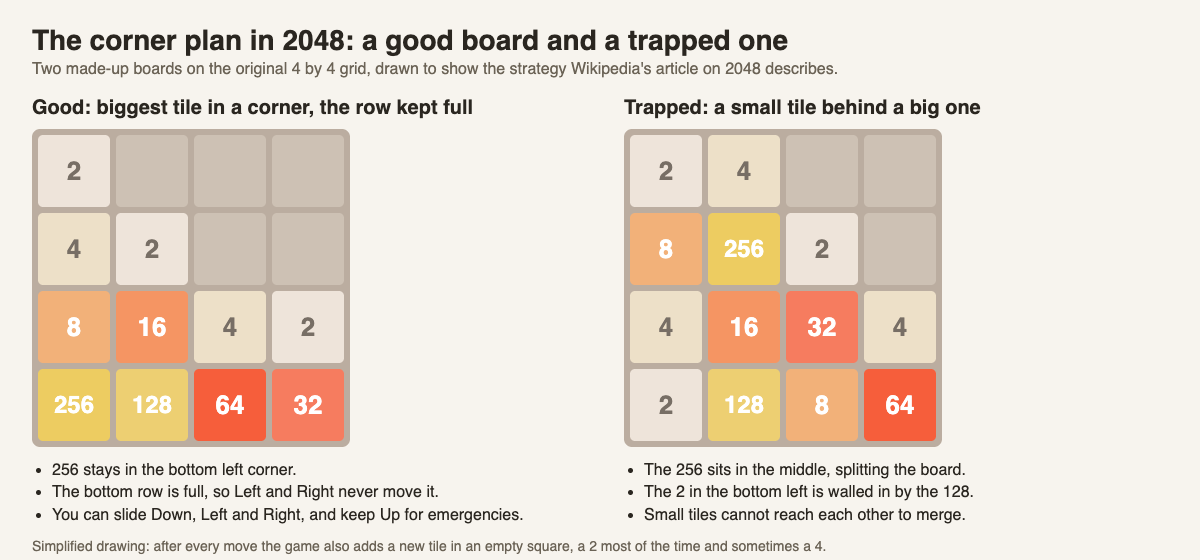
Left: the corner plan with a full bottom row. Right: a big tile in the middle and a small tile walled in.
Never trap a small tile behind a big one
Wikipedia's last rule of thumb is that no small tile should be separated from the other small tiles by a large tile. Look at the trapped board in the drawing. The 2 in the bottom left corner has a 128 next to it. To merge, that 2 needs another 2 to reach it, and the 128 is in the way. Meanwhile your biggest tile is stuck in the middle.
The fix is to build the row in order: biggest in the corner, then smaller and smaller as you move away from it. When a new tile does land in a bad spot, merge it out quickly rather than building on top of it.
A worked example: your first corner game
Here is a first game you can follow on any 4 by 4 version, with bottom left as your corner.
- Open with Down and Left. Alternate them. Small tiles drift toward the bottom left and merge into 4s and 8s.
- Use Right when Down and Left are stuck. It keeps the bottom row in place if the row is full.
- Grow the bottom row in order. Aim for something like 64, 32, 16, 8 from left to right. When the 8 doubles to 16, it can merge with the 16 next to it, and that chain runs back toward the corner.
- Feed the row from above. Build small tiles in the row above the bottom, then slide Down to merge them into the row.
- Use Up only as a last resort, and slide Down or Left right after it to fill the corner back up before a new 2 lands there.
You may lose your first few games. The goal at first is not 2048 but the habit: biggest tile in the corner, row full, three directions.
The same plan on a cube: 3D 2048
3D 2048 puts the puzzle on a cube like a Rubik's cube, with six faces of nine squares. You slide the front face as in 2048, so the corner plan still works, on a 3 by 3 face. In one of our test games, played in a browser by a simple script that slid toward one corner, the left column held 8, 16 and 32 by move 23, the biggest in the bottom left.
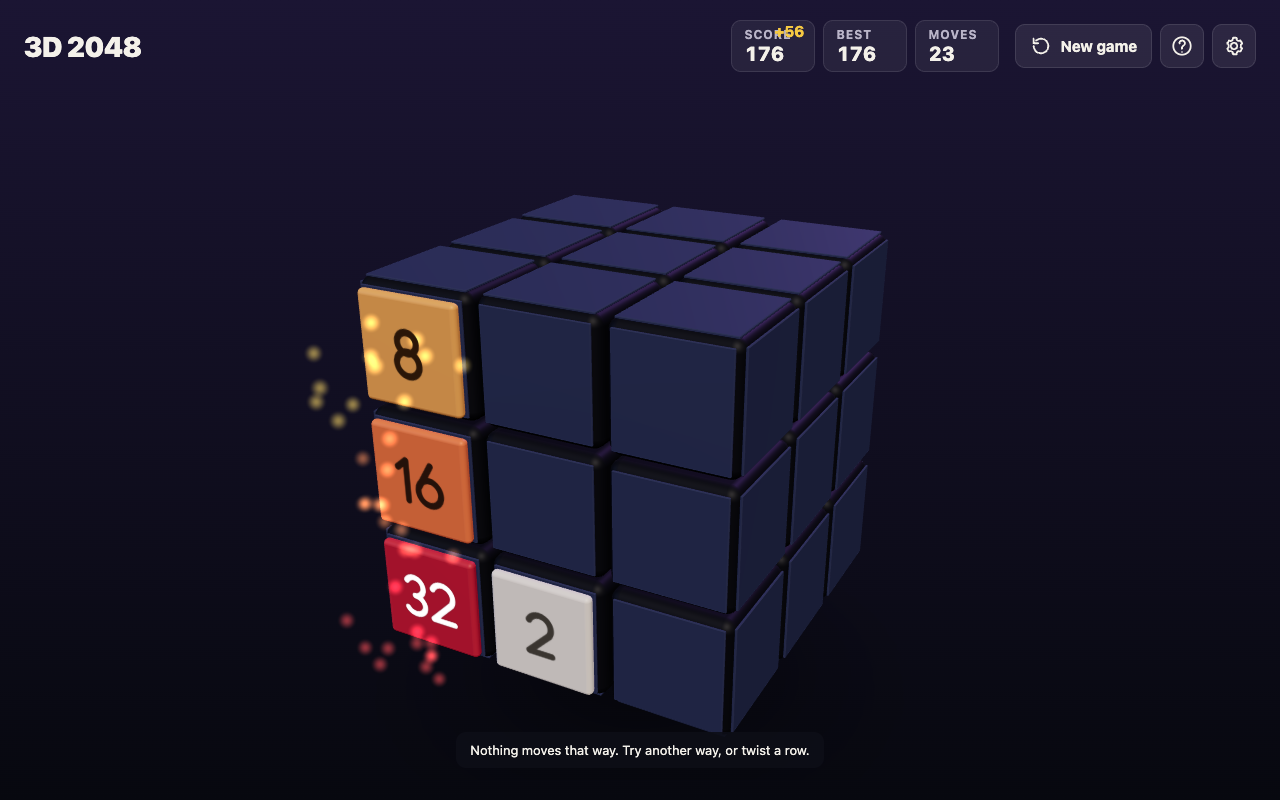
3D 2048 at move 23: a corner chain of 32, 16 and 8 on the front face.
The cube adds two moves the flat game lacks. A twist carries a row or column to the next face, and turning the whole cube is free. Those moves change the advice, so the cube has its own guide: 3D 2048 tips.
Frequently asked questions
Which corner is best in 2048?
Any corner works. What matters is that you pick one and keep your largest tile there for the whole game.
Why should I avoid the Up arrow?
With a bottom corner, Up is the slide that can pull tiles out of your bottom row and let a new tile land in your corner. Save it for when nothing else moves.
Are new tiles always 2s?
No. According to Wikipedia, a new tile is a 2 about 90% of the time and a 4 about 10% of the time.
Does the corner strategy work in 3D 2048?
Yes, on the face you slide, which is 3 by 3. The cube's twist and free turn add more to plan around.
Get started
Try the corner plan in your next game, then take it onto a cube. If the cube controls are new to you, how to play 3D 2048 walks you through them.
Play 3D 2048: it is free and plays in your browser on a computer or a phone.
Comments
No comments yet.
Sign in or make an account to comment.