3D 2048 tips: how to make the 2048 tile on a cube
These 3D 2048 tips come from play, not just from reading the rules. We played two test games in a browser, one with slides only and one with slides and twists, and watched where each one went wrong. Below is what they showed, four tips that follow from it, and a plan you can use in your next game.
3D 2048 tips start with two test games
Both games were played on 9 October 2026 at 3d2048.vlvd.net, signed out, by a simple script that followed fixed rules. A script is not a skilled player, so treat the numbers as one game each, not as averages. They still show where the cube catches you out.
- Game 1, slides only. The script only slid the front face. It made a 32 tile by move 23. By move 46 all nine squares of the front were full, nothing could slide, and the score stood at 332. The other five faces were still empty. Turning the cube to an empty face did not help: sliding a face with no tiles moves nothing, and the game said so: "Nothing moves that way. Try another way, or twist a row."
- Game 2, slides and twists. This time the script twisted a row or column whenever the front was stuck. It made a 64 at move 36, a 128 at move 118, and reached a score of 1160. But it twisted 39 times, and by move 165 all 54 squares were full. The game told it: "The cube is full. Merge two tiles on a face to make room before you twist."
Game 2 was not actually over. Other faces still had equal tiles side by side. The script never turned the cube to use them, so it got stuck while moves were still there.
Tip 1: keep your biggest tile in a corner of the front
This is the oldest 2048 habit, and it still works on a 3 by 3 face. Pick one corner, say bottom left, and slide toward it. Your biggest tile settles there, and the next biggest lines up beside it.
At move 118 of game 2, the 128 sat in the bottom left corner of the front, with an 8 next to it. A face holds only nine tiles, so a big tile in the middle splits the face into small pockets that are hard to merge. In a corner, it is out of the way.
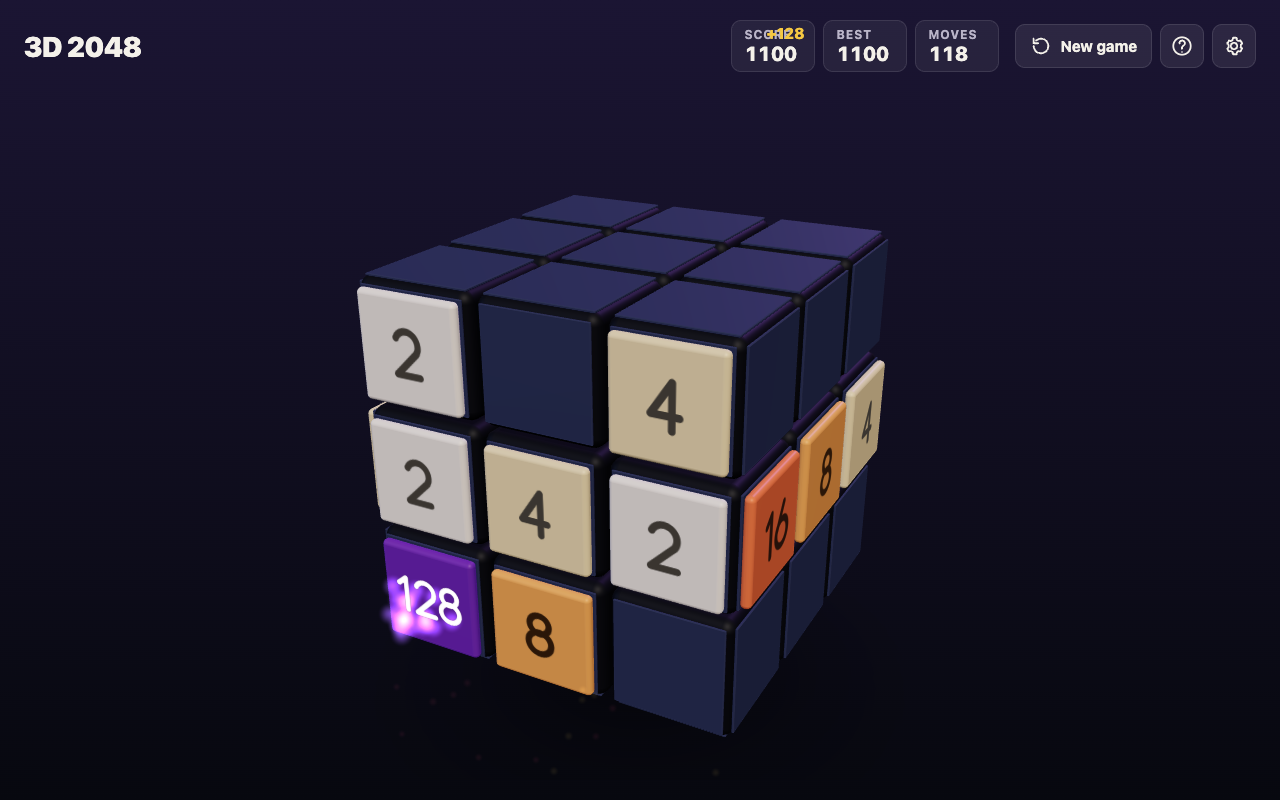
Game 2 at move 118: the 128 in a corner, and tiles carried onto the right face by twists.
Tip 2: twist when the front is stuck, not before
A twist is what makes this game different. Drag a row on the right face sideways, or a column on the top face, and that layer turns a quarter, carrying its tiles to the next face. It is how you bring a tile from the side next to its match on the front.
But every slide or twist adds a new 2 or 4, so a twist is never free. Game 2 shows the cost. Each twist carried tiles off the front and let a new tile in, and after 39 twists the cube had no empty square left. Game 1 shows the opposite mistake: with no twists at all, the front jammed at move 46 and five faces sat unused.
The middle path: slide while the front has a useful slide, and twist when it does not, or when a twist lands a tile right next to its match.
Tip 3: turn the cube before you twist
Turning the whole cube costs nothing. The game says so, and in our first game a turn left the Moves counter where it was and added no tile. Press Shift and an arrow key, or drag the space around the cube.
So before any twist, turn and look at every face. Two things to look for:
- A face with a pair. If another face has two equal tiles side by side, turn it to the front and slide. The merge frees a square on that face, which is room a later twist can use.
- A tile that matches one on the front. If a side face holds a tile equal to one on the front, that is the twist worth making.
Game 2 skipped this step. When it stopped, other faces were full of small pairs it could have merged by turning first.
Tip 4: always keep room for a twist
A twist needs one empty square for its new tile. When all 54 squares are full, you cannot twist at all, and you are left with whatever slides the faces still allow. The game ends when all 54 squares are full and no face has two equal tiles side by side.
The game's own advice, from its No moves left box, is the best rule here: "Next time, keep room on one face so a twist can still bring tiles round to their match." In practice that means merging on a side face as soon as you see a pair there, so the cube never fills up with stray 2s and 4s.
A plan for your next game
Put the four tips together and a game has a simple rhythm. Here it is as steps you can follow. On a phone, swipe instead of using the arrow keys, and drag the space around the cube to turn it.
- Choose your corner. Pick bottom left. Prefer Down and Left. Use Right only when you must, and Up last.
- Grow one face first. Slide only the front until you have a 32 or a 64 in your corner. In both test games that took less than 40 moves.
- When the front stalls, turn and look. Use Shift and the arrow keys to check all six faces. It is free.
- Merge on another face if you can. Turn a face with a pair to the front, slide it, then turn back.
- Twist with a purpose. If no face has a pair, twist a row or column that brings a tile next to its match on the front.
- Watch the empty squares. If the cube is close to full, stop twisting and merge until there is room again.
When you make 2048, the game tells you how many moves it took and offers Keep going, for 4096, or New game. Your game and best score are saved on your device, so you can stop and come back later on the same device.
Frequently asked questions
Does turning the cube use up a move?
No. The game says turning is free, and in our test game a turn did not change the Moves counter or add a tile.
Why does nothing happen when I slide a new face?
If the face in front has no tiles, or none of them can move, a slide does nothing. The game shows "Nothing moves that way. Try another way, or twist a row."
Why can I not twist any more?
A twist needs one empty square for its new tile. If the game says the cube is full, merge two tiles on a face first.
Is it better to twist a lot or a little?
In our two test games, never twisting jammed the front early, and twisting at every chance filled all 54 squares. Twist when the front is stuck or when a twist lines up a pair.
Get started
New to the controls? Read how to play 3D 2048 first, and who made 2048 if you want the flat game's rules. Curious about the shape? See how many squares a cube like this has. Then open the game, pick a corner and try the plan above.
Play 3D 2048: it is free and plays in your browser on a computer or a phone.
Comments
No comments yet.
Sign in or make an account to comment.