2048 Twist Not Working: Why a Twist Needs One Empty Square
2048 twist not working: why a twist needs one empty square. Most often the board is too full. In Evolved 2048, every slide or twist adds a new tile, so a twist needs one empty square for it. With none free, the twist is refused, even if the twist itself would have been a good move.
Evolved 2048 is the 2048 puzzle on a cube you turn like a Rubik's cube, and it is free to play in your browser. This post covers the one rule that stops twists, how to see it coming, and how to plan around it.
Why your 2048 twist is not working
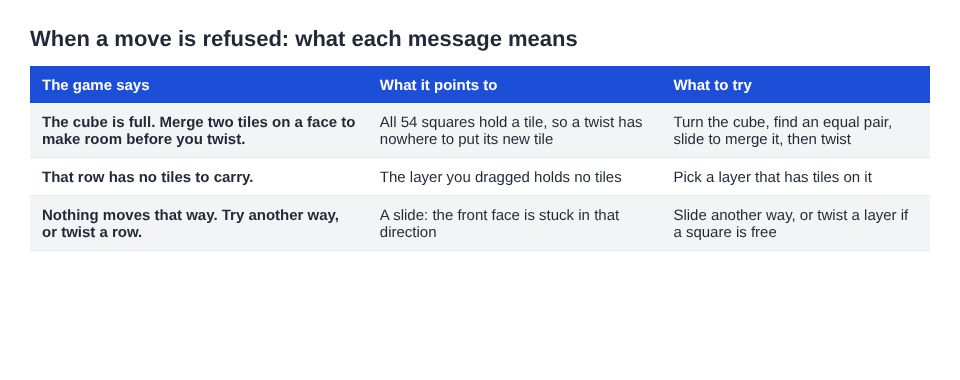
The three messages the game shows when a move is refused.
A twist can fail for three reasons, and the game words each one differently. Read the message before you change anything.
- "The cube is full. Merge two tiles on a face to make room before you twist." All 54 squares hold a tile. There is no place for the new tile, so the twist will not run.
- "That row has no tiles to carry." The layer you dragged is empty all the way round its ring, so there is nothing to move. This is not a full board problem at all.
- "Nothing moves that way. Try another way, or twist a row." This one is about a slide, not a twist. The front face is stuck in that direction.
The first message is the one this post is about. The second is a common false alarm: nothing was carried because the layer held no tiles. In one test, a board with a single tile in the centre of the front face ignored a press of 1 and the move counter stayed at 0, because the top row's ring held no tile.
What a twist does to the board
A twist turns one layer of the cube a quarter turn. You drag a row on the right face sideways, or a column on the top face. On a keyboard, 1, 2 and 3 twist the top, middle and bottom row right. Keys 4, 5 and 6 twist the left, middle and right column up. Hold Shift to twist the other way.
The layer carries its tiles to the next face. That is how you bring a tile from the side next to its match on the front. In one test, dragging the right face's top row to the left carried a 16 from just over the front's top right edge onto the front's top left square. One slide down then merged it with the 16 below into a 32.
Three details matter for this rule:
- A twist counts as one move and adds no points. Only merges score.
- A twist adds a new tile, a 2 or a 4, just as a slide does.
- The whole layer moves, so the front's own squares in that row leave for the next face.
Turning the whole cube is different. It is free, adds no tile and counts no move. You can turn as often as you like without making the board any fuller.
2048 twist not working: why a twist needs one empty square
The new tile has to land somewhere. The game picks a random empty square on the front face. If the front face is full, it picks any empty square on the cube. If there is no empty square anywhere, there is nowhere to put it, and the twist is refused.
A slide is easier on this point. It can merge two tiles, which frees a square, so a slide that merges still has room for its new tile. A twist only moves tiles around. It frees nothing by itself, so it needs a spare square before it starts.
One more point: the front face fills first. New tiles go there when it has room. In a slides-only test game, the front face was full at move 46 and the other five faces were empty. Nothing could slide, and turning to an empty face and sliding moved nothing, because slides only work on the front. A twist was the way out, and that board still had 45 empty squares to take the new tile.
How to tell if the board is too full to twist
You do not need to count squares one by one. Look for these signs.
- Turn the cube and look. Turning is free, so use it. Hold Shift and press an arrow key to bring each side to the front. If every side you see is packed, the cube is close to full.
- Watch the front face. If it is full and no slide works, you are relying on twists. That is the moment to check how many empty squares remain elsewhere.
- Read the refusal. "The cube is full" tells you the count is at 54. It does not mean the game is over.
That last point is easy to miss. The game ends when all 54 squares are full and no face has two equal tiles side by side. In one scripted game, all 54 squares were full at move 165, with a score of 1160 after 39 twists. The front had no slide, but other faces still had equal tiles side by side, so the game was not over.
That board needed a different fix. Turn the cube to bring the face with the equal pair to the front, then slide to merge it. The merge frees a square, and a twist is possible again. The message is telling you the same thing: merge two tiles on a face to make room.
If you play in Edge mode, equal tiles across an edge also count. Its end rule reads that the game ends when no two equal tiles sit side by side, on a face or across an edge.
How to keep an empty square open for your next twist
The game's own advice, in the No moves left box, is: "Next time, keep room on one face so a twist can still bring tiles round to their match." Here is how to act on it.
Merge before you twist
When you see a pair on the front face, slide and merge it before you reach for a twist. Each merge turns two tiles into one. Do that often enough and the empty squares you need appear on their own.
Keep one face as your working face
Pick a corner of the front face for your biggest tile and build from it. In one chain test, a slide up and two slides left folded 16 and 16 into 32, then 32 and 32 into 64, then 64 and 64 into a 128 in the top left corner. That kind of order leaves the rest of the face open.
Do not twist just to fill a move
Every twist adds a tile, so it makes the cube fuller than before. If a slide would do the job, use the slide. If a slide would also add a tile and merge nothing, a twist that sets up a merge is the better trade.
Remember there is no undo
The game has no undo. A twist can be twisted back with Shift and its key, but that counts as a second move and adds a second new tile. In one test, key 4 then Shift and 4 took the board from 4 tiles to 6. A wasted twist can leave you with less room than when you started, so decide before you drag.
When to save a twist and when to use it
Think of an empty square as something you spend. A twist costs one. A slide that merges earns one back. If you keep that in mind, the choice gets simpler.
Use a twist when:
- A tile on another face is one step from its match on the front, and a twist brings it round.
- The front is stuck and "Nothing moves that way" keeps appearing.
- You still have several empty squares, so the new tile will not block you.
Save it when:
- You are down to one or two empty squares and no merge is in sight.
- A slide would merge something and free a square first.
- The layer you are about to drag is empty. Nothing happens, and you learn nothing new.
Try this once as an exercise. On your next game, count the empty squares before every twist, and write the number down when a twist is refused. The count shows how close you play to a full cube.
For more on choosing a twist well, see how to plan a 2048 slide three moves ahead on a cube and where to keep your biggest tile in 2048 on a cube.
Frequently asked questions
Why does my twist do nothing in Evolved 2048?
Either the cube is full, so the new tile has no square, or the layer you dragged holds no tiles. The game shows "The cube is full" in the first case and "That row has no tiles to carry" in the second.
Does "The cube is full" mean I lost?
No. The game ends only when all 54 squares are full and no face has two equal tiles side by side. If an equal pair exists, turn the cube to bring it to the front, slide to merge it, and you can twist again.
Does turning the cube use up an empty square?
No. A whole cube turn is free. It adds no tile, scores nothing and does not count as a move.
Can I take a twist back?
There is no undo. You can twist the layer back with Shift and the same key, but that counts as a second move and adds a second new tile.
Get started with Evolved 2048
The quickest way to feel this rule is to hit it. Play a game, let a face fill up, and then try a twist with the cube nearly full. Read the message, turn the cube, find the pair and merge it. Play Evolved 2048: it is free and plays in your browser on a computer or a phone.
The 2048 puzzle on a Rubik's cube, and past 2048.
Visit evolved2048.vlvd.net↗
Comments
No comments yet.
Sign in or make an account to comment.