Where to Keep Your Biggest Tile in 2048 on a Cube
Where to keep your biggest tile in 2048 on a cube? Put it in a corner of the front face, and plan your twists so they never use the row or column that holds it. A corner has fewer neighbours and two walls to slide toward, so it is the easiest square to protect.
If you want to try this yourself, Evolved 2048 is the 2048 puzzle on a cube you turn like a Rubik's cube, free in your browser, so you can test every idea below.
Why tile placement matters more on a cube
On a cube, your biggest tile can leave the face you are playing on. A slide moves it along the front face. A twist carries a whole layer of tiles to the next face. A turn changes which face is the front.
The game ends when all 54 squares are full and no equal tiles sit side by side. So the aim is to keep room and keep tiles near their matches. A big tile that wanders makes both harder.
Two test games, each played once by a script, show the stakes. With slides only, the front face was full at move 46 with a score of 332 and the other five faces empty. With a twist whenever the front was stuck, a 128 appeared at move 118 in the front's bottom left corner, with tiles on four faces, and all 54 squares were full at move 165 with a score of 1160 after 39 twists. Slides alone stalled early. Twists kept the game alive, and the big tile sat in a corner.
How the cube board differs from a flat grid
Each face is 3 by 3, so the cube has six faces and 54 squares. You have three kinds of action:
- Slide the front face with the arrow keys or W A S D. Equal tiles merge into their sum.
- Twist a layer. On a keyboard, 1, 2 and 3 twist the top, middle and bottom row right. 4, 5 and 6 twist the left, middle and right column up. Hold Shift to twist the other way.
- Turn the whole cube with Shift and an arrow key. Turning is free and adds no move.
Every slide or twist adds a 2 or a 4, on the front face when it has room. A twist needs one empty square for that new tile. A slide scores the value of the tiles its merges make, and a twist adds no points.
Where to keep your biggest tile in 2048 on a cube: a corner of the front face
Pick one corner of the front face and treat it as the anchor. Say you choose the top left. That square sits in the top row (key 1) and the left column (key 4). Those are the only two layers you must avoid twisting while the anchor is there. The other four layers are free to use.
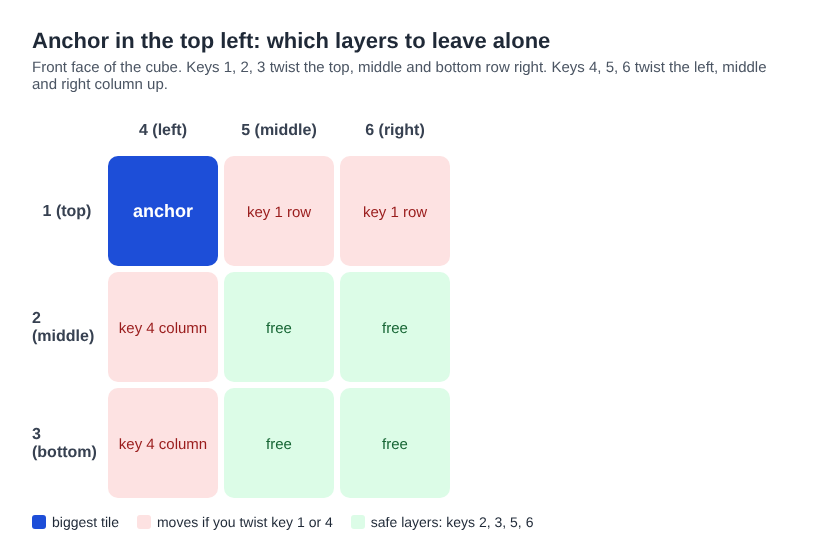
With the anchor in the top left, keys 1 and 4 would carry it off the front. Keys 2, 3, 5 and 6 leave it alone.
The other corners work the same way. Bottom left uses keys 3 and 4. Top right uses 1 and 6. Bottom right uses 3 and 6.
Do not pick a corner by score alone. In one set of tests, slides only and with edge merges on, we played eight games from the same start with a fixed seed, one per corner and seed. With seed A, bottom left scored 432 and top right scored 136. With seed B, top left scored 600 and top right 176. These are single games, not averages, so they do not rank the corners. Every one of them ended with the front full and the other five faces empty. The real lesson is that slides alone fill the front, and you need twists to use the rest of the cube.
Why the centre and the edges are riskier
Every front square is in two layers, so a corner is not safer from twists. The difference is how often a slide moves the tile.
- The centre square sits in the middle row and middle column, which keys 2 and 5 twist. It has four neighbours, so a slide in almost any direction can shift it.
- An edge square in the middle of a side has three neighbours, and a slide along that side can move it.
- A corner has two walls behind it. If you slide only toward those walls, the anchor stays put.
Edge mode adds a wrinkle. There, a slide towards an edge of the front face also merges the tile at that edge with an equal tile just over the edge, on the next face. In a test, an 8 on the front's top right square and an 8 on the right face square just over that edge made a 16 on the top right after one slide right. That can feed your anchor. An 8 two squares in did not merge, and in Evolved mode the pair across the edge did not merge either, so check your mode before you rely on it.
How to keep the anchor tile from drifting across faces
Three habits protect the anchor.
Slide toward the corner. With the anchor at the bottom left, use Down and Left most of the time. Use Up or Right only when nothing else moves. A slide that moves nothing costs no move: the game says "Nothing moves that way. Try another way, or twist a row."
Twist the other layers. With the anchor at the top left, keys 2, 3, 5 and 6 never touch it. A twist moves the whole layer, so the front's own squares in that row leave for the next face. In one test, key 1 sent a tile round to the back face and the front's empty top row went to the right face.
Turn back after you turn. Turning is free, but it moves your anchor to another face. Shift and Left brings the right face to the front, so the old front goes to the left face. Shift and Right reverses it, and four Shift and Left turns bring the cube back to where it started. If you turn to look at another side, turn back before you slide.
Building a chain of descending tiles around your corner
Once the anchor is set, line up smaller tiles next to it in descending order along the top row if the anchor is top left. Then each merge feeds the next one.
Here is a worked example from a test on a set-up board. The front's top row read 64, 32, 16 from left to right. The middle row read 4, 8, 16. The bottom row was empty.
- Up merged the two 16s into a 32 at the top right. Score 32, Moves 1.
- Left merged 32 and 32 into a 64 next to the other 64. Score 96, Moves 2.
- Left again merged 64 and 64 into a 128 in the top left corner, and two 2s on the bottom row into a 4. Score 228, Moves 3.
Each slide did one step because a tile made in a merge does not merge again in the same slide. That is why the descending order works: each new tile waits one slide for its partner.
Twists can supply the partner. In another test, a 16 sat on the front's middle left and another 16 sat on the right face, just over the front's top right edge. Shift and 1 twisted the top row left and put that 16 on the top left, above the first 16. Then Up merged them into a 32 in the top left corner. The twist cost one move and added a new 2. This worked because the top left was empty. Once your anchor lives there, key 1 is the layer to avoid.
For more on looking ahead, see how to plan a 2048 slide three moves ahead on a cube.
Common mistakes that dislodge your biggest tile
- Twisting the anchor's row or column. The anchor leaves the front at once. This is the most common way to lose it.
- Sliding away from the corner out of habit. If the row has a gap, the anchor slides into it.
- Treating a twist as undoable. There is no undo. Shift and the same key twists back, but it counts as a second move and adds a second new tile. In one test, key 4 then Shift and 4 gave Moves 2 and grew 4 tiles into 6.
- Filling the front and forgetting the rest. A full cube refuses a twist with "The cube is full. Merge two tiles on a face to make room before you twist." The game's own advice at the end is to keep room on one face so a twist can still bring tiles round to their match.
- Turning and then sliding. After a turn, the anchor is no longer on the front. Check before you press an arrow key.
If you like thinking in turn counts, cube turn counts and why a scramble has about 20 moves is a related read.
Frequently asked questions
Is a corner always the best place for the biggest tile?
We cannot say it always is. Our corner tests were single games and gave mixed results. A corner gives you fewer neighbours and two walls to slide toward, which makes the anchor easier to protect.
Does turning the cube move my biggest tile?
Yes, it moves to another face, because the turn changes which face is the front. Turning is free and adds no move. Turn back with the opposite Shift and arrow key before you slide.
Can I undo a twist that moved my anchor?
There is no undo. You can twist the layer back with Shift and the same key, but that counts as a second move and adds a second new tile.
Does the mode change where I should keep the tile?
Edge mode adds merges across the front's edges, so the tile just over an edge can feed your anchor. Evolved mode has no edge merges. The corner plan works in both, but check which mode you are in before you count on an edge merge.
Get started
Pick a corner, learn your two layers to avoid and slide toward the walls. Then use the other four layers to bring tiles round to the chain beside your anchor.
Play Evolved 2048: it is free and plays in your browser on a computer or a phone.
The 2048 puzzle on a Rubik's cube, and past 2048.
Visit evolved2048.vlvd.net↗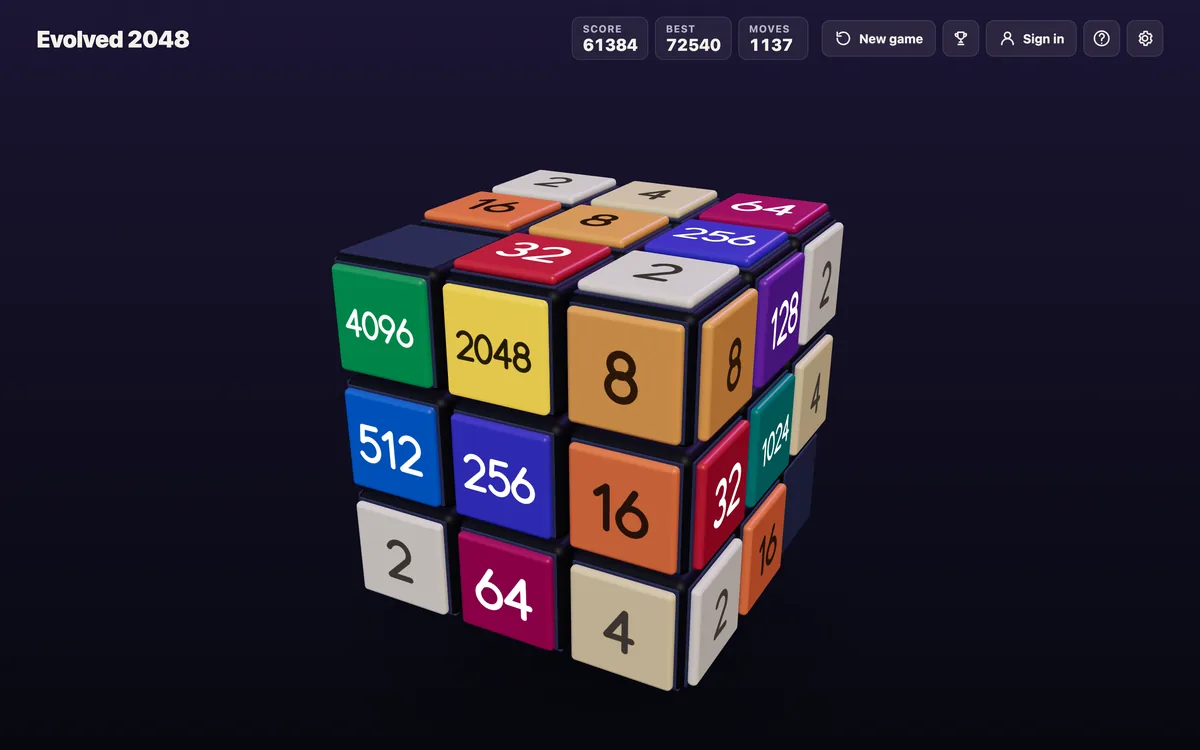
Comments
No comments yet.
Sign in or make an account to comment.