AI Agent Examples: 7 Jobs Small Teams Can Hand to Agents
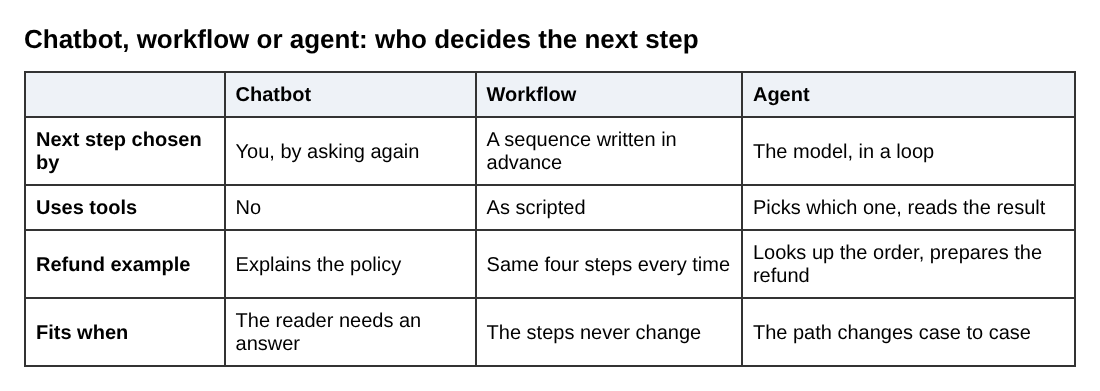
Most ai agent examples online are demos. This post lists seven jobs a small team can actually hand to an agent, what tools each one needs, and where a person should still approve the result. If you want the plain definition first, the site's own post on what an AI agent is and how it differs from a chatbot shows the same refund task done both ways. A chatbot explains the policy. An agent looks up the order and takes the step.
If you want to learn how agents work before you build one, Age of AI Entrepreneur has an Advanced course called Agents and Automation, with lessons on workflows versus agents, tools and loops, and a project where you build an agent that does a real job. You sign in with your email and an emailed code to open it.
AI agent examples: what actually counts
An agent is a model that runs in a loop. It looks at the situation, picks a tool, uses it, reads the result and decides what to do next, until the job is done or it gives up. The tool can be a database lookup, a calendar, a search, a code runner or an email draft.
That rules out a few things. A chat window that answers questions is not an agent. A fixed sequence of steps you wrote in advance is a workflow, even if a model writes one of the steps. The line matters because it decides how much can go wrong. If you are unsure which one your idea needs, this guide to choosing between an AI workflow and an AI agent walks through the choice.
Every example below passes one test: the path through the job changes from case to case, so a fixed script would break.
Example 1: Support triage and refund handling
A customer writes in: "I was charged twice." A chatbot can quote your refund policy. An agent can do more.
- Tools: order lookup, payment record lookup, a refund action, a reply draft.
- Loop: find the customer, check for the duplicate charge, check the policy, then either prepare the refund or ask a question.
- Human step: refunds above a set amount wait for a person to click approve.
The value is not that the agent writes a polite reply. It is that it gathers the facts across two systems before anyone reads the ticket. Your human starts with a case file instead of a blank screen.
Example 2: Research and lead qualification
You have a list of 200 companies and want to know which ones fit your product. The agent takes one company at a time, searches the web, reads the site, checks it against your criteria and writes a short note with the evidence.
- Tools: web search, page reader, a spreadsheet or CRM row to write into.
- Loop: search, read, decide whether it needs another page, then score.
- Human step: you read the notes for the top group before anyone sends an email.
Make the agent quote the page it used. A score with no source is a guess, and models do state wrong things with confidence.
Example 3: Scheduling and inbox management
This is the example most people picture. Someone asks for a meeting, and the agent reads your calendar, proposes three slots, drafts the reply and puts the hold on the calendar.
- Tools: calendar read and write, email read, email draft.
- Loop: read the request, check conflicts, propose times, handle the reply, confirm.
- Human step: start with drafts only. Let it send on its own once you have watched it for a few weeks.
The risk here is low per task but high in total. One bad send to a client costs more than ten saved minutes. That is a good reason to read this piece on when to add human approval to an AI agent before you let anything send automatically.
Examples 4 to 7: coding, reporting, data cleanup and content
Example 4: Coding and bug-fixing helpers
Coding is a natural fit because the agent can check its own work. It reads the bug report, searches the codebase, edits a file, runs the tests, reads the failure and tries again.
- Tools: file read and write, code search, a test runner.
- Loop: change, test, read the error, change again.
- Human step: a person reviews the change before it merges.
The test suite is what makes this work. It tells the agent when it is wrong without you in the room. If your tests are thin, the agent will happily make them pass in the wrong way.
Example 5: Weekly reporting
The agent pulls numbers from your payment tool and your analytics, notices something odd, such as a drop in signups on Tuesday, goes looking for a cause, and writes a short summary. The loop earns its place because the second query depends on what the first one found. Have it show the raw numbers beside every claim so you can check them.
Example 6: Data cleanup
Customer records arrive with misspelled company names, duplicate rows and missing fields. An agent can inspect a batch, decide which fixes are safe, apply them, and flag the rows it cannot resolve. Let it write to a copy of the data, never the original, and have it log every change it makes.
Example 7: Content operations
The agent takes a call transcript or a product update, drafts a changelog entry, a short help article and a summary for the team, and checks each against your style notes. The human step is the edit. This is a good first job because a bad draft costs you a few minutes, not a customer.
Which jobs are a poor fit for an agent
Agents are a bad choice when the steps never change. If every refund follows the same four steps, write a workflow. It is cheaper, faster and easier to test.
They are also a poor fit when:
- A mistake cannot be undone, such as moving money out or deleting records.
- You cannot tell whether the output was right without doing the job yourself.
- The agent would need broad access to many systems just to be useful.
The last point is about permissions. An agent that can do anything can also do the wrong thing at scale. Give each agent only the tools its one job needs.
How to pick your first agent job
Choose a job you already do by hand, that you can describe in a paragraph, and where a wrong answer is cheap to catch. Then write the brief before you build anything. Here is one for the refund example:
Job: handle duplicate-charge tickets. Tools: order lookup, payment lookup, draft reply, prepare refund. Rule: never issue a refund yourself; prepare it and stop. Stop and ask a person if the charge is over the limit, the customer has asked before, or the records disagree. Always cite the order ID you used.
That brief names the tools, the stopping rules and the evidence. Then test it on twenty old tickets where you already know the right answer. Count how often it matches you. That small set of cases is the start of an eval, and the Evals course in Age of AI Entrepreneur covers why your AI product needs evals and how to build and judge a set. Sign in to open it.
Watch the cost as well. Each trip around the loop is another model call, so a task that takes eight steps costs more than one that takes two. The AI Product Stack course has a lesson on tokens and what a request costs.
Frequently asked questions
What is a simple example of an AI agent?
A support agent that reads a "charged twice" email, looks up the order and payment, and prepares a refund for a person to approve. It uses tools and decides the next step from what it finds, which a plain chatbot does not.
Are AI agents used in real businesses today?
Teams do build agents for jobs like triage, research, scheduling and code fixes. The jobs that work best are narrow, have clear stopping rules and keep a person in charge of anything costly or hard to undo.
Do I need to code to build an AI agent?
Not always, since some tools let you connect a model to apps without code. But you still need to define the tools, the rules and the tests, and understanding how the loop works helps you debug it when it fails.
How much does it cost to run an AI agent?
It depends on the model and on how many steps each task takes, because every step is a model call. Run a small test set first and measure the cost per finished task before you let it loose on real volume.
Get started
Pick one job from the list, write the one paragraph brief, and test it on old cases before it touches anything live. If you want the definitions straight first, read what an AI agent is and how it differs from a chatbot. Then take the Agents and Automation course in Age of AI Entrepreneur, where the last lesson is a project to build an agent that does a real job. Lessons are free to anyone with an account, as the terms page explains, and you sign in with your email and an emailed code.
Building a business in the age of AI, from a first project to a company.
Visit aientrepreneur.vlvd.net↗
Comments
No comments yet.