Human in the Loop AI Agent: When to Add Human Approval
A human in the loop AI agent is an agent that does the work but stops at chosen points so a person can check, edit or approve before anything important happens. You decide which points, and that choice matters more than the model you pick. The site's own guide on how to build an AI agent that does a real job safely walks a builder through the whole safety stack: a narrow task, limited permissions, human approval, evals and live monitoring. Approval is one layer among several, not a replacement for the others, and this post goes deeper on that one layer.
Age of AI Entrepreneur teaches this in short hands-on lessons: its Advanced Agents and Automation course covers workflows versus agents, tools, loops and why agents fail, and ends with a project where you build an agent that does a real job. A reader signs in with an email and an emailed code to open it.
What a human in the loop AI agent actually is
An agent is a model that can use tools and repeats a loop: look at the situation, pick an action, run it, look again. A human in the loop AI agent adds a gate somewhere in that loop. The agent proposes, a person decides, and only then does the action run.
The person can play three roles:
- Approver. They say yes or no to an action the agent proposes.
- Editor. They fix a draft, then send it on.
- Taker-over. They handle the case themselves when the agent says it is stuck or unsure.
The gate does not have to cover every step. Most of an agent's work, such as reading a ticket or looking up an order, is safe to run without anyone watching. You put the human where a mistake costs something.
Why fully autonomous agents fail on real jobs
Language models are good at plausible output, and plausible is not the same as correct. In a single chat answer, a wrong detail is annoying. In an agent loop, it gets carried forward. The agent reads a wrong number, acts on it, then reasons from the result of that action. Each step builds on the last, so an early slip can grow.
The second problem is side effects. A chat reply sits on a screen. An agent action can send an email, change a record or move money. You cannot take a sent email back.
The third problem is that you do not know your failure cases yet. A human gate buys you time to find them while the damage stays small.
If you are not sure the job needs an agent at all, read our post on AI workflow vs AI agent. A fixed workflow has fewer places to go off script, so it needs fewer gates. For how loops and tools break, see why AI agents fail.
Which agent actions need a human to approve
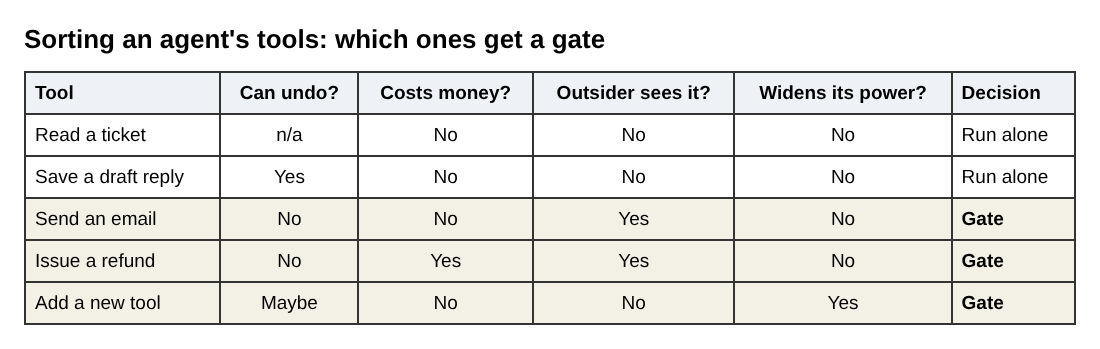
Sort every tool the agent can use by what happens if it is wrong. Four questions help:
- Can it be undone? Deleting data, sending a message and publishing a page are hard to reverse. Saving a draft is easy to reverse.
- Does it cost money? Refunds, purchases, discounts and plan changes all touch money.
- Does an outsider see it? Anything that reaches a customer, a partner or the public carries your name.
- Does it widen the agent's own power? Changing permissions, adding a new tool or editing its own instructions should never happen unreviewed.
Actions that fail all four tests (read-only, reversible, free, internal) can run on their own. Actions that fail any one of them get a gate. When in doubt, gate it now and loosen it later. Going the other way means learning from an incident.
Three approval patterns: before, during and after the action
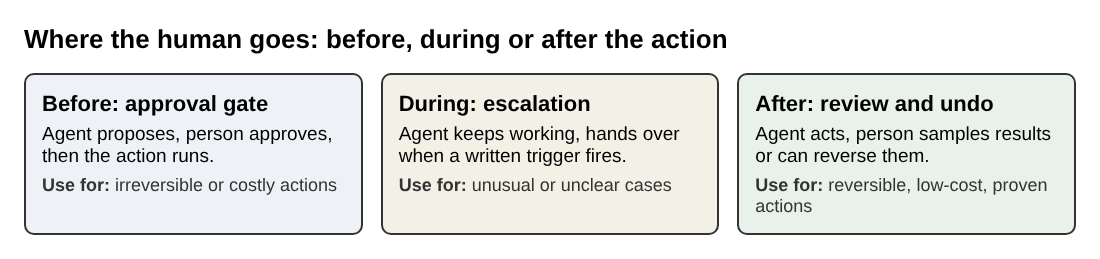
There are three places to put the human, and a real agent often uses more than one.
- Before the action (approval gate). The agent writes down what it wants to do and waits. Nothing runs until a person approves. This is the safest pattern and the right default for anything irreversible.
- During the action (escalation). The agent keeps working but asks for help when something looks off: missing information, a case outside its rules, or two sources that disagree. You write the triggers down in advance, and the agent hands over when one fires.
- After the action (review and undo). The agent acts, and a person reviews a sample or has a short window to reverse it. This only works when the action is reversible. It is faster, but a mistake still reaches the world before anyone sees it.
A good rule: gate before for irreversible actions, escalate during for unusual cases, and review after for reversible, low-cost actions you have already seen work many times.
How to design an approval step people will not skip
An approval step fails when it is easier to click yes than to think. Design it so that checking is cheap and careless approval is hard.
- Show the action, not the chat log. The reviewer should see the exact thing that will happen: the email text, the amount, the record that will change.
- Show the evidence next to it. Put the facts the agent relied on beside the proposal, so the reviewer does not have to hunt for them.
- Make editing as easy as approving. If fixing a draft takes five clicks, people will approve bad drafts.
- Default to no. If nobody responds, the action does not run.
- Ask for a reason on rejections. One short field. Those reasons become your best test cases later.
A worked example: an agent that drafts customer refunds
Say you run a small online shop and want an agent to handle refund requests. This is an invented example, and the numbers are placeholders you would set for yourself.
The agent has three tools. It can read a support ticket, look up the matching order, and write a proposal. It has no tool that issues a refund. That is a deliberate limit: the agent can only propose, and the payment system is reached through a separate step that a person triggers.
For each ticket, the agent produces a card like this:
Proposed action:
refund. Amount:42.00. Order: delivered 9 days ago. Customer says the item arrived damaged and attached a photo. Policy rule matched: damaged items within 30 days. Draft reply: "Sorry about the damage. Your refund of 42.00 is on its way." Confidence note: photo is blurry, please check.
The reviewer sees one screen with three buttons: approve, edit, reject. The pattern mix looks like this:
- Before: every refund needs approval in week one.
- During: the agent escalates when the order cannot be found, the customer asks for more than the order total, or the ticket mentions legal action. It does not draft anything in those cases.
- After: replies that ask for more information, with no money involved, go out directly, and you read a sample each day.
The example narrows the agent's permissions, gates the costly action and routes odd cases to a person: the same ideas as in the safety guide, applied to one job.
How to measure when you can loosen the human check
Loosen the gate because the numbers say so, not because the agent feels reliable. Log every decision the reviewer makes, then track these per action type:
- Approved without edits. How often the proposal was right as written.
- Edited. How often it needed a fix, and what kind.
- Rejected. How often it should not have been proposed at all.
- Escalated. How often the agent correctly asked for help.
Turn the rejected and edited cases into an eval set: a fixed list of real inputs with known good outcomes that you re-run whenever you change a prompt, a tool or a model. The Evals course covers why your AI product needs evals, how to build an eval set and judge outputs, and how to run AI in production. You can open Evals: Shipping AI That Works after you sign in.
Then loosen one action type at a time, starting with the lowest risk. Move it from "approve before" to "review after", and keep sampling; if the edit rate climbs, put the gate back.
Frequently asked questions
Does human in the loop make an AI agent slower?
Yes, for the gated actions, because the agent waits for a person. You limit the cost by gating only risky actions and letting the rest run on their own.
What is the difference between human in the loop and human on the loop?
In the loop means a person must approve or act before the step happens. On the loop means a person watches the agent and can step in or stop it, but the agent does not wait for them.
How do I stop reviewers from just clicking approve?
Keep the queue small, show the evidence beside the proposed action, and make editing easy. Track how often each reviewer approves without edits, and check a few approved items yourself to see whether errors slip through.
Can I remove the human once the agent is reliable?
For some actions, yes, if your logged decisions and eval results support it. For irreversible or costly actions, many builders keep a gate or at least a daily sample review, because one bad run can cost more than the review time saves.
Get started
Start small. List every tool your agent has, mark each as reversible or not, and put a gate on the ones that are not. Then read the full walkthrough in how to build an AI agent that does a real job safely to see where approval fits with permissions, evals and monitoring.
To practice, Age of AI Entrepreneur has short lessons you can work through on your own. Sign in with your email and an emailed code, then open the Agents and Automation course, which includes a project where you build an agent that does a real job. Every lesson is free to anyone with an account; see the terms page for details.
Building a business in the age of AI, from a first project to a company.
Visit aientrepreneur.vlvd.net↗
Comments
No comments yet.
Sign in or make an account to comment.