Cache Busting: How a Web Game Gets Updates to Your Browser
Cache busting is giving a file a new address every time its content changes, usually by putting a version number or a hash in its name or after a ?v=. Browsers keep files by address. So a site can tell browsers to keep its big files for weeks, and still have an update arrive at once: the new file has an address the browser has never seen, so it downloads it.
You can see it on a real page in Tank City Reboot, a free tank game that plays in your browser on a computer or a phone with no account, whose game files each carry a short code that changes whenever the file does.
Why browsers keep old files
A cache is a stored copy. When a server sends a file, it can add a Cache-Control header that says how long the copy stays fresh. MDN's Cache-Control page explains that max-age is that time in seconds. While the copy is fresh, the browser uses it and skips the download.
That is great for speed and for your data plan. It is a problem for updates. If a script is cached for a month and the site changes it tomorrow, a returning visitor can keep the old one for weeks. Worse, MDN's HTTP caching guide points out that if a page's scripts and styles are out of step with each other, the display breaks.
So a site seems to face a choice: short cache times, and every visit downloads again, or long cache times, and updates arrive late. Cache busting removes the choice.
What is cache busting? A new address for new content
The idea rests on one fact from the same MDN guide: the cache tells files apart by their URL. Change the URL and, as far as the cache is concerned, it is a different file.
So you never change a file at its old address. You publish the new version under a new one, and point the page at it. MDN lists the usual shapes:
- a version in the filename, like
bundle.v123.js; - a version in the query, like
bundle.js?v=123; - a hash in the filename or the query, where the code is computed from the file's own bytes.
A hash has one extra strength. The same bytes always give the same code, so a file that did not change keeps its address and stays cached, while only the changed files get new ones.
The other half: a short cache on the page
Cache busting only works if the page that lists the addresses is itself fresh. If the old page sits in the cache, it keeps pointing at the old files.
So sites split their cache times. The page, which is small, gets a short life or none: MDN notes that a common default is Cache-Control: no-cache, which makes the browser check for a new version. The versioned files, which are large and never change at a given address, get a long one. MDN's guide even lists one month, max-age=2592000, among the common long values.
A worked example: the Tank City Reboot game files
Here is the whole pattern on one live page, step by step. You can repeat every step with your browser's developer tools.
- The page is kept for minutes. The game page answers with
Cache-Control: public, max-age=300, so a browser treats it as fresh for 300 seconds, 5 minutes. - It names each file with a code. In the page's script, the game's code file is listed as
game.wasm.unityweb?v=dbc9a0ce83, and the loader, framework and data files each have their own. - The code comes from the bytes. Download the code file and compute its SHA-256: it starts
dbc9a0ce83. The same is true of all four files of the first game on 30 October 2026, so each?v=is the first 10 characters of its file's hash. - The files are kept for a month. Those files answer with
Cache-Control: public, max-age=2592000, which is 30 days. A browser that has played once reuses them with no download. - An update busts the cache. When a file changes, its hash changes, so the page names a new address. Within about 5 minutes a returning browser gets the new page, sees an address it has never stored, and downloads that file. Files that did not change keep their codes and stay cached.
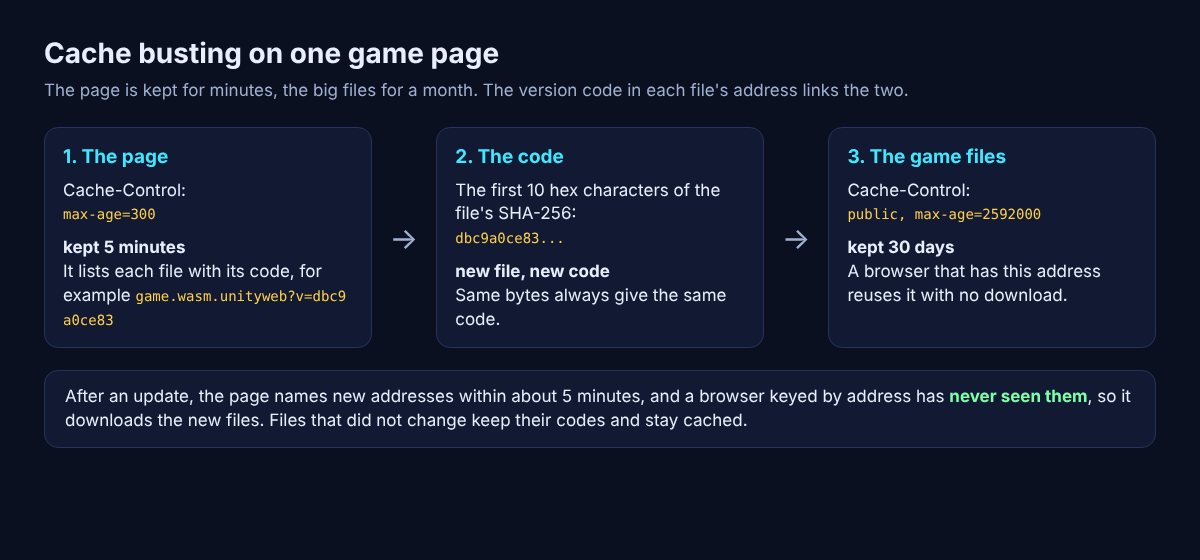
One more detail shows that the cache really goes by address. Both games use a loader with the same code, 9f3deb030f, so the bytes are identical. But the first game's sits under /games/tank-city-reboot/ and Tank City Zero Day's under /games/zero-day/. Two addresses means two cache entries, even for the same file.
The files themselves are only asked for when you press Play, as the post on lazy loading explains, and the post on the loading progress bar shows how the page counts their bytes as they arrive.
Common cache busting mistakes
- Caching the page as long as the files. The page then keeps pointing at old addresses, and the new versions never get asked for.
- Changing a file without changing its address. Visitors with a fresh copy keep the old one until it expires.
- Using a timestamp that changes on every build. Every file gets a new address even when its bytes did not change, so every visitor downloads everything again. A content hash avoids this.
- Telling users to "clear the cache". That pushes the site's job onto every reader. Versioned addresses do it for them.
Frequently asked questions
What is cache busting in simple terms?
It is changing a file's address whenever its content changes, so browsers that stored the old file fetch the new one. A version number or hash in the name or after ?v= is the usual way.
Is a query string like ?v=123 enough for cache busting?
MDN lists a version in the query, such as bundle.js?v=123, as one of the ways to do it, alongside a version or hash in the filename. Tank City Reboot uses the query form.
Why use a hash instead of a version number?
A hash is computed from the file's bytes, so it changes only when the file does. Unchanged files keep their address and stay cached.
How long should versioned files be cached?
Long, because a given address never changes. MDN's caching guide lists one week, one month and one year among the common values, and says in practice the choice makes little difference.
Get started
Open the game with your browser's Network tab showing, press Play and look at the file addresses and their ?v= codes. Then play: your antivirus tank guards the CPU core while malware tanks named for real computing ideas close in.
Play Tank City Reboot: it is free, plays in your browser on a computer or a phone, and needs no account.
The Family Computer tank classic, rebuilt inside a computer.
Visit tankcityreboot.vlvd.net↗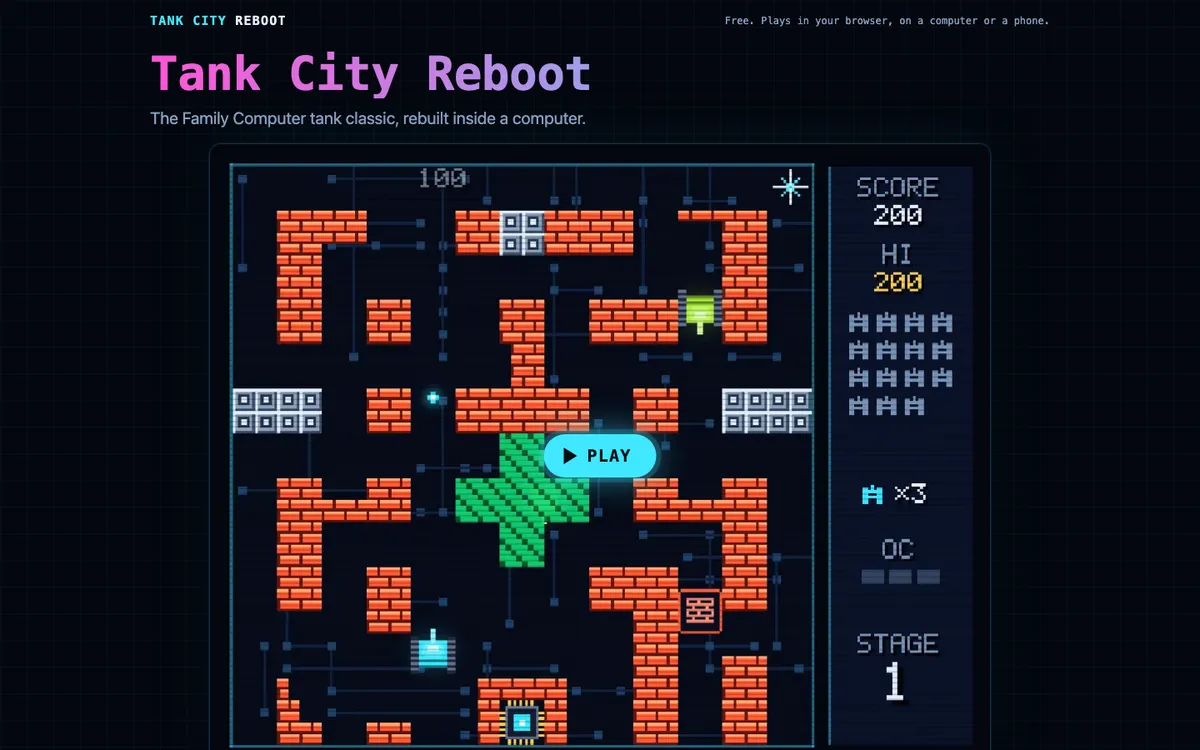
Comments
No comments yet.