Check sheet example: tally a problem before you fix it
This check sheet example shows the method from start to finish. Before you fix a problem, you tally how often each kind of failure happens, mark by mark, for a fixed stretch of time. Then the counts tell you where to start, instead of your memory or your loudest complaint. You will set up the sheet, read the marks, and turn the biggest causes into fixes you can track.
Once you know the causes, Problem Graph gives you somewhere to keep them. You write each problem in one line, attach the fixes you try, and record whether each one worked, partly worked or failed.
What a check sheet is and why you tally before you fix
A check sheet is a simple form for counting events as they happen. Down the side you list the categories you expect, such as types of defect, causes of delay or kinds of complaint. Across the top you put time slots, usually days. Each time the event happens, you make one mark in the right box. The Wikipedia article on the check sheet calls it one of the seven basic tools of quality control, and lists Kaoru Ishikawa's uses for it, including counting defects by type and by cause.
The point is to collect data before you decide what is wrong. It is tempting to pick the cause you remember best, such as the most recent one or the most annoying one, and fix that. A tally checks that guess. You stop guessing and start counting.
A check sheet example: two weeks of late orders
Say you run a small online shop (a made-up example). Customers complain that orders arrive late, and you promise to ship within two business days. You have a hunch that the courier is to blame. Before you call them, you tally.
For ten business days, every time an order misses the two-day window, you note why it was late. You set up six categories:
- Item out of stock when the order came in
- Courier missed the pickup
- Shipping label failed to print
- Address problem (incomplete or wrong)
- Payment held for review
- Other
Each day you make one mark per late order in the right row. You group marks in fives so they are easy to count. At the end of the two weeks, the totals look like this:
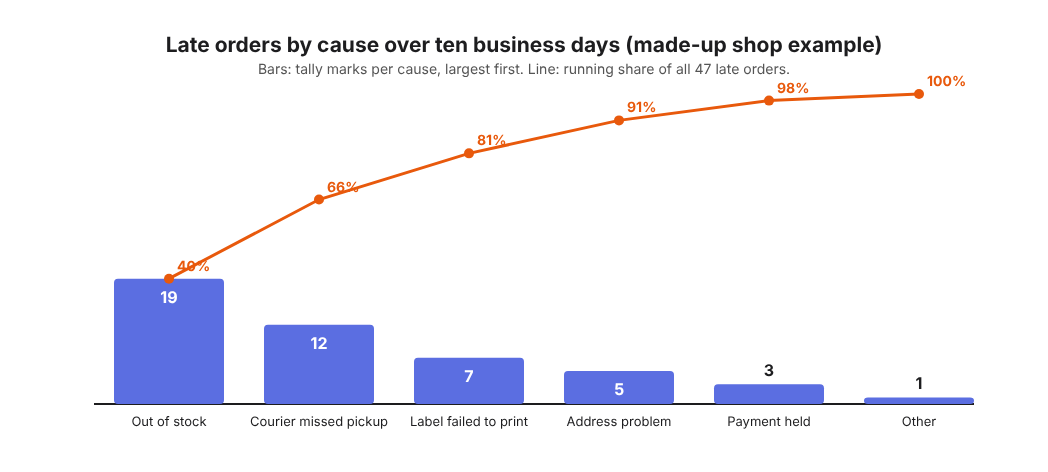
- Item out of stock: 19
- Courier missed pickup: 12
- Label failed to print: 7
- Address problem: 5
- Payment held for review: 3
- Other: 1
That is 47 late orders. Your hunch about the courier was not wrong, but it was not the biggest cause either. Stock problems caused more late orders than the courier did. Without the tally, you would have fixed the second problem first.
How to set up your own check sheet in five steps
- Name the problem in one sentence. "Orders ship late" is enough. Write down what counts as one event. Here, one event is one order that ships after two business days.
- List your categories before you start. Pick a handful of causes you expect, plus "Other". If you have no idea, tally for two or three days with notes, then group the notes into categories.
- Choose the time slots. Days are a simple start. Use shifts or hours if the problem changes during the day.
- Decide who marks it and when. Mark each event as it happens, not at the end of the week from memory. If several people mark it, give them the same written definition of each category.
- Set an end date. This example uses ten business days. Stop on that date and count.
Keep the form close to where the problem happens. For the shop, that means next to the packing table, not in a folder on someone's laptop.
Reading the tallies: from counts to a Pareto view
Raw counts are useful. Sorted counts are better. Put the categories in order from largest to smallest, then work out each one's share of the total and a running total.
- Out of stock: 19 of 47, about 40%. Running total 40%.
- Courier missed pickup: 12 of 47, about 26%. Running total 66%.
- Label failed to print: 7 of 47, about 15%. Running total 81%.
- Address problem: 5 of 47, about 11%. Running total about 91%.
- Payment review: 3 of 47, about 6%. Running total about 98%.
- Other: 1 of 47, about 2%. Running total 100%.
This is a Pareto view. The Lean Enterprise Institute's Pareto chart entry describes the chart as a way to prioritize problem solving by showing how often each cause occurs. It shows that two causes explain two thirds of your late orders, and three causes explain about four out of five. If you could only fix one thing this month, stock comes first.
Also look across the days, not just down the totals. Say the courier marks cluster on Fridays. That points to a different fix than marks spread evenly across the week. A Friday pattern suggests a pickup schedule problem. An even spread suggests a reliability problem.
The counts also help you weigh options. Set the cost of better stock tracking against the late orders it would prevent. When the choice is close, force field analysis can help.
Common check sheet mistakes that skew your data
- Vague categories. If "Address problem" and "Other" overlap, two people will mark the same order differently. Write one line that defines each category.
- Filling it in from memory. A Friday afternoon catch-up gives you the causes you remember, which is the bias you wanted to avoid.
- Changing the rules halfway. If you add a category on day six, the first five days are not comparable. Note the change, or restart.
- Counting one event twice. An order that was out of stock and then missed the pickup needs a rule. Mark the first cause, or mark both and say so.
- Fixing while you count. If you change the stock process on day four, your tally measures two different systems. Collect first, then fix.
From tallies to fixes: mapping causes in a problem graph
A check sheet tells you what is happening. It does not remember what you tried next. Three months later, you may not be able to say whether the new label printer helped or whether the stock alert was ever switched on.
Here is how the shop example looks as a graph in the Problem Graph app. The pages describe no tally counting, so keep the marks on paper or in a spreadsheet. What it holds is the problems, the fixes and their outcomes.
- Write the main problem in one line: "Orders ship late (47 in 10 days)". Put it in the work lane. It lands on the graph when you press Enter.
- Add the top causes as their own problems: "Items out of stock when ordered (19)", "Courier misses pickup (12)", "Labels fail to print (7)". Link each one to the main problem.
- Attach solutions to each cause. Under stock, you might add "Set a reorder alert at 5 units" and "Hide items with zero stock". Mark the one you are trying.
- After your next two-week tally, record the outcome. If out-of-stock delays drop from 19 to 4, mark that solution as worked. If they drop to 12, mark it partly. If nothing changes, mark it failed.
A failed fix stays on the map as failed. That matters. The next time someone suggests the same idea, you can see it was tried and what happened.
If you work with a partner or a small team, mark "Orders ship late" as a main node and share it into a private network. You create the network and give the invite code to the people you choose. When you share a main node, its solutions, their outcomes and the requirements they need go with it. Problems you only linked to it stay private. Private is the default, and nobody else sees a private problem.
When you are stuck, Problem Graph can show you similar problems others have shared and which of their solutions worked; borrow one with one tap and it keeps a link back. You can also ask for suggestions: the AI proposes new solutions grounded in what worked for others. Treat them as proposals to test with your next tally.
Logging what you tried each week works beyond shipping too, as in a weekly log for thesis writing problems.
Frequently asked questions
What is the difference between a check sheet and a checklist?
A checklist tells you what to do, step by step, so you do not skip anything. A check sheet records what happened, so you can count how often each kind of event occurs. One guides action. The other collects data.
How long should you collect data on a check sheet?
Long enough to cover the normal pattern of your work, such as every weekday at least once. If the problem happens rarely, keep going until every main category has more than a mark or two.
Can a check sheet be digital instead of paper?
Yes. A spreadsheet, a shared form or a notes app all work, as long as people mark events as they happen. Keep it wherever the event happens, so marking takes seconds.
What comes after a check sheet in quality improvement?
A Pareto chart to rank the causes is a common next step, then a closer look at the top one to find its root cause. After you try a fix, run the check sheet again with the same categories so you can compare before and after.
Get started
Pick one problem that keeps coming back. Tally it for ten days. Then put the top two causes on a map with the first fix you plan to try for each, and record what happens after your next tally.
Try Problem Graph: it is free, and you can look around the public network without an account. Write one problem down in a line and attach the first thing you will try.
Every problem you carry, on one map. Solved together.
Visit problemgraph.vlvd.net↗


Comments
No comments yet.