Thesis writing problems log: what you tried each week
A thesis writing problems log is a running record of the blockers in your thesis, the fixes you tested each week, and how each one turned out. It helps you stop fighting the same problem twice. Every week you write down what got in the way, what you tried, and whether it worked, partly worked, or failed. After a month you have evidence instead of a vague sense that things are going badly, and you can walk into a supervisor meeting with something concrete to discuss.
Problem Graph gives you a place to keep that log as a map. You write each thesis problem in one line, attach the fixes you try along with their outcomes, and link the problems that turn out to be connected.
Why a thesis writing problems log beats a vague to-do list
A to-do list tells you what you meant to do. It says nothing about why you did not do it. "Write chapter 2" can sit on a list for six weeks. Over those weeks you might try three different approaches, abandon two, and forget all of them.
A problems log records the friction itself. Compare these two entries:
- To-do: "Finish literature review."
- Log: "Literature review reads like a list of summaries, not an argument. Tried writing a one-sentence claim at the top of each section. Partly worked: sections 2.1 and 2.2 now have a point, 2.3 still drifts."
The second entry tells you where you are, what helped, and what to try next. It also stops you repeating a fix that already failed.
What to record for each problem: blocker, attempt, result, next step
Keep each entry small. Four parts are enough.
- Blocker. One line, written as a problem rather than a task. "Can't explain why my method fits the research question" works better than "Methods chapter."
- Attempt. The specific thing you tried. "Read more" is too vague. "Read the methods sections of three theses from my department" is specific enough to repeat or rule out.
- Result. Choose worked, partly, or failed. Then add one sentence on what actually happened.
- Next step. The next attempt, or "done" if the blocker is gone.
It is the same structure as a bike repair log: what broke, what you did, whether it held.
In Problem Graph this maps onto the app directly. The problem is one line, and it lands on the graph when you press Enter. You put it in a lane: personal, work, expert or scientific. A thesis problem might fit expert or scientific. Each attempt becomes a solution. You can add it as an idea, mark it as one you are trying, and then record the outcome as worked, partly, or failed. The map also has a third kind of node, the requirement. That is a good place for things a fix depends on, such as "needs the cleaned dataset" or "needs ethics approval."
A simple weekly template for logging what you tried
Pick one fixed time each week, for example Friday afternoon while the week is still fresh. Spend fifteen minutes and fill in this template:
- This week's open problems: each blocker, in one line.
- What I tried: one or two attempts under each problem.
- Outcome: worked, partly, or failed, plus one sentence.
- Still open: problems carrying into next week.
- Next attempt: one thing to test per open problem.
Here is a worked example from the first two weeks of a made-up philosophy thesis:
- Problem: "Chapter 1 keeps restating positions instead of defending mine."
- Week 1, tried: wrote my thesis claim as one sentence and pinned it above the draft. Outcome: partly. The intro improved, and the middle sections still wander.
- Week 2, tried: cut every paragraph that does not support or test the claim. Outcome: worked. The chapter lost 1,200 words and gained a direction.
- Next: apply the same cut test to chapter 2.
Notice that the failed and partial attempts stay in the log. That is the point.
Common thesis writing problems and the fixes worth testing
These are starting points to test, not answers. Log each one as an attempt and record honestly how it went.
The blank page
Fixes to test: write the section's conclusion first, or write a deliberately bad 200-word version you plan to throw away. If getting started is your main problem, a writing block log goes deeper on that one; the thesis log covers the whole project.
Literature review sprawl
Fixes to test: group sources by the question they answer rather than by author, and cap each group at the five most relevant sources. Write one sentence per group stating what the group shows.
Scope creep
Fixes to test: write down what your thesis will not cover, and check each new idea against that list before you chase it.
Waiting on data or results
Fixes to test: draft the methods and limitations sections while you wait, or write the results chapter with placeholder figures. Log the data itself as a requirement so it is clear what is blocking what.
Contradictory feedback
Fixes to test: list every comment, mark the ones that conflict, and bring only the conflicts to your next meeting.
Writing time eaten by everything else
Fixes to test: a protected two-hour block on the same two mornings each week, or a daily 300-word minimum. Track which one actually happened, not which one you planned.
If you get stuck choosing what to try, you can ask for suggestions in Problem Graph. The AI proposes new solutions grounded in what worked for others on problems like yours. Treat each one as another attempt to test and log, not as a verdict.
Using your log to run better supervisor meetings
"Here is what I tried and what happened" gives a supervisor more to work with than "I'm stuck." Your log gives you that script.
Before each meeting, pick the two or three problems that are still open. For each one, say what you tried, how it went, and what you plan next. Then ask one focused question. For example: "I tried restructuring the chapter by theme and by chronology. Thematic partly worked. Is that the direction you'd push?"
If you want your supervisor or a thesis group to see the log, Problem Graph lets you share deliberately. Everything is private by default: only you see it, and it follows you to any phone or computer you log in on. To share, you mark one problem as a main node and share it into a private network. You create the network and give the invite code to the people you choose. Be aware that anyone with the code can join, so give it out carefully.
When you share a main node, its solutions, their outcomes and the requirements they need go along with it. Problems you have only linked to it stay private. You can share "Methods chapter does not justify the sampling approach" with your supervisor and keep "Writing anxiety before deadlines" to yourself. The same keeper habit runs a shared problem list for running club organisers.
Spotting patterns across weeks so problems stop repeating
Every few weeks, read the log back and look for three things:
- Repeat blockers. If "can't start writing" appears in five separate weeks, it is not a weekly problem. It is a structural one.
- Fixes that keep working. If the conclusion-first draft worked in chapters 1, 2 and 4, make it your default.
- Hidden links. A writing problem may be tied to a sleep, teaching or money problem.
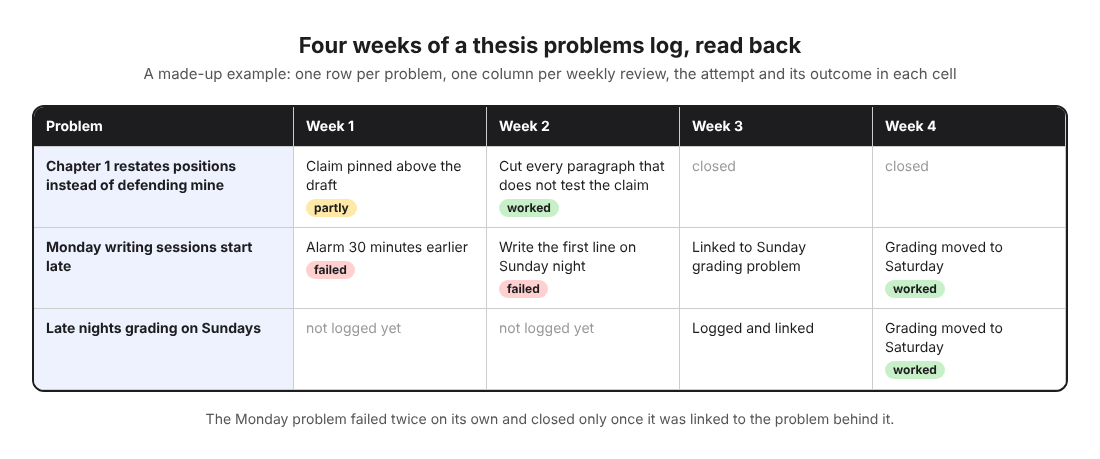
That third point is where a graph helps more than a list. In Problem Graph you can link problems that belong together, even across lanes. Say "Monday writing sessions start late" sits in your scientific lane and "Late nights grading on Sundays" sits in your work lane. Link them, and the connection is visible on the map. In the table, the Monday problem failed twice on its own and only closed once it was linked to the grading problem behind it. The home page says it plainly: patterns show up on the map that never show up in a list. When you want to read rather than look, a list view sits beside the map. You can filter by lane to see only your thesis problems.
Frequently asked questions
How often should I update a thesis problems log?
Once a week at a fixed time is a good start. Add a quick line during the week when something fails badly, so you do not forget the detail by Friday.
Should I share my log with my supervisor?
Share the problems you want help with, not necessarily everything. In Problem Graph only a main node is shared, together with its solutions, outcomes and requirements, while the rest of your graph stays private.
What if nothing I try each week works?
Log the failures anyway, because a list of ruled-out fixes is useful information for you and your supervisor. If the same problem fails for several weeks, treat it as a bigger issue to raise directly rather than another weekly tweak.
Can I use the same log for coursework and research problems?
Yes. Put them in different lanes, such as expert for coursework and scientific for research, so you can filter to one lane at a time.
Get started
Open the app this week and write down the one thesis problem that has stalled you longest. Add the last thing you tried and mark it worked, partly, or failed. Then add the next attempt as an idea. If the empty graph feels strange, the app offers a "Load example set" button, so you can see how problems, solutions and outcomes fit together before you add your own.
Try Problem Graph: it is free, and you can look around the public network without an account. Write one problem down in a line and attach the first thing you will try.
Every problem you carry, on one map. Solved together.
Visit problemgraph.vlvd.net↗


Comments
No comments yet.