Customer onboarding follow-up email: a template after the call
A customer onboarding follow-up email is the message you send right after the kickoff call to confirm what was agreed, who does what, and what happens next. Send it the same day, keep it short, and build it from what was actually said, not from what you remember. If you want the recording side first, this post shows how to record an onboarding call in Chrome with both voices and a transcript, saved on your own computer. This post picks up after the call ends and covers the email.
For the capture part, Cheap Recorder records your screen, your voice and the other side of a call from Chrome as one MP4 on your own disk, with a transcript you can read while you write.
What a customer onboarding follow-up email needs to do
The email has three jobs. Everything else is decoration.
- Confirm what was decided. The customer should be able to reply "yes, that is right" in one line.
- Assign owners and dates. Every next step has a name and a day next to it.
- Make the next action obvious. One clear ask in the first lines, not buried at the bottom.
A recap that only says "great call, let me know if you have questions" does none of this. It also gives the customer nothing to point to later if a step slips.
When to send it and how long it should be
Send it the same day, while the call is fresh for both sides. If you need an hour to read back through the call, take the hour, then send.
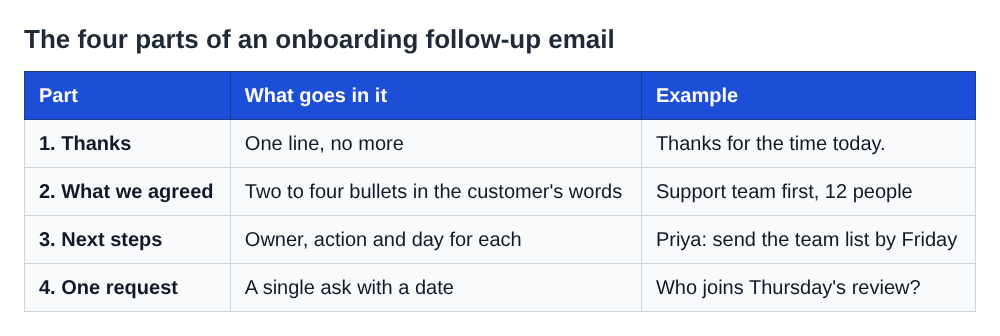
Aim for a length the customer can read on a phone without scrolling much. A good shape is:
- One line of thanks.
- Two to four bullets of what was agreed.
- A short list of next steps with owner and date.
- One question or request that needs an answer.
If the call covered a lot, link to a longer document rather than pasting it all into the email body. The same logic applies to other post-call messages. This note on what to include in a coaching session recap email makes a similar point about keeping a recap focused.
A copy-and-paste follow-up email template
Replace everything in square brackets.
Subject: [Company] onboarding: what we agreed and next steps Hi [First name], Thanks for the time today. Here is what we agreed, so we are on the same page. What we agreed
- [Goal in the customer's own words]
- [Scope or setup decision]
- [Go-live or review date]
Next steps
- [Your name]: [action] by [date]
- [Customer name]: [action] by [date]
- [Other person]: [action] by [date]
One thing I need from you: [single clear request] by [date]. If I got anything wrong, reply and tell me. Otherwise I will go ahead on this basis. [Your name]
The last line matters. It turns silence into agreement and turns a mistake into a quick correction.
A filled-in example for a software onboarding call
Here is the template for a made-up customer, so you can see the level of detail to aim for.
Subject: Northwind onboarding: what we agreed and next steps Hi Priya, Thanks for the time today. Here is what we agreed. What we agreed
- Your goal is for the support team to handle their own setup without engineering help.
- You will start with the support team only (12 people) and add sales later.
- We review progress together on Thursday 14 November.
Next steps
- Me: send the admin setup checklist by end of tomorrow.
- Priya: send the list of 12 team members and their roles by Friday.
- Tom (your IT lead): confirm the single sign-on settings by next Wednesday.
One thing I need from you: tell me whether Tom or someone else should be on Thursday's review. If I got anything wrong, reply and tell me. Otherwise I will go ahead on this basis.
Notice what is specific: a number, a date, a name for each task. Those are the details people misremember, which is why they are worth checking against the recording.
Capture exact details so you do not rely on memory
Notes taken while you are also talking are thin. Dates get shortened, names get swapped and the customer's own wording is lost. A recording with a transcript fixes that.
In Cheap Recorder, the Call audio tile handles the call itself. You press Pick the call tab..., choose the Google Meet or Teams tab in Chrome's sharing window, and tick Share tab audio. Your microphone and the call are mixed into one recording. There are step-by-step guides for Google Meet and Teams if you want the details.
A few things that make the later email easier:
- Keep Live transcript ticked under Options. It is ticked by default, and a transcript cannot be added to a recording afterwards. Pick the language before you start, because Chrome listens for one language per recording.
- Use headphones. They stop the customer's voice coming out of your speakers and back into your microphone, which keeps the transcript cleaner.
- Press M at the start of each new topic. A short note confirms the time. Markers are saved to files only when Also save every source separately is ticked. With the default single MP4 the notes show while you record but are not saved, so jot down any times you need.
- Tell the customer you are recording. Depending on where you and they are, you may need everyone's agreement.
Do a one-minute test call with a friend before an important kickoff, then play it back. It catches a muted tab or the wrong microphone before the real call.
The recording goes to a folder you choose on your own computer. Nothing is uploaded unless you use Convert or Download MP3. The transcript is made by Chrome's speech recognition, and Chrome sends your microphone audio to Google to turn it into text. If the call must not leave your computer in any form, untick Live transcript before you press Start recording.
Turn a call transcript into next steps and owners
When the call ends, the recording's folder holds the MP4 and, if the transcript heard speech, a plain-text file such as Northwind kickoff - transcript.txt. Each line has a time. Once you rename the Speaker boxes and save, each line also starts with a name, for example Priya: We only want support on it for now. The file opens in any text editor and is easy to paste into notes.
Here is a quick way to go from transcript to email in about ten minutes:
- Skim for commitments. Search the text for phrases like "I will", "can you", "by Friday", "next week" and "we need". Each hit is a candidate next step.
- Write each as owner, action, date. If the call left the date vague, write the date you will propose and mark it as a proposal.
- Pull the customer's goal word for word. Their own phrasing in your "What we agreed" section tells them you listened.
- Check numbers and names against the lines. Team size, dates and spellings are where memory fails.
- Jump to the moment if the text is unclear. Use the line's time to find it in the MP4 and listen.
Two caveats from how the transcript works. Caption timing is per line, not per word, so use the times as a pointer, not a precise cut. And everyone on the far end of a call comes from one Chrome tab, so they share one label. If three people from the customer's side spoke, you will need to tell them apart by the content of what they said.
If you also review calls internally, the same recording can feed that. This sales call review template shows a way to score a call in ten minutes.
Mistakes that make onboarding follow-ups get ignored
- Sending it days later. The customer has moved on and your recap reads like paperwork.
- Vague owners. "We will sort the setup" has no person. Write a name.
- Vague dates. "Soon" and "next week" mean different things to different people. Write the day.
- Too many asks. If you need five things, the customer does none. Lead with one, list the rest as next steps.
- Pasting the whole transcript. Nobody reads it. Summarise and offer the detail if they want it.
- Recapping what you wish was agreed. Stick to what was said. If something was left open, say it was left open.
Frequently asked questions
How soon should I send a customer onboarding follow-up email?
Send it the same day as the call. If that is not possible, send a short note saying the full recap is coming and give the time.
How long should the email be?
Short enough to read on a phone. A thank-you line, a few bullets of what was agreed, next steps with owners and dates, and one clear request is usually enough.
Can I use the call transcript in the email?
Use it as source material, not as the email. Pull exact names, numbers and dates from it, and quote the customer's goal in their words, but summarise the rest.
Do I need to tell the customer I am recording?
Yes. Depending on where you and the customer are, you may need everyone's agreement, so always say you are recording before you start.
Get started
Write the template above once, then reuse it after every kickoff. To make the details reliable, record the call so the transcript is there when you sit down to write. The full setup for that is in the onboarding call recording post.
The free plan covers recording, live transcript and captions, with 12 hours of recording a month and no card needed. Try Cheap Recorder in Chrome, and your recordings stay on your own disk. You can also start on the free plan directly.
Screen recording that is cheap and easy.
Visit cheaprecorder.com↗
Comments
No comments yet.
Sign in or make an account to comment.